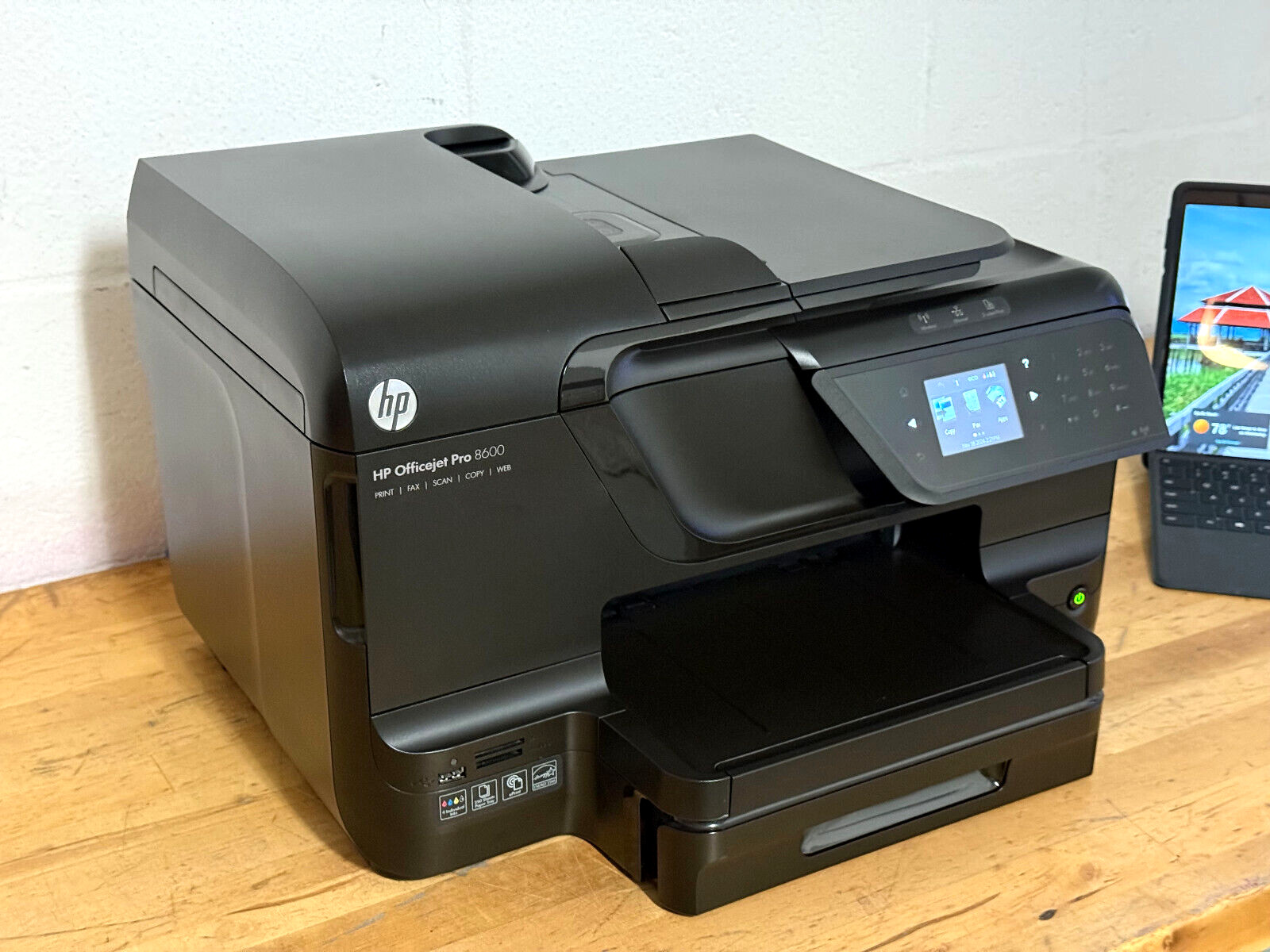

Photos from current listings. Actual item, color, and included accessories may vary.
HP OfficeJet Pro 8600 Buying Guide
The HP OfficeJet Pro 8600 is a legacy wide-format all-in-one inkjet aimed at small offices that need 11x17 printing, faxing, and duplex scanning in one box. Because HP discontinued it years ago, every unit you find is used or refurbished—so printhead health and ink cartridge availability matter far more than the spec sheet. Buyers often overlook that its drivers are frozen at the Windows 8/macOS 10.13 era, making it a poor fit for modern 64-bit-only operating systems.
Key takeaways
- Print engine is a thermal inkjet with a 32 ppm black / 30 ppm color draft rating and a maximum 4800 x 1200 dpi optimized resolution on plain paper.
- Uses four individual HP 950/951 ink cartridges (black plus cyan/magenta/yellow), with XL versions available; third-party refills are common but risk head clogs on a dormant unit.
- Standard connectivity is USB 2.0, Ethernet, and 802.11b/g/n Wi-Fi; the RJ-11 port is for fax only, not network data.
At a glance
- Category
- Computers & Peripherals
- Status
- Listings available
- Last updated
- Nov 28, 2026
Current offers
Highlights
- Print engine is a thermal inkjet with a 32 ppm black / 30 ppm color draft rating and a maximum 4800 x 1200 dpi optimized resolution on plain paper.
- Uses four individual HP 950/951 ink cartridges (black plus cyan/magenta/yellow), with XL versions available; third-party refills are common but risk head clogs on a dormant unit.
- Standard connectivity is USB 2.0, Ethernet, and 802.11b/g/n Wi-Fi; the RJ-11 port is for fax only, not network data.
- Automatic duplex printing is standard, but automatic duplex scanning depends on the ADF model—the base flatbed requires manual two-pass scanning for double-sided documents.
Best use cases
- Best fit: a home or small office that still runs Windows 7/8/10 or macOS 10.13 or earlier and needs occasional 11x17 output plus fax. Pick a tested unit with a clean nozzle check.
- Wrong fit: anyone on Windows 11 ARM, macOS 11+, or ChromeOS—HP has no native driver, so you are limited to generic AirPrint or third-party workarounds with reduced scan/fax function.
- Skip if you print daily high-volume color: the 950/951 cartridge yield (roughly 1,000 black / 700 color pages standard) makes cost per page high versus a modern EcoTank or laser.
- Choose only if wide-format (up to 13x19 via the rear feed) is a hard requirement—otherwise a compact letter-size AIO is cheaper to run and easier to service.
Buying tips
- Inspect the printhead before paying: ask for a nozzle-check pattern and confirm no banding or missing segments, since replacement heads are scarce and costly.
- Prioritize units that include the power supply and both paper trays (250-sheet main plus 250-sheet optional) because these accessories are often missing on used listings.
- Avoid any unit sold without a test print or with 'as-is' language—the 8600's carriage and encoder strip are common failure points after long storage.
- Compare cartridge bundles: a unit with genuine HP 950/951 XL carts is worth more than one with empty or third-party tanks, as genuine XL ink offsets setup cost.
Specs
| Print Technology | Thermal inkjet, 4-color |
|---|---|
| Max Paper Size | 11x17 in tray / 13x19 in rear feed |
| Connectivity | USB 2.0 / Ethernet / 802.11b/g/n |
| Ink System | HP 950/951 (XL available) |
Alternatives to compare
Related searches
What to check before buying
- Measure your desk footprint: the unit is roughly 19.5 x 16.5 x 12 inches and needs several inches of clearance behind for the rear feed and cable routing.
- Confirm your OS: check that Windows 10/8/7 or macOS 10.13 or earlier is in use—Windows 11 and macOS 12+ lack full HP driver support for this model.
- Verify a nearby 802.11b/g/n 2.4 GHz network or an Ethernet drop; the 8600 does not support 5 GHz Wi-Fi or Wi-Fi Direct on all firmware revisions.
- Check that you have a standard US RJ-11 phone jack if you intend to use fax, and a USB Type-B cable if you plan a direct connection (not always included).
FAQ
Data sources: eBay / Amazon listings and product attribute feeds. Updated Nov 28, 2026.
Some links on this page are affiliate links. If you buy after clicking one, we may earn a commission at no extra cost to you. This does not change which products appear here or their order. Affiliate disclosure.