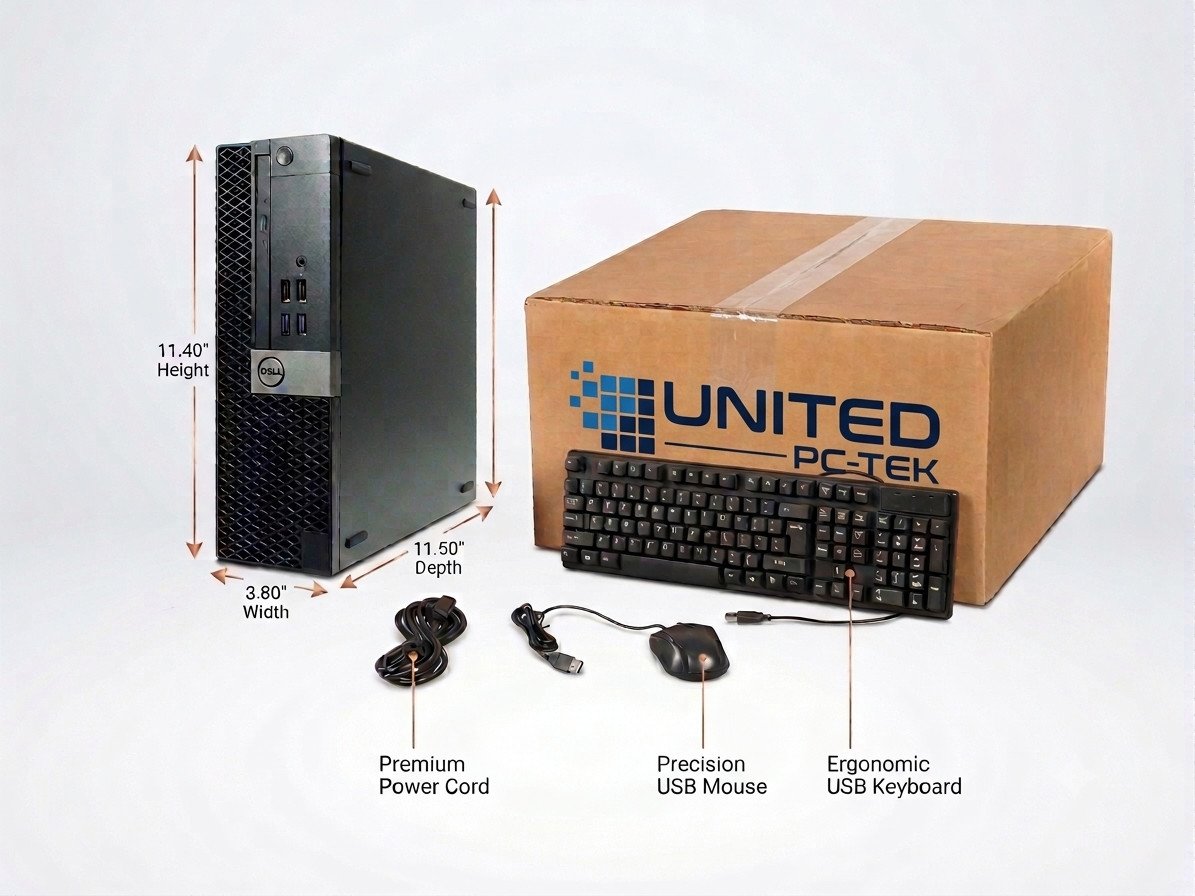

Photos from current listings. Actual item, color, and included accessories may vary.
Dell OptiPlex Buying Guide
Dell OptiPlex is a business-class desktop line spanning compact micro, small form factor (SFF), and mini-tower (MT) chassis, all built around Intel's vPro platform and long-lifecycle motherboards. The primary trade-off is physical size versus upgradeability and thermal headroom: Micro models use laptop-class CPUs and SO-DIMM memory, while MT models accept full desktop CPUs, standard DIMMs, and multiple expansion cards. The decision rule is simple: buy Micro only if desk space is critical and you never plan to add a GPU or swap a CPU; buy SFF or MT if you need standard parts, quiet cooling, or any future expansion.
Key takeaways
- Chassis tiers differ in CPU class: Micro uses 35W laptop-derived processors and SO-DIMM slots; SFF and MT use 65W desktop CPUs with standard DIMM slots.
- Micro models typically have one M.2 slot and one 2.5-inch bay; MT models add a 3.5-inch bay, PCIe x16 slot, and optional optical drive.
- Recent generations (7010/7011/7020 and 7410/7420) move to 12th–14th Gen Intel with DDR4 or DDR5 depending on exact model and year.
At a glance
- Category
- Computers & Peripherals
- Status
- Listings available
- Last updated
- Nov 28, 2026
Current offers
Highlights
- Chassis tiers differ in CPU class: Micro uses 35W laptop-derived processors and SO-DIMM slots; SFF and MT use 65W desktop CPUs with standard DIMM slots.
- Micro models typically have one M.2 slot and one 2.5-inch bay; MT models add a 3.5-inch bay, PCIe x16 slot, and optional optical drive.
- Recent generations (7010/7011/7020 and 7410/7420) move to 12th–14th Gen Intel with DDR4 or DDR5 depending on exact model and year.
- Business-grade OptiPlex units carry vPro-enabled chipsets, TPM 2.0, and 3-year onsite warranty options versus 1-year consumer coverage.
Best use cases
- Best fit for Micro: reception desks, kiosks, and home offices with a single monitor where a VESA mount hides the PC behind the display — pick a 35W i5 and 16GB RAM.
- Best fit for SFF: office productivity with dual monitors and a low-profile GPU for light CAD or video playback — choose a 65W i5/i7 and confirm the PCIe slot is half-height.
- Best fit for MT: users who will add a full-height GPU, extra drives, or a sound card later — select a 300W+ PSU model and verify the PCIe x16 slot is wired for full bandwidth.
- Wrong fit: buying any OptiPlex for gaming beyond esports or for heavy 3D rendering — the integrated PSU and proprietary motherboard limit GPU upgrades; build a standard ATX system instead.
Buying tips
- Match the CPU suffix: Micro models use T-series (35W) or U-series chips and cannot be upgraded to desktop CPUs; SFF/MT use standard 65W parts with socket compatibility limited to one or two generations.
- Count memory slots before buying: Micro has two SO-DIMM slots (max 32–64GB depending on generation); SFF/MT have four DIMM slots and accept up to 128GB on recent chipsets.
- Check the PSU wattage and connector: SFF models often ship 180–200W with proprietary 8-pin power, while MT models range 260–360W and can support a 75W low-profile GPU without adapter cables.
- Verify the storage interface: M.2 NVMe is standard on 7070 and newer; older 7050/9020 units may be SATA-only or need a caddy for a 2.5-inch SSD.
Specs
| Chassis Tiers | Micro / SFF / Mini Tower |
|---|---|
| CPU Class | 35W laptop (Micro) vs 65W desktop |
| Memory Type | SO-DIMM (Micro) vs DIMM (SFF/MT) |
| Win 11 Cutoff | 8th Gen Intel (7060) or newer |
Alternatives to compare
Related searches
What to check before buying
- Measure your desk or VESA mount: Micro is roughly 1.2 liters and can mount behind a monitor; SFF needs about 3.5 inches of height; MT needs a full tower footprint.
- Confirm monitor ports on the exact model: DisplayPort and HDMI are standard, but VGA is optional on many units — buy an adapter only if your display lacks digital inputs.
- Check the power plug and voltage: Dell business desktops ship with regional C13 or barrel connectors; confirm the included adapter matches your country's 100–240V supply.
- Plan for a keyboard, mouse, and Wi-Fi: many OptiPlex units ship wired peripherals only; add a USB Wi-Fi 6 adapter if the model lacks the optional wireless card.
FAQ
Data sources: eBay / Amazon listings and product attribute feeds. Updated Nov 28, 2026.
Some links on this page are affiliate links. If you buy after clicking one, we may earn a commission at no extra cost to you. This does not change which products appear here or their order. Affiliate disclosure.