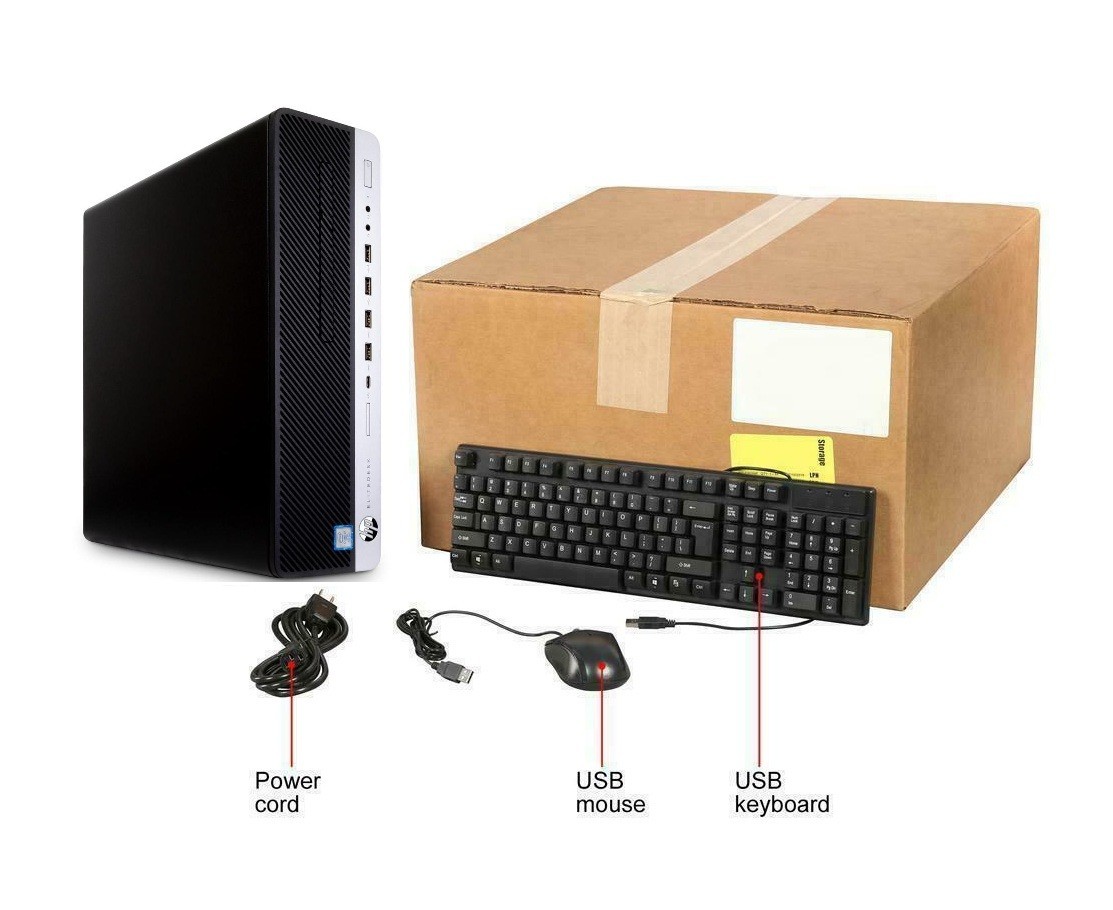

Photos from current listings. Actual item, color, and included accessories may vary.
HP Desktop Buying Guide
An HP Desktop is a pre-built Windows PC spanning budget office towers to compact all-in-ones, and the primary trade-off is CPU generation versus expandability: older quad-core business refurbs are cheap but lack upgrade paths, while current-gen towers cost more but accept standard GPUs and RAM. The decision rule is to buy a model with a socketed desktop CPU, standard DIMM slots, and a 300W+ PSU if you need longevity, and skip soldered-memory all-in-ones or slimline units with proprietary power supplies unless space is the only constraint.
Key takeaways
- Business-class HP towers (ProDesk, EliteDesk) use standard micro-ATX or ATX motherboards and 80 PLUS power supplies, while consumer Slimline and All-in-One models often use proprietary PSUs and soldered RAM.
- Intel Core generations matter: 8th-gen and newer support Windows 11 officially, while 6th/7th-gen quad-core business refurbs need bypass installs and lack TPM 2.0 on some boards.
- HP EliteDesk 800 G-series and ProDesk 600 G-series include four DIMM slots and a PCIe x16 slot, enabling 64GB RAM and a low-profile GPU upgrade; Slimline SFF units accept only low-profile cards.
At a glance
- Category
- Computers & Peripherals
- Status
- Listings available
- Last updated
- Nov 28, 2026
Current offers
Highlights
- Business-class HP towers (ProDesk, EliteDesk) use standard micro-ATX or ATX motherboards and 80 PLUS power supplies, while consumer Slimline and All-in-One models often use proprietary PSUs and soldered RAM.
- Intel Core generations matter: 8th-gen and newer support Windows 11 officially, while 6th/7th-gen quad-core business refurbs need bypass installs and lack TPM 2.0 on some boards.
- HP EliteDesk 800 G-series and ProDesk 600 G-series include four DIMM slots and a PCIe x16 slot, enabling 64GB RAM and a low-profile GPU upgrade; Slimline SFF units accept only low-profile cards.
- Storage interfaces differ by generation: 6th-8th gen business units offer SATA plus one M.2 slot, while 10th-gen and newer add NVMe boot support and dual M.2 on EliteDesk 800 G6 and later.
Best use cases
- Best fit: a home office or student buyer who needs typing, browsing, and video calls should pick a ProDesk 600 or EliteDesk 800 SFF refurb with an 8th-gen i5, 16GB RAM, and SSD—skip 4GB-RAM or HDD-only configs.
- Best fit: a light gamer or creator should choose a mid-tower HP with a 500W+ PSU and full-height PCIe slot (e.g., OMEN or EliteDesk 800 TWR), then add a low-power GPU; skip Slimline or All-in-One units with no expansion.
- Wrong fit: a buyer wanting future CPU upgrades should avoid HP All-in-One and Mini PCs entirely—their soldered CPUs and RAM cannot be upgraded; pick a socketed tower instead.
- Best fit: a kiosk or POS deployment should use the HP t-series thin client or EliteDesk Mini with VESA mount and lock slot; skip full towers that waste counter space and power.
Buying tips
- Match the CPU to Windows 11 support: 8th-gen Intel Core or newer (e.g., i5-8500, i5-10500) guarantees official compatibility; 6th/7th-gen quad-core refurbs require workarounds.
- Check the power supply wattage before planning a GPU: Slimline and SFF units ship with 180–240W PSUs and low-profile slots, so limit add-in cards to 75W bus-powered models.
- Verify RAM form factor: EliteDesk and ProDesk towers use standard DDR4 UDIMMs (2 or 4 slots), while All-in-One and Mini models use SO-DIMMs, often with one slot occupied and a lower ceiling.
- Confirm storage layout: business refurbs with a 2.5-inch SSD leave the 3.5-inch bay free for bulk HDD, but units with only eMMC or a single M.2 slot limit expansion—pick one with both SATA and M.2.
Specs
| Form Factor | Tower / SFF / Mini / All-in-One |
|---|---|
| CPU Socket | LGA1151 / LGA1200 / LGA1700 |
| RAM Type | DDR4 UDIMM / SO-DIMM |
| PSU Wattage | 180W–500W (model-dependent) |
Alternatives to compare
Related searches
What to check before buying
- Measure your desk or floor space: mid-tower HP units are roughly 6.7–7.5 inches wide and 13–15 inches tall, while SFF and Mini models are under 4 inches wide—confirm clearance for airflow and rear cables.
- Check your monitor ports: older HP business desktops output DisplayPort 1.2 and VGA, so budget for a DisplayPort-to-HDMI cable if your monitor is HDMI-only.
- Confirm your region's voltage and plug: HP desktops sold in North America are 120V with NEMA 5-15P cords; units from other regions may need a step-up transformer or a replacement PSU.
- Plan for a keyboard and mouse: most business refurbs ship without them, so add a USB or wireless set; All-in-One models include a wired keyboard and mouse in the box.
FAQ
Data sources: eBay / Amazon listings and product attribute feeds. Updated Nov 28, 2026.
Some links on this page are affiliate links. If you buy after clicking one, we may earn a commission at no extra cost to you. This does not change which products appear here or their order. Affiliate disclosure.