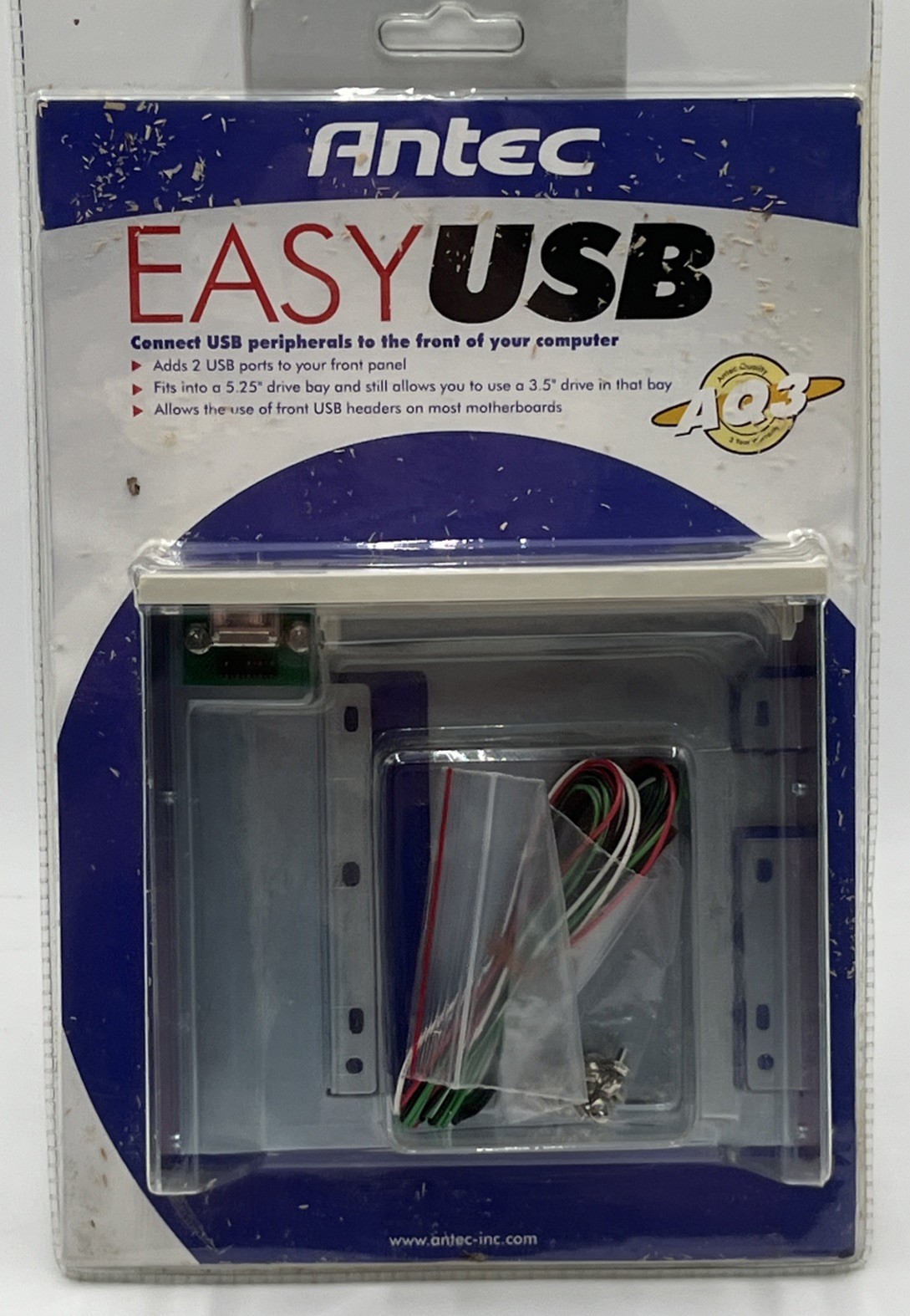

Photos from current listings. Actual item, color, and included accessories may vary.
Antec Easy USB Buying Guide
The Antec Easy USB is a 5.25-inch bay expansion module that routes two USB ports from your motherboard's internal headers to the front of a desktop PC, solving rear-port reach without a hub. The primary trade-off is legacy bay compatibility versus modern USB standards: this is a USB 2.0-era passive pass-through, not a USB 3.0 or charging solution. The decision rule is simple: buy it only if you have a free 5.25-inch optical bay and a motherboard with two 9-pin USB 2.0 headers—otherwise choose a rear-panel USB 3.0 bracket or a powered hub.
Median $35.19
Key takeaways
- Uses two standard 9-pin USB 2.0 motherboard headers and passes through to two front-facing Type-A ports at up to 480 Mbps.
- Fits any standard 5.25-inch external drive bay (5.75-inch width opening) with a front bezel designed for optical-drive cutouts.
- Passive design draws no auxiliary power, so each port delivers the USB 2.0 standard 500 mA—not suitable for bus-powered 2.5-inch drives or fast charging.
At a glance
- Category
- Computers & Peripherals
- Status
- Listings available
- Last updated
- Nov 28, 2026
Current offers
Highlights
- Uses two standard 9-pin USB 2.0 motherboard headers and passes through to two front-facing Type-A ports at up to 480 Mbps.
- Fits any standard 5.25-inch external drive bay (5.75-inch width opening) with a front bezel designed for optical-drive cutouts.
- Passive design draws no auxiliary power, so each port delivers the USB 2.0 standard 500 mA—not suitable for bus-powered 2.5-inch drives or fast charging.
- No chipset or driver is required; it is a wiring bridge, so compatibility depends entirely on the motherboard having spare USB 2.0 headers.
Best use cases
- Best fit: a desktop with a free 5.25-inch bay and a motherboard that has unused 9-pin USB 2.0 headers, where you need front access for keyboard, mouse, or flash drives.
- Wrong fit: any case without a 5.25-inch external bay (most modern tempered-glass and ITX cases)—use a rear USB bracket or a USB 3.0 front-panel adapter instead.
- Best fit: retro or office builds restoring front-panel USB 2.0 on older Antec or standard ATX cases; skip it if you need USB 3.0 speeds, high-wattage charging, or USB-C.
- Wrong fit: laptops, mini-PCs, and all-in-ones—there is no internal header or bay to connect to, so a powered external hub is the correct purchase.
Buying tips
- Count your motherboard's 9-pin USB 2.0 headers first: you need one free header per two ports, and many modern boards provide only one or two.
- Measure the bay: the module requires a standard 5.25-inch external bay opening roughly 5.75 inches wide and about 1.6 inches tall.
- Expect USB 2.0 throughput (480 Mbps) and 500 mA per port; do not buy this for external SSDs, optical burners, or phone fast-charging.
- Prefer a sealed, complete kit that includes the two internal header cables and mounting screws; the module is passive, so missing cables make it unusable.
Specs
| Interface | USB 2.0 (480 Mbps, 500 mA/port) |
|---|---|
| Bay Size | 5.25-inch external drive bay |
| Internal Connection | Dual 9-pin USB 2.0 headers |
| Port Count | 2x USB Type-A front ports |
Alternatives to compare

Related searches
What to check before buying
- Confirm your case has at least one free 5.25-inch external bay; this module cannot mount in 3.5-inch or 2.5-inch positions.
- Verify your motherboard has one or two spare 9-pin USB 2.0 internal headers (look for labels like USB_2, F_USB, or JUSB).
- Check that the 5.25-inch bay bezel is removable or that the case accepts a standard optical-drive faceplate, since the Antec front plate is sized to that standard.
- Confirm you do not need USB 3.0/3.1 speeds or USB-C; if you do, select a USB 3.0 front-panel bay or a rear bracket instead.
FAQ
Data sources: eBay / Amazon listings and product attribute feeds. Updated Nov 28, 2026.
Some links on this page are affiliate links. If you buy after clicking one, we may earn a commission at no extra cost to you. This does not change which products appear here or their order. Affiliate disclosure.