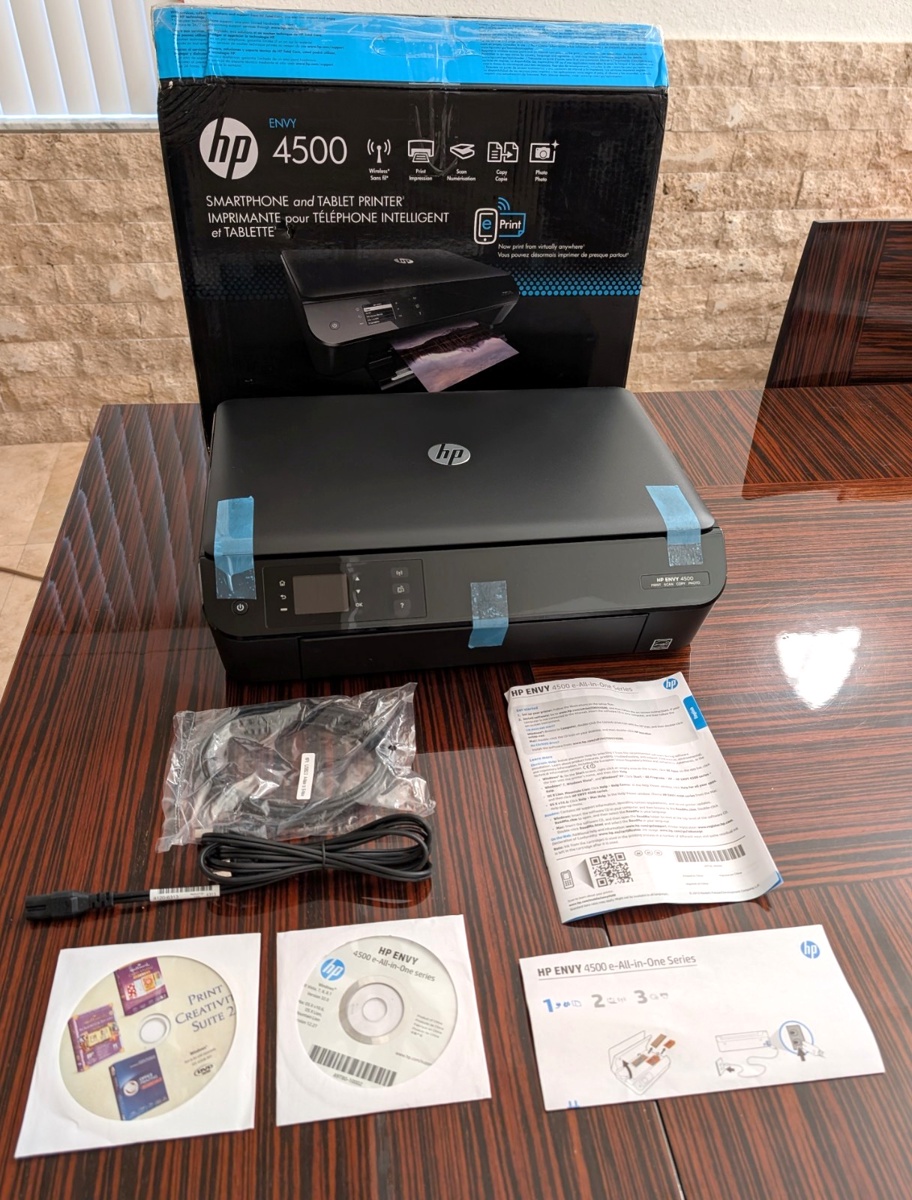

Photos from current listings. Actual item, color, and included accessories may vary.
HP Envy 4500 Buying Guide
The HP Envy 4500 is a compact all-in-one inkjet aimed at light home printing, scanning, and copying where space and wireless convenience matter more than speed or volume. Shoppers hunting this model are usually replacing a dead unit or outfitting a dorm/home office, so the real decisions are cartridge family, connectivity generation, and whether a decades-old print engine still fits modern workflows.
Key takeaways
- Dual-cartridge thermal inkjet (black + tri-color) means replacing one color channel drains the whole tri-color cartridge—cost per page rises sharply on mixed-color documents.
- Print resolution of 1200 x 1200 dpi applies to black text and graphics; color output is optimized for everyday documents, not photo-lab continuous tone.
- Wireless 802.11 b/g/n plus USB 2.0 is the practical connection set; the parallel and Ethernet entries in catalog specs describe the Envy family, not the 4500 itself, which ships USB/Wi-Fi only.
At a glance
- Category
- Computers & Peripherals
- Status
- Listings available
- Last updated
- Nov 28, 2026
Current offers
Highlights
- Dual-cartridge thermal inkjet (black + tri-color) means replacing one color channel drains the whole tri-color cartridge—cost per page rises sharply on mixed-color documents.
- Print resolution of 1200 x 1200 dpi applies to black text and graphics; color output is optimized for everyday documents, not photo-lab continuous tone.
- Wireless 802.11 b/g/n plus USB 2.0 is the practical connection set; the parallel and Ethernet entries in catalog specs describe the Envy family, not the 4500 itself, which ships USB/Wi-Fi only.
- Envy 4500 uses HP 61 (or 61XL) cartridges in North America; regional variants use 301/302 or 650/651, so cartridge compatibility must be confirmed by region before stocking up.
Best use cases
- Best fit: a student or home user printing a few dozen pages a week—pick the 4500e bundle with instant-ink eligibility and USB setup for reliability.
- Wrong fit: a small office running 500+ pages monthly—skip the 4500 and choose a tank or laser all-in-one; dual-cartridge inkjet economics collapse at that volume.
- Best fit: scanning receipts and copying IDs via the flatbed—the 1200 dpi scan glass handles documents well; skip if you need an auto-document feeder for multi-page batches.
- Wrong fit: anyone needing Ethernet or wired network printing—the 4500 lacks an RJ-45 port; choose a business-class Envy or OfficeJet model instead.
Buying tips
- Confirm the cartridge code printed on the region label (61/61XL in the US, 301/302 in Europe, 650/651 in Asia-Pacific) before buying—cross-region cartridges physically will not fit.
- Prioritize the 'e' variant only if you accept HP+ enrollment terms; the standard 4500 works with third-party cartridges while HP+ units enforce genuine HP ink.
- Inspect open-box units for missing setup cartridges and a clean printhead—inkjet heads clog when stored unused for months, so test printing immediately on arrival.
- Avoid paying extra for parallel or Ethernet claims; the 4500 is USB/Wi-Fi only and those catalog fields are family-level mislabels.
Specs
| Print Engine | Dual-cartridge thermal inkjet |
|---|---|
| Max Print Resolution | 1200 x 1200 dpi (black) |
| Connectivity | USB 2.0 / Wi-Fi 802.11 b/g/n |
| Cartridge Family | HP 61 / 61XL (NA region) |
Alternatives to compare
Related searches
What to check before buying
- Measure your shelf: the unit is roughly 17.5 x 13.5 x 6 inches closed, and the output tray extends several inches forward during printing.
- Verify your Wi-Fi band—the 4500 is 2.4 GHz only and will not appear on 5 GHz-only networks.
- Check you have a USB Type-B (printer) cable; one is not always included in open-box or refurbished sales.
- Confirm your region's voltage and plug type (100–240 V external adapter) if importing a unit from another market.
FAQ
Data sources: eBay / Amazon listings and product attribute feeds. Updated Nov 28, 2026.
Some links on this page are affiliate links. If you buy after clicking one, we may earn a commission at no extra cost to you. This does not change which products appear here or their order. Affiliate disclosure.