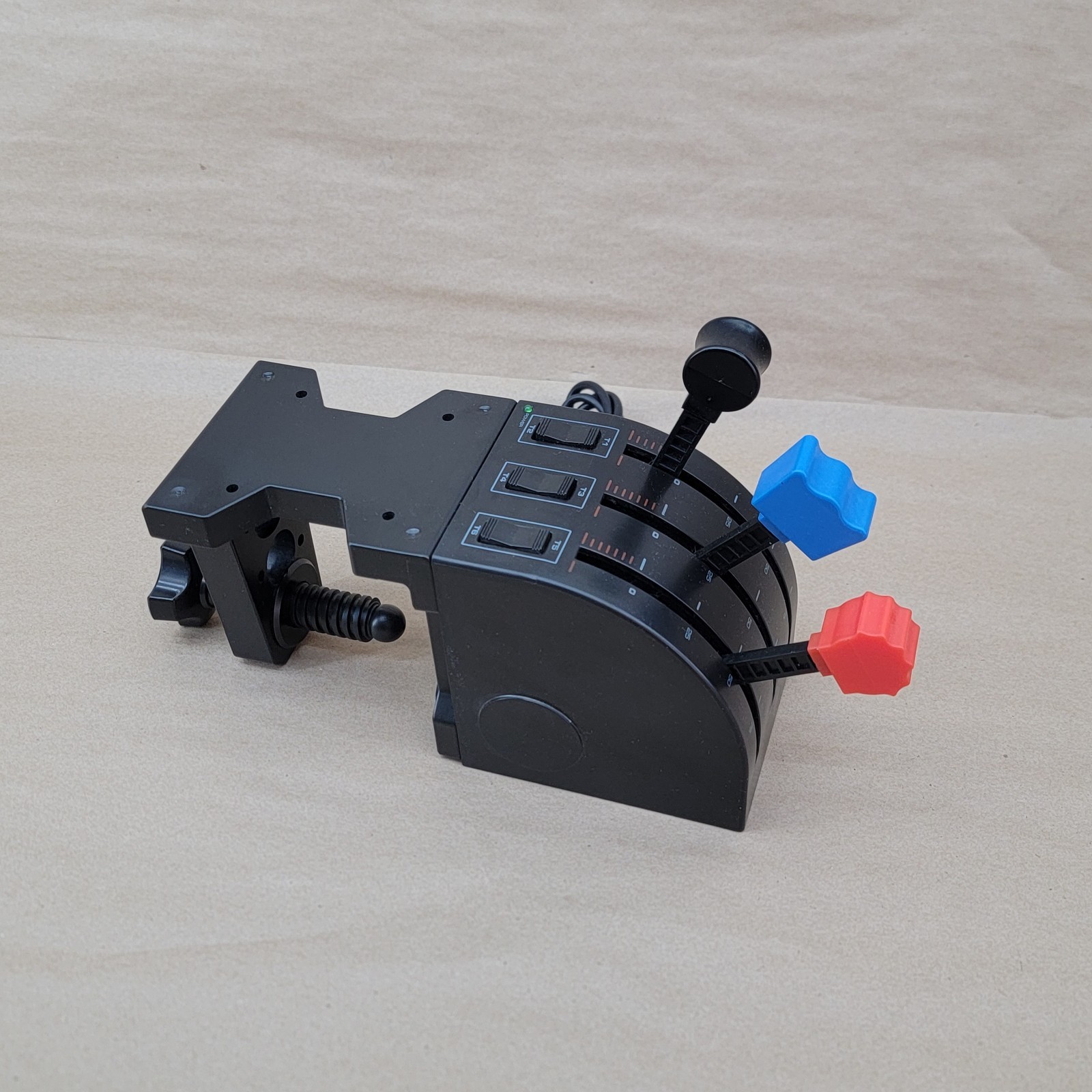

Photos from current listings. Actual item, color, and included accessories may vary.
Saitek Pro Flight Throttle Quadrant Buying Guide
The Saitek Pro Flight Throttle Quadrant is a 3-lever USB throttle unit for flight sims, built around a plastic housing and potentiometer-based levers. The core trade-off is simple: it offers three assignable axes and a compact footprint at a budget tier, but its plastic construction and older potentiometer design mean it is a starter module, not a lifetime control. Buy it only if you need a cheap, functional 3-axis throttle add-on; skip it if you demand Hall-effect sensors, metal internals, or long-term durability under heavy use.
Key takeaways
- Three independent levers with assignable axes for throttle, prop, and mixture — the minimum for multi-engine or complex single-engine setups.
- Potentiometer-based sensing (not Hall effect) means wear and spiking are the primary long-term failure mode; smoother and more durable than gamepad sliders but below magnetic sensors.
- Plastic housing and lever arms keep weight and cost down but flex under firm input; mounting holes and a weighted base are essential to prevent sliding.
At a glance
- Category
- Flight Sim Yokes & Throttles
- Last updated
- Nov 24, 2026
Current offers
Highlights
- Three independent levers with assignable axes for throttle, prop, and mixture — the minimum for multi-engine or complex single-engine setups.
- Potentiometer-based sensing (not Hall effect) means wear and spiking are the primary long-term failure mode; smoother and more durable than gamepad sliders but below magnetic sensors.
- Plastic housing and lever arms keep weight and cost down but flex under firm input; mounting holes and a weighted base are essential to prevent sliding.
- USB plug-and-play with Logitech/Saitek driver support; older units may need legacy driver packages on modern Windows, and the quadrant is often sold used or as a READ/untested item.
Best use cases
- Best fit: budget multi-engine sim pilots who need a second or third throttle axis alongside a yoke or joystick and accept plastic construction at a low price.
- Best fit: twin-engine or prop sim flyers who want separate throttle, prop, and mixture levers without buying a full throttle quadrant with extra switches.
- Wrong fit: heavy daily users or realism-focused buyers who should step up to Hall-effect throttles (e.g., Honeycomb Bravo or Virpil) for metal internals and longevity.
- Wrong fit: buyers expecting plug-and-play on modern Windows without driver tinkering — legacy Saitek units often require manual driver installation.
Buying tips
- Confirm the unit includes its USB cable and that all three levers move freely through full travel; used 'READ' listings often have one stiff or spiking axis.
- Check whether it is the Saitek-branded original or the later Logitech G refresh — drivers and plastics differ slightly, and Logitech support is current.
- Plan on a desk or cockpit mount: the plastic base is light, so clamp or bolt it down using the built-in mounting holes to stop it sliding mid-flight.
- Budget for a driver step on Windows 10/11: install the Logitech/Saitek flight sim driver package before assigning axes in the sim.
Specs
| Lever Count | 3 assignable axes |
|---|---|
| Sensor Type | Potentiometer (not Hall effect) |
| Housing Material | Plastic body and levers |
| Connectivity | USB-A, bus-powered, plug-and-play |
Related searches
What to check before buying
- Measure your desk or cockpit space: the quadrant is compact but needs clearance for three levers through full forward/back travel.
- Verify you have a free USB-A port and that your sim (MSFS, X-Plane, P3D) recognizes multiple axis controllers simultaneously.
- Check your mounting surface: a smooth desk needs clamps or bolts; a cockpit panel with pre-drilled holes is ideal.
- Confirm your region's plug/USB standard — it is USB bus-powered, so no external power adapter is needed.
FAQ
Data sources: eBay / Amazon listings and product attribute feeds. Updated Nov 24, 2026.
Some links on this page are affiliate links. If you buy after clicking one, we may earn a commission at no extra cost to you. This does not change which products appear here or their order. Affiliate disclosure.