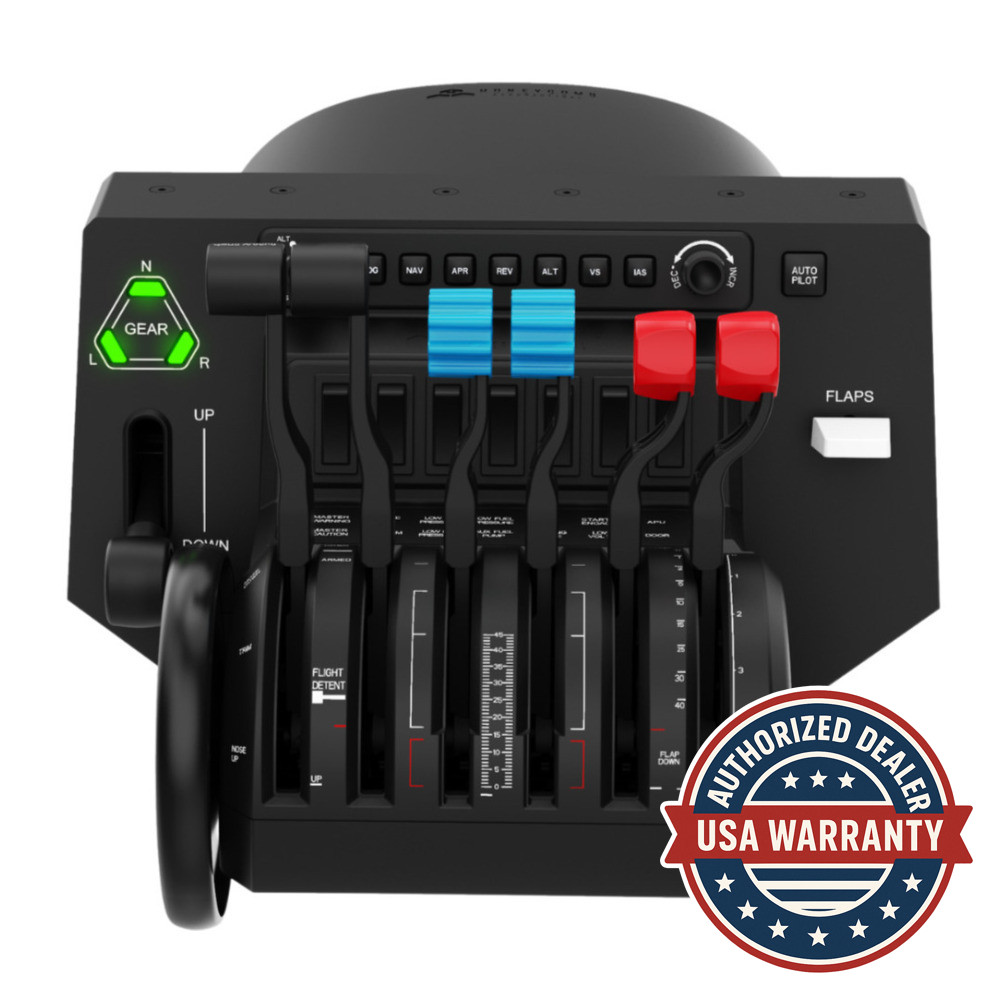

Photos from current listings. Actual item, color, and included accessories may vary.
Honeycomb Throttle Quadrant Buying Guide
The Honeycomb Bravo Throttle Quadrant is a modular, six-lever flight simulator controller designed for multi-engine and complex single-engine aircraft, featuring swappable lever handles, six-axis trim and gear controls, and a USB-C connection. The core trade-off is between its plastic construction and potentiometer-based axes versus metal or Hall-effect alternatives at higher prices. Choose the Bravo if you need six independent axes and a swappable handle system; skip it if you require contactless magnetic sensors or a full metal chassis.
Key takeaways
- Six independent axes: two throttle, one prop, one mixture, plus two configurable levers for flaps, speedbrakes, or spoilers
- Swappable lever handles (airliner, single-engine, twin-engine) secured by captive screws, enabling one quadrant to fit multiple aircraft types
- Potentiometer-based axis sensing, not Hall-effect, so mechanical wear and dust ingress can affect long-term precision
At a glance
- Category
- Flight Sim Yokes & Throttles
- Last updated
- Nov 24, 2026
Current offers
Highlights
- Six independent axes: two throttle, one prop, one mixture, plus two configurable levers for flaps, speedbrakes, or spoilers
- Swappable lever handles (airliner, single-engine, twin-engine) secured by captive screws, enabling one quadrant to fit multiple aircraft types
- Potentiometer-based axis sensing, not Hall-effect, so mechanical wear and dust ingress can affect long-term precision
- USB-C connection with a 6-foot cable, plug-and-play in Microsoft Flight Simulator, X-Plane, and Prepar3D via standard HID
Best use cases
- Best fit: Twin-engine piston or turboprop simmers needing separate throttle, prop, and mixture per engine—buy the Bravo for its six axes.
- Best fit: Airliner simmers who fly two-crew aircraft and want flap and speedbrake detents—use the two configurable levers and swap to airliner handles.
- Wrong fit: Combat simmers needing afterburner detents, radar cursor, or 20+ programmable buttons—choose a dedicated combat throttle instead.
- Wrong fit: Buyers demanding Contactless Hall-effect sensors or an all-metal housing—the Bravo's potentiometers and plastic body will not satisfy that requirement.
Buying tips
- Count your required axes: a twin-engine piston with prop and mixture needs 6; a single-engine jet needs 2 throttle plus flaps and speedbrake, also 6.
- Confirm your simulator supports standard HID game controllers; MSFS, X-Plane, and Prepar3D do, but some console sims require a licensed adapter.
- Leave at least 6 inches behind the quadrant for USB-C cable clearance and 4 inches above for full lever travel.
- If you plan to add a yoke and rudder pedals, budget USB ports: the Bravo uses one port and does not include a hub.
Specs
| Lever Count | 6 axes + gear lever |
|---|---|
| Sensor Type | Potentiometer (not Hall-effect) |
| Connection | USB-C, bus-powered |
| Handle Sets | Airliner, single, twin included |
Related searches
What to check before buying
- Measure desk depth: the Bravo footprint is approximately 12 x 7 inches, so a desk at least 24 inches deep keeps levers within reach.
- Verify USB-C port availability or a powered USB-A-to-C adapter; the Bravo draws power over USB and does not need a wall outlet.
- Check simulator compatibility: MSFS, X-Plane 11/12, and Prepar3D support native HID mapping; older sims may need third-party software.
- Confirm your aircraft's lever layout matches the included handles: airliner, single-engine, and twin-engine handles are in the box.
FAQ
Data sources: eBay / Amazon listings and product attribute feeds. Updated Nov 24, 2026.
Some links on this page are affiliate links. If you buy after clicking one, we may earn a commission at no extra cost to you. This does not change which products appear here or their order. Affiliate disclosure.