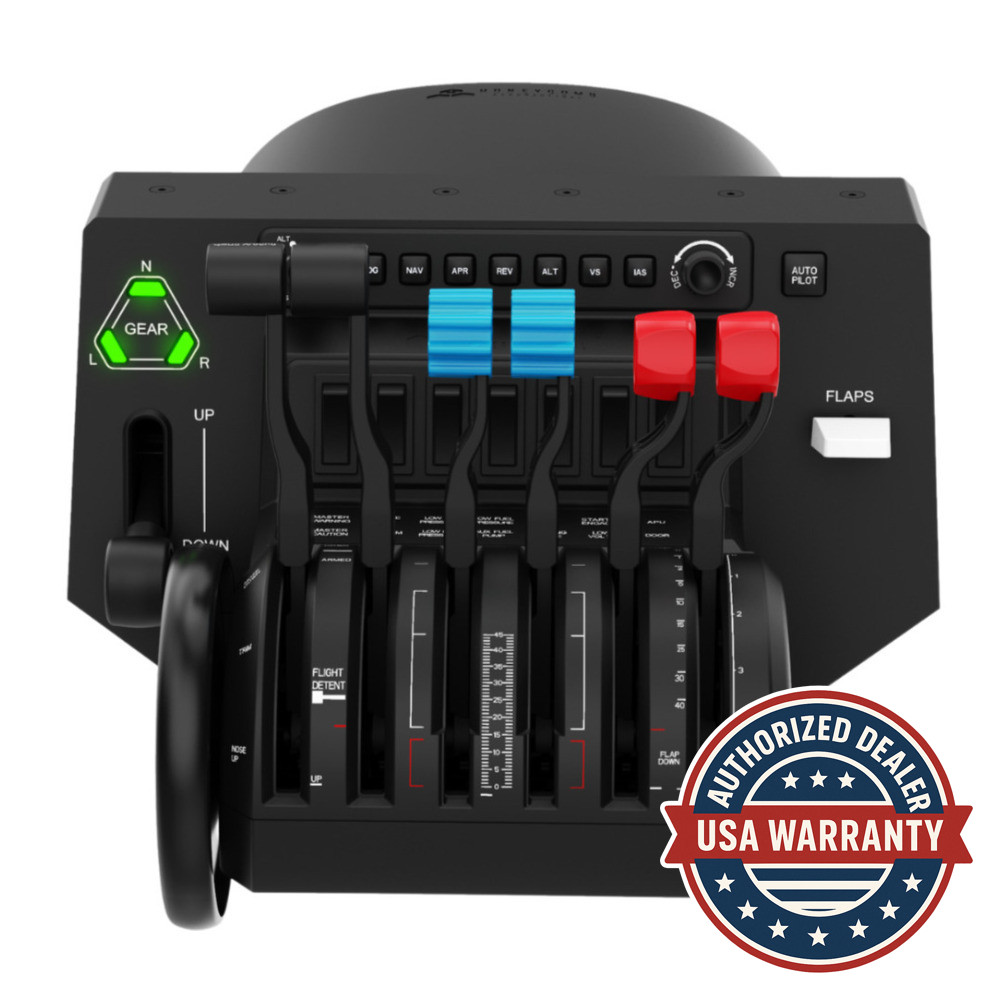

Photos from current listings. Actual item, color, and included accessories may vary.
Honeycomb Flight Sim Buying Guide
Honeycomb Aeronautical produces a two-part flight sim control ecosystem: the Alpha Flight Controls yoke and the Bravo Throttle Quadrant, both built around a metal internal shaft and steel-bearing axis rather than the plastic gimbals of entry-level gear. The core trade-off is ecosystem lock-in versus modularity—you buy the yoke first for pitch/roll realism, then add the throttle quadrant only if you need multi-engine, prop, or jet lever management. The decision rule: pick Honeycomb if you want a single-brand yoke-plus-throttle stack with Hall-effect sensing and swappable Bravo handle sets; skip it if you only fly stick-based aircraft or need console compatibility, since both units are PC-only USB peripherals.
Key takeaways
- Alpha yoke uses a metal internal shaft and steel-bearing pitch axis with Hall-effect sensors, giving contact-free wear resistance versus potentiometer yokes that degrade.
- Bravo throttle quadrant ships with interchangeable lever handles and six axis levers (throttle, prop, mixture, flaps, spoilers, gear) plus 30+ programmable buttons.
- Both units are USB-C class-compliant HID devices on PC; the Alpha includes a built-in Xbox-style button cluster but does not output native Xbox console signals.
At a glance
- Category
- Flight Sim Yokes & Throttles
- Last updated
- Nov 24, 2026
Current offers
Highlights
- Alpha yoke uses a metal internal shaft and steel-bearing pitch axis with Hall-effect sensors, giving contact-free wear resistance versus potentiometer yokes that degrade.
- Bravo throttle quadrant ships with interchangeable lever handles and six axis levers (throttle, prop, mixture, flaps, spoilers, gear) plus 30+ programmable buttons.
- Both units are USB-C class-compliant HID devices on PC; the Alpha includes a built-in Xbox-style button cluster but does not output native Xbox console signals.
- Alpha travel is roughly 180° pitch and 90° roll with adjustable tension, while the Bravo’s lever detents are user-swappable for jet or prop profiles.
Best use cases
- Best fit: GA and airliner simmers on PC who want a floor-or-desk yoke with realistic pitch travel—buy Alpha first, add Bravo only when flying twins or jets.
- Best fit: multi-engine prop and regional-jet cockpit builders—buy the Bravo quadrant for its six levers and swappable handles, then pair with Alpha for a full stack.
- Wrong fit: stick-and-throttle combat or space-sim pilots—skip Honeycomb and buy a HOTAS, since the yoke’s 180° pitch travel is wrong for fighter ergonomics.
- Wrong fit: console-only simmers on Xbox or PlayStation—skip both units, because Honeycomb’s USB HID output is PC-only and has no native console driver.
Buying tips
- Budget for the pair: Alpha alone covers pitch/roll/yaw-less flight, but the Bravo is a separate purchase—plan both if you need mixture, prop, and multi-engine levers.
- Match the Bravo handle set to your aircraft: jet handles have straight throttle detents, prop handles add prop/mixture levers—swap handles rather than buying a second quadrant.
- Check desk thickness and clamp clearance for the Alpha’s integrated clamp; the yoke body is deep, so measure front-edge overhang before committing to a monitor-close layout.
- Confirm PC-only USB-C: no Xbox or PlayStation native support, so budget a powered USB hub if your motherboard’s rear ports are already occupied by rudder pedals.
Specs
| Sensor Type | Hall-effect (Alpha) / potentiometer-free |
|---|---|
| Axis Count | Alpha 2-axis + Bravo 6 levers |
| Connectivity | USB-C HID, PC only |
| Build Core | Metal shaft, steel bearings |
Related searches
What to check before buying
- Measure desk depth and front-edge clearance: the Alpha yoke body and clamp need roughly 30 cm of forward space, so a shallow keyboard tray will not fit it.
- Confirm you have free USB-A or USB-C ports and a PC running Windows 10/11; Honeycomb units are HID-class and need no proprietary driver.
- Decide whether you need rudder pedals: neither Alpha nor Bravo includes yaw axis, so add a separate rudder pedal set for realistic taxi and crosswind control.
- Check your sim’s axis-binding support: MSFS, X-Plane, and Prepar3D map all Bravo levers natively, but older sims may need manual axis assignment.
FAQ
Data sources: eBay / Amazon listings and product attribute feeds. Updated Nov 24, 2026.
Some links on this page are affiliate links. If you buy after clicking one, we may earn a commission at no extra cost to you. This does not change which products appear here or their order. Affiliate disclosure.