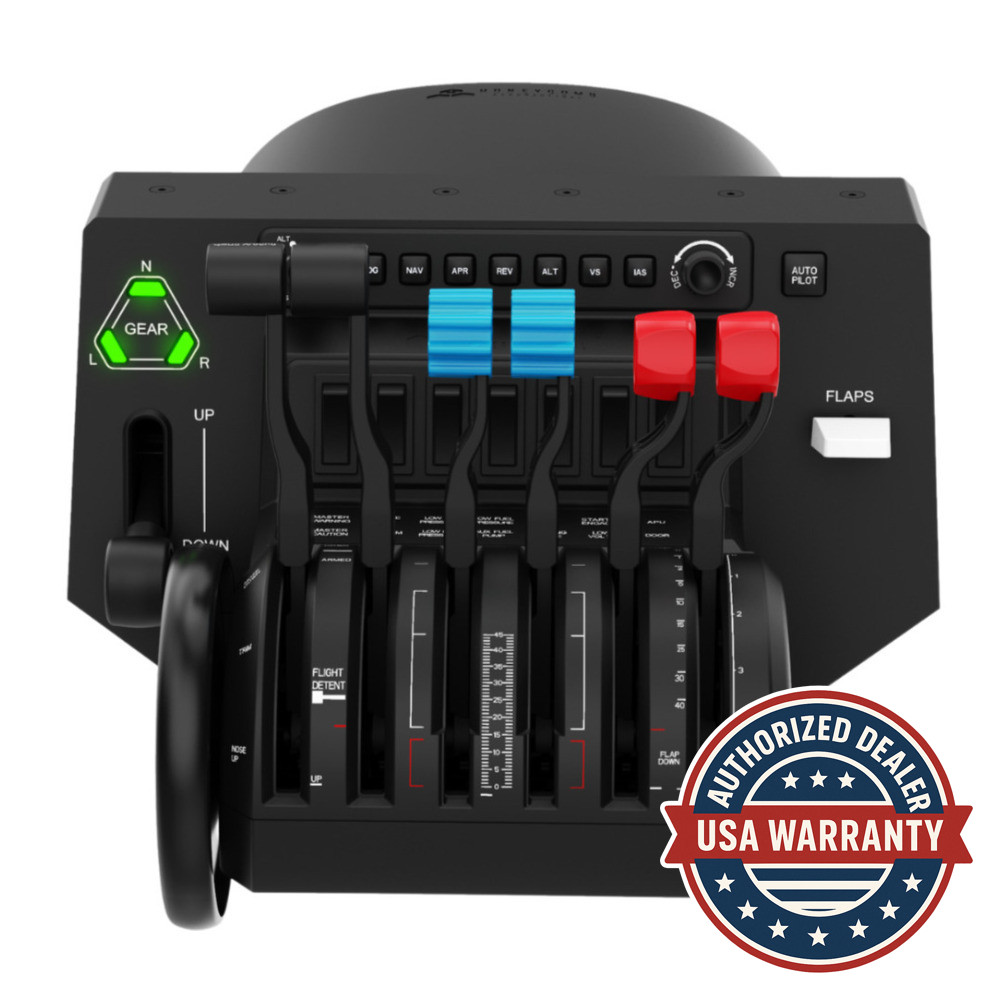

Photos from current listings. Actual item, color, and included accessories may vary.
Honeycomb Bravo Throttle Quadrant Buying Guide
The Honeycomb Bravo Throttle Quadrant is a modular, six-lever flight-sim throttle unit with an integrated autopilot panel, designed for desktop PC simulators. Its core trade-off is plastic construction and potentiometer-based levers versus metal, Hall-effect, or force-sensing designs—but the Bravo's lever configurability and autopilot annunciator set it apart at its tier. Buy it if you need multi-engine, multi-configuration throttle control with built-in autopilot hardware; skip it if you require contactless sensors for extreme longevity or a standalone trim wheel.
Key takeaways
- Six configurable levers ship with interchangeable throttle, prop, mixture, and spoiler/flap detent plates for single- and twin-engine setups.
- Integrated autopilot panel includes heading, altitude, vertical speed, IAS, and NAV/APR/AP buttons with annunciator LEDs, eliminating a separate AP module.
- Levers use potentiometers (not Hall-effect sensors), so smoothness and centering depend on internal lubrication and calibration rather than magnetic sensing.
At a glance
- Category
- Flight Sim Yokes & Throttles
- Last updated
- Nov 24, 2026
Current offers
Highlights
- Six configurable levers ship with interchangeable throttle, prop, mixture, and spoiler/flap detent plates for single- and twin-engine setups.
- Integrated autopilot panel includes heading, altitude, vertical speed, IAS, and NAV/APR/AP buttons with annunciator LEDs, eliminating a separate AP module.
- Levers use potentiometers (not Hall-effect sensors), so smoothness and centering depend on internal lubrication and calibration rather than magnetic sensing.
- Plastic housing and lever arms keep weight and cost down, but the unit relies on desk clamping or optional mounting for stability during aggressive inputs.
Best use cases
- Best fit: twin-engine GA and regional turboprop simmers who need throttle, prop, and mixture levers plus a dedicated autopilot panel in one unit.
- Best fit: single-engine pilots transitioning to multi-engine aircraft who want one quadrant that reconfigures via detent plates rather than buying separate throttle and mixture units.
- Wrong fit: shoppers wanting a standalone trim wheel or a metal, Hall-effect throttle for airliner simulation—those buyers should look at dedicated airliner throttle quadrants or force-sensing units.
- Skip if: your sim desk lacks a stable edge or clamp surface; the plastic housing and lever throw need a rigid mount to avoid flexing during use.
Buying tips
- Confirm your sim supports the Bravo natively or via a config tool; it enumerates as a HID joystick with multiple axes, so map levers per aircraft in MSFS, X-Plane, or Prepar3D.
- Plan for 6 lever axes plus the autopilot button/annunciator mapping—budget USB ports and a stable powered hub if you run multiple Honeycomb or Logitech panels.
- Choose the standard Bravo over the "PRO" listing label only when you need the same hardware; the Bravo PRO designation does not add sensor or material upgrades—verify lever and detent contents.
- Allow desk depth for the quadrant's footprint and lever throw; clamp or mount the unit so throttle sweeps do not tip the base, especially with stiff detents installed.
Specs
| Lever Count | 6 configurable axes |
|---|---|
| Sensor Type | Potentiometer (non-contactless) |
| Autopilot Panel | Integrated with annunciator LEDs |
| Housing Material | Plastic body and levers |
Related searches
What to check before buying
- Measure desk edge thickness and depth: the integrated clamp needs a flat, rigid lip and enough rear clearance for full lever travel.
- Confirm your PC has a free USB-A port and that your sim (MSFS, X-Plane, Prepar3D) recognizes multi-axis HID controllers for per-lever mapping.
- Check that your aircraft add-ons support separate throttle/prop/mixture axes; otherwise the six-lever advantage is wasted on a single-axis default mapping.
- Verify you have space for the autopilot panel section and that its annunciator LEDs are visible at your seating distance before committing.
FAQ
Data sources: eBay / Amazon listings and product attribute feeds. Updated Nov 24, 2026.
Some links on this page are affiliate links. If you buy after clicking one, we may earn a commission at no extra cost to you. This does not change which products appear here or their order. Affiliate disclosure.