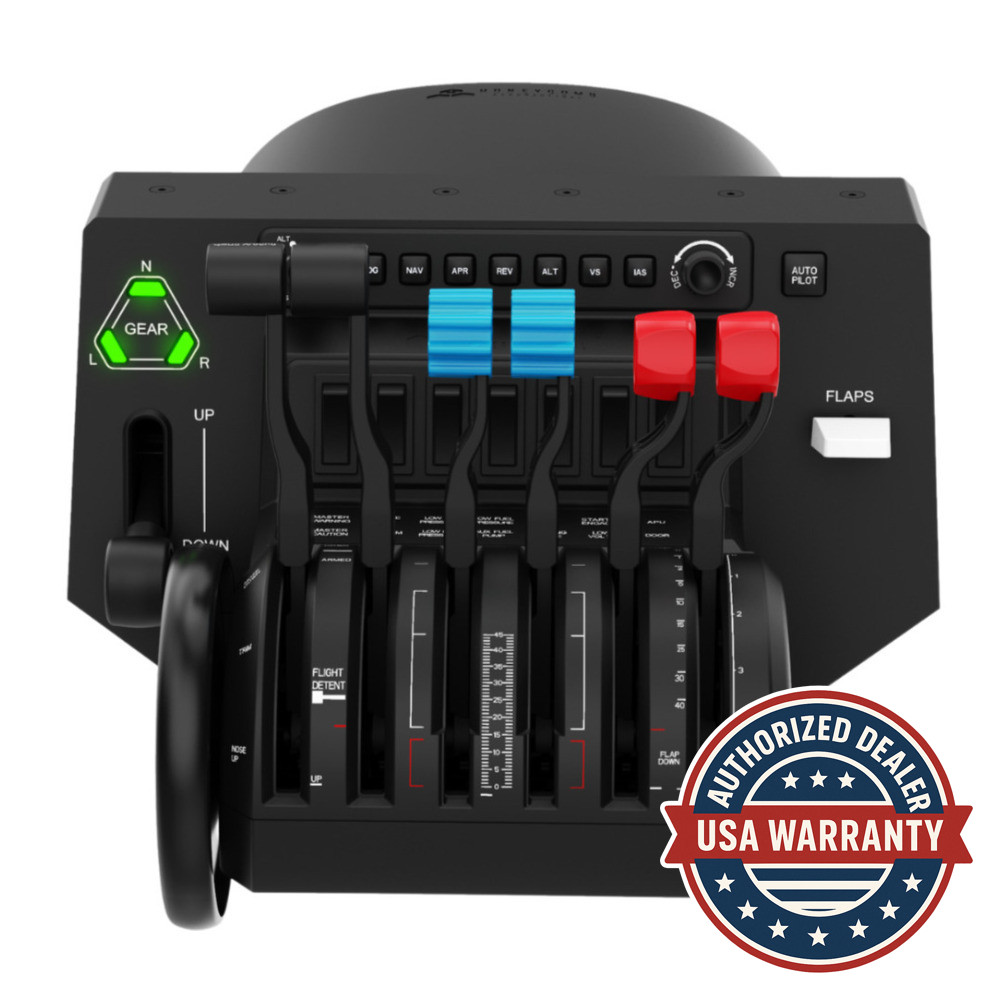

Photos from current listings. Actual item, color, and included accessories may vary.
Honeycomb Aeronautical Bravo Throttle Quadrant Buying Guide
The Honeycomb Bravo Throttle Quadrant is a modular flight-sim throttle with six levers, configurable detents, and a button-rich panel for turboprop, jet, and multi-engine setups. Its primary trade-off is plastic construction and Hall-effect sensing versus metal-bodied competitors—the Bravo delivers excellent lever feel and input count at a mid-tier build grade. The decision rule: buy it for Airliner or GA multi-engine flying on PC with USB-A and desk or clamp mounting; skip it if you need console compatibility or heavy metal construction.
Key takeaways
- Six configurable levers: throttle, prop, mixture, and two engine pairs, with swappable lever handles for 2-, 4-, or 6-lever layouts.
- Hall-effect (contactless) sensors on all lever axes eliminate potentiometer wear and dead zones over years of use.
- Configurable detents let you set afterburner, reverse, and idle stops per aircraft profile without hardware swaps.
At a glance
- Category
- Flight Sim Yokes & Throttles
- Last updated
- Nov 24, 2026
Current offers
Highlights
- Six configurable levers: throttle, prop, mixture, and two engine pairs, with swappable lever handles for 2-, 4-, or 6-lever layouts.
- Hall-effect (contactless) sensors on all lever axes eliminate potentiometer wear and dead zones over years of use.
- Configurable detents let you set afterburner, reverse, and idle stops per aircraft profile without hardware swaps.
- Plastic housing and lever arms with metal internal shafts keep weight and cost down but require rigid desk mounting.
Best use cases
- Best fit: airliner simmers flying 2- or 4-engine jets who want reverser detents, gear, and trim in one panel—buy the Bravo plus a yoke or stick.
- Best fit: GA twin or turboprop pilots needing prop and mixture levers—configure the six levers as throttle/prop/mixture pairs.
- Wrong fit: console-only simmers (Xbox/PlayStation)—the Bravo is PC-only and needs USB-A; skip it rather than adding adapters.
- Wrong fit: buyers wanting a single-engine stick-and-throttle starter kit—the Bravo is a throttle quad only and requires a separate flight stick.
Buying tips
- Match lever count to your aircraft: 2 engine pairs plus prop/mixture covers twins; a single-engine jet needs only one throttle lever.
- Plan for USB-A on the PC side and a rigid mount—desk clamp or sim rig; plastic housing flexes under heavy lever throws if unmounted.
- Confirm you already own a primary flight control (yoke or stick); Bravo ships as a standalone quadrant with no pitch/roll axis.
- Use the configuration software to set per-aircraft detents; leaving default detents causes reverse-thrust and afterburner mis-triggers.
Specs
| Lever Count | 6 levers / up to 4 engines |
|---|---|
| Axis Sensing | Hall-effect contactless |
| Platform | PC (Windows) / USB-A |
| Build Grade | Plastic housing / metal shafts |
Related searches
What to check before buying
- Measure desk depth and edge thickness: the quadrant needs roughly a 10-12 inch footprint plus clamp clearance behind the levers.
- Verify PC platform: Windows with USB-A; no native Xbox or PlayStation support, and no console adapter path is officially supported.
- Check sim compatibility for per-aircraft profiles: MSFS, X-Plane, and Prepar3D support detent configuration; older sims may need manual axis mapping.
- Budget desk space for a yoke or stick as well—the Bravo is an add-on module, not a complete flight control set.
FAQ
Data sources: eBay / Amazon listings and product attribute feeds. Updated Nov 24, 2026.
Some links on this page are affiliate links. If you buy after clicking one, we may earn a commission at no extra cost to you. This does not change which products appear here or their order. Affiliate disclosure.