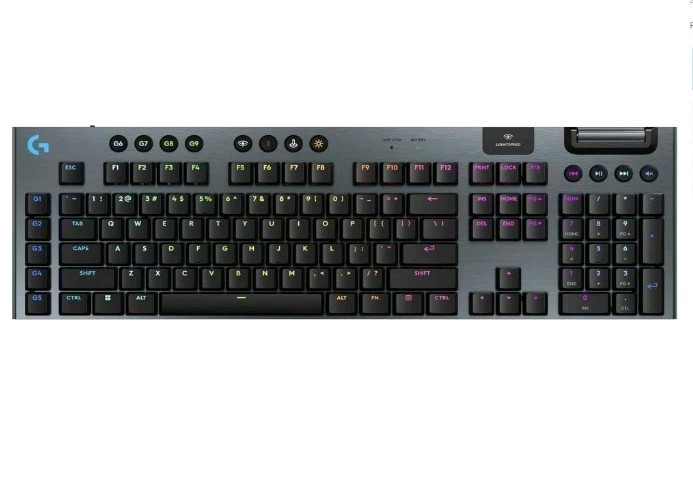

Photos from current listings. Actual item, color, and included accessories may vary.
Clicky Keyboard Buying Guide
Clicky mechanical keyboards use a two-piece slider and bump mechanism that produces a sharp tactile event and an audible click on every keypress, distinct from linear or silent-tactile switches. The core trade-off is switch architecture and chassis rigidity: welded plastic trays with plate-mounted clones feel hollow and ping, while gasket-mounted or screw-in stabilized boards with genuine branded clicky switches deliver consistent sound and key feel. The decision rule is simple — buy a board whose click mechanism is specified by switch family and whose case and stabilizers are user-serviceable; skip any listing that hides the switch type behind vague 'blue switch' marketing.
Key takeaways
- Clicky switches split into two families: MX-style (Cherry MX Blue, Kailh Box White/Box Jade, Gateron Blue) with a separate click jacket, and buckling-spring designs (Unicomp) with a folded metal spring for a deeper, heavier click.
- Kailh Box clicky switches use an enclosed IP56-rated box stem that resists dust and spills, unlike open MX-style click jackets that can catch debris and develop a muted or inconsistent click.
- Board rigidity drives sound: a 1.5–2 mm steel or aluminum top plate, screw-in PCB-mount stabilizers, and a gasket-mounted plate with foam between PCB and case eliminate the hollow ping common to tray-mounted plastic boards.
At a glance
- Category
- Mechanical Keyboards
- Last updated
- Nov 24, 2026
Current offers
Highlights
- Clicky switches split into two families: MX-style (Cherry MX Blue, Kailh Box White/Box Jade, Gateron Blue) with a separate click jacket, and buckling-spring designs (Unicomp) with a folded metal spring for a deeper, heavier click.
- Kailh Box clicky switches use an enclosed IP56-rated box stem that resists dust and spills, unlike open MX-style click jackets that can catch debris and develop a muted or inconsistent click.
- Board rigidity drives sound: a 1.5–2 mm steel or aluminum top plate, screw-in PCB-mount stabilizers, and a gasket-mounted plate with foam between PCB and case eliminate the hollow ping common to tray-mounted plastic boards.
- Wireless clicky boards require 2.4 GHz or Bluetooth 5.x with onboard battery; 2.4 GHz low-latency dongles are the correct pick for gaming, while Bluetooth is adequate for typing and multi-device switching.
Best use cases
- Best fit — office or shared-space typists should pick a clicky board only if they have a private room or use a headset; otherwise choose a silent-tactile switch, because clicky switches measure roughly 55–65 dB at typing distance and carry across open-plan desks.
- Best fit — gamers who want audible confirmation should choose a wired or 2.4 GHz low-latency clicky board with a 1000 Hz polling rate and N-key rollover; skip Bluetooth-only models because added latency and battery drain degrade competitive play.
- Best fit — first-time mechanical buyers should pick a hot-swap board with a standard 5-pin MX footprint and a starter set of Kailh Box Whites or Cherry MX Blues; skip soldered budget boards because a failed switch means replacing the entire PCB.
- Wrong fit — buyers in quiet bedrooms, libraries, or shared dorm rooms should skip clicky entirely; the click mechanism is intentionally audible and no dampening o-ring fully removes it.
Buying tips
- Match switch to feel: Cherry MX Blue and Gateron Blue give a medium 50–60 gf actuation with a sharp high click; Kailh Box Jade and Navys give a heavier 65–75 gf click with a deeper tone; buckling-spring Unicomp boards run 60–70 gf with a loud, low-pitched ring.
- Require a standard 5-pin MX hot-swap PCB (or at minimum 3-pin with plate mount) so any Cherry MX, Kailh, Gateron, or Outemu clicky switch fits; non-standard optical or low-profile sockets lock you into one switch family.
- Choose screw-in PCB-mount stabilizers over plate-mount clips on any board with a spacebar longer than 6.25u; screw-in stabilizers reduce rattle that is especially audible on clicky boards.
- For wireless, pick 2.4 GHz with a dedicated dongle and at least 1000 mAh battery for a full-size board; Bluetooth 5.x is fine for multi-device typing but adds latency and typically yields fewer months per charge.
Specs
| Switch Type | MX-style click jacket / buckling spring |
|---|---|
| Actuation Force | 50-75 gf clicky range |
| Connection | USB-C wired / 2.4 GHz / Bluetooth 5.x |
| Plate & Mount | Steel/aluminum plate, gasket or tray |
Related searches
What to check before buying
- Measure your desk and monitor stand clearance: a full-size 104-key board runs about 44 cm wide, a TKL about 36 cm, and a 65% about 32 cm — confirm the footprint before choosing a layout with a numpad.
- Confirm your PC or laptop has a free USB-A port for the 2.4 GHz dongle or a USB-C port for wired connection; Bluetooth-only setups need an active Bluetooth 5.x radio.
- Check the keycap material and profile: double-shot PBT in Cherry or OEM profile resists shine and keeps click sound consistent; thin ABS caps develop shine and can sound hollow within months.
- Verify the board ships with the correct regional plug if it includes a detachable USB-C cable — USB-C is universal, but wall adapters for wireless charging docks are not.
FAQ
Data sources: eBay / Amazon listings and product attribute feeds. Updated Nov 24, 2026.
Some links on this page are affiliate links. If you buy after clicking one, we may earn a commission at no extra cost to you. This does not change which products appear here or their order. Affiliate disclosure.