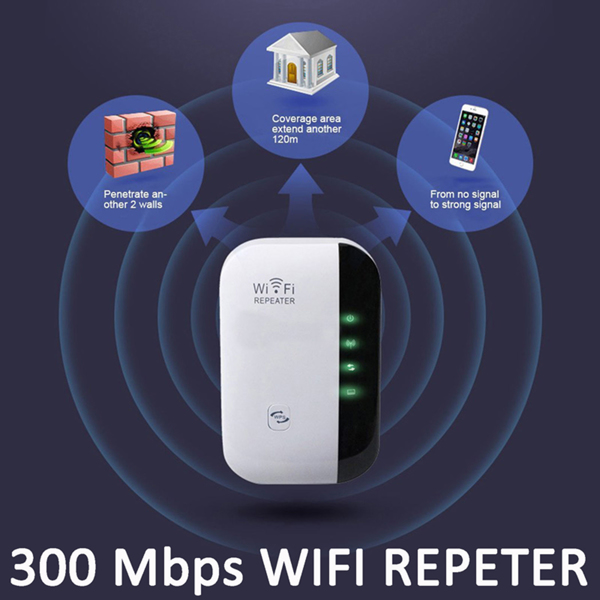

Photos from current listings. Actual item, color, and included accessories may vary.
WiFi Repeater Buying Guide
A WiFi repeater (range extender) rebroadcasts an existing signal to fill dead zones, and its performance hinges on backhaul technology: single-radio 2.4 GHz units halve throughput, while dual-band or dedicated-backhaul models preserve speed. Choose a dual-band unit with at least AC1200 or AX1800 ratings and external antennas for real walls; skip 300M single-band models unless you only need basic IoT coverage.
Key takeaways
- Single-band 300M repeaters operate only on 2.4 GHz, cap at 300 Mbps PHY and typically deliver under 100 Mbps real throughput after halving.
- Dual-band AC1200 units run simultaneous 2.4 GHz (300 Mbps) and 5 GHz (867 Mbps) radios, but most repeat on the same radio, cutting peak speed by roughly 50%.
- Tri-band or dedicated-backhaul models use a separate 5 GHz radio for the router link, preserving full client throughput on the front-haul bands.
At a glance
- Category
- Network Switches, Routers & Firewalls
- Last updated
- Nov 28, 2026
Current offers
Highlights
- Single-band 300M repeaters operate only on 2.4 GHz, cap at 300 Mbps PHY and typically deliver under 100 Mbps real throughput after halving.
- Dual-band AC1200 units run simultaneous 2.4 GHz (300 Mbps) and 5 GHz (867 Mbps) radios, but most repeat on the same radio, cutting peak speed by roughly 50%.
- Tri-band or dedicated-backhaul models use a separate 5 GHz radio for the router link, preserving full client throughput on the front-haul bands.
- External dipole antennas (2-4) with 3-5 dBi gain outperform internal plastic-housed antennas; plastic casing is universal and not a durability differentiator.
Best use cases
- Pick a dual-band AC1200 or AX1800 repeater with external antennas for a single-room dead zone across one interior wall; skip 300M units if you stream HD or game.
- Choose a tri-band or mesh-capable extender with Ethernet backhaul for multi-room coverage or thick masonry walls; a single-radio repeater will drop too much speed.
- Use a compact plug-in 300M repeater only for low-bandwidth IoT devices, smart plugs, or a garage sensor; skip it for phones, laptops, or TVs.
- For a wired device in a far room, select a repeater with a Gigabit Ethernet port; a 10/100 port caps wired clients at 100 Mbps regardless of WiFi rating.
Buying tips
- Match the WiFi generation: an AC1200 extender cannot exceed 867 Mbps on 5 GHz even if your router is AX3000; pair AX routers with AX1800+ extenders for full benefit.
- Count walls: each interior drywall wall costs roughly 3-5 dB, and 5 GHz loses more than 2.4 GHz; place the repeater where the router signal is still at least 2 bars (about -67 dBm).
- Prefer a model with a Gigabit Ethernet port if you will connect a TV, console, or PC; 10/100 ports are the bottleneck on any AC1200-class unit.
- For full throughput in both directions, choose tri-band or dedicated-backhaul; single-radio repeaters halve bandwidth, so a 100 Mbps internet plan can drop to 50 Mbps at the extender.
Specs
| WiFi Standard | 802.11n 300M / AC1200 / AX1800 |
|---|---|
| Band Architecture | Single-band 2.4G / Dual-band / Tri-band |
| Ethernet Port | 10/100 Mbps vs Gigabit |
| Antenna Type | Internal vs 2-4 external dipole |
Related searches
What to check before buying
- Measure the distance from router to dead zone and confirm the repeater can sit roughly midway with at least 2 bars of router signal (about -67 dBm or better).
- Verify your router's band and security standard: WPA2/WPA3 and 802.11ac/ax compatibility; older WEP-only routers will not pair with modern extenders.
- Check the plug type and outlet placement: most plug-in repeaters block the second wall outlet and need open space, not a metal cabinet or floor-level socket.
- Confirm you have a spare Ethernet cable run or coax outlet if choosing a wired-backhaul model; wireless-only units need no cabling but lose speed.
FAQ
Data sources: eBay / Amazon listings and product attribute feeds. Updated Nov 28, 2026.
Some links on this page are affiliate links. If you buy after clicking one, we may earn a commission at no extra cost to you. This does not change which products appear here or their order. Affiliate disclosure.