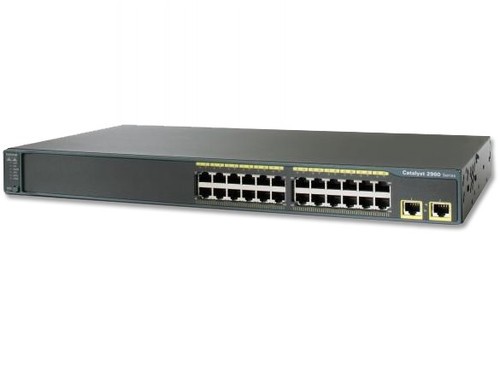

Photos from current listings. Actual item, color, and included accessories may vary.
Cisco Catalyst Switch Buying Guide
Cisco Catalyst switches are enterprise-grade access and aggregation platforms defined by their IOS/IOS-XE software stack, PoE budgets, and uplink architecture. The key trade-off is between older Fast Ethernet models with limited lifespan and modern Gigabit/multigigabit units that support current PoE standards and cloud management. Buy a Catalyst only if you need Cisco CLI familiarity, stacking, or advanced Layer 3 features; otherwise a ProCurve or UniFi switch delivers similar port counts for less.
Key takeaways
- Catalyst 2960-series uses Fast Ethernet (100 Mbps) access ports with 2x Gigabit uplinks; 2960-X adds PoE+ and stacking.
- Catalyst 9200/9300 series provide Gigabit or multigigabit access, PoE+ (30W) or UPOE (60W), and StackWise-160/480 backplane.
- Older 2960 models run IOS 12.2/15.0 and lack 802.3at PoE+; 2960-X and 9200 support 802.3at/bt for modern APs and cameras.
At a glance
- Category
- Network Switches, Routers & Firewalls
- Last updated
- Nov 28, 2026
Current offers
Highlights
- Catalyst 2960-series uses Fast Ethernet (100 Mbps) access ports with 2x Gigabit uplinks; 2960-X adds PoE+ and stacking.
- Catalyst 9200/9300 series provide Gigabit or multigigabit access, PoE+ (30W) or UPOE (60W), and StackWise-160/480 backplane.
- Older 2960 models run IOS 12.2/15.0 and lack 802.3at PoE+; 2960-X and 9200 support 802.3at/bt for modern APs and cameras.
- Fixed-configuration Catalyst switches have limited SFP uplink options; fiber aggregation requires 9300/9500 models with 10G/25G uplinks.
Best use cases
- Best fit: home lab or small office needing managed VLANs, port security, and CLI practice — pick a 2960-24TT-L or 2960X-24TS-L for Gigabit uplinks.
- Best fit: SMB with PoE IP phones and access points — choose 2960X-24PS-L or 9200L-24P-4G with PoE+ budget calculated per port.
- Wrong fit: whole-home 2.5G/10G backbone — skip Catalyst 2960 Fast Ethernet and move to 9300 or a multigigabit non-Cisco switch.
- Wrong fit: plug-and-play consumer setup with no CLI experience — skip Catalyst entirely; use a web-managed or cloud-managed switch.
Buying tips
- Match port speed to your heaviest device: 2960 Fast Ethernet caps at 100 Mbps; 2960X/9200 Gigabit ports handle NAS and AP traffic without bottleneck.
- Calculate PoE budget: sum device draw (AP ~15W, camera ~12W, phone ~7W) and ensure switch PoE budget exceeds total; 2960X-24PS-L offers 370W, 9200L-24P-4G offers 370W.
- Check uplink type: SFP (1G) vs SFP+ (10G); 2960X uses SFP, 9300 uses SFP+ — fiber backbone needs 10G uplinks.
- Verify IOS license: LAN Base vs IP Base vs IP Services — LAN Base lacks static routing and advanced QoS; IP Base adds routing, IP Services adds full Layer 3.
Specs
| Port Speed | Fast Ethernet (100M) vs Gigabit |
|---|---|
| PoE Standard | None / 802.3af / 802.3at / UPOE |
| Uplink Type | SFP (1G) vs SFP+ (10G) |
| Stacking | StackWise-80 / 160 / 480 |
Related searches
What to check before buying
- Rack depth and ears: Catalyst 2960 is 1U and ~12 inches deep; confirm rack or shelf clearance before mounting.
- Power: all Catalyst switches are 100-240V AC with IEC C14 inlet; ensure nearby outlet and proper grounding.
- Cooling: 2960/9200 use side-to-side airflow; leave 1U gap above and below in enclosed cabinets.
- Management access: confirm you have console cable (RJ-45 or mini-USB) and terminal software for initial IOS configuration.
FAQ
Data sources: eBay / Amazon listings and product attribute feeds. Updated Nov 28, 2026.
Some links on this page are affiliate links. If you buy after clicking one, we may earn a commission at no extra cost to you. This does not change which products appear here or their order. Affiliate disclosure.