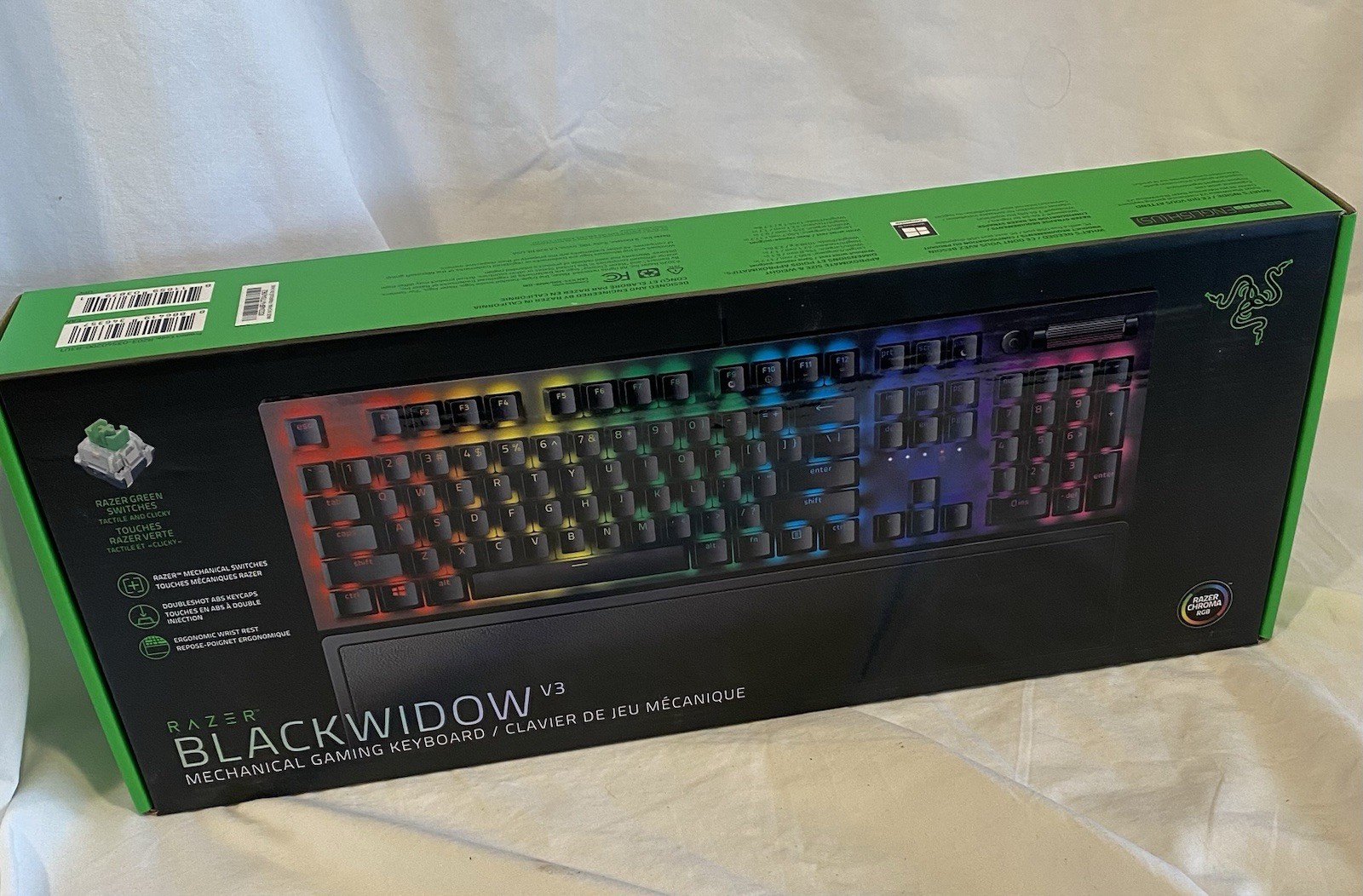

Photos from current listings. Actual item, color, and included accessories may vary.
Razer Blackwidow V3 Mechanical Keyboard Buying Guide
The Razer BlackWidow V3 is a full-size wired mechanical keyboard built around Razer's own Green (clicky) or Yellow (linear) switches, with a 2-year warranty and no wireless option. The core trade-off is switch feel and acoustic preference versus durability and connectivity: Green switches deliver tactile click but are loud enough to disrupt shared rooms, while Yellow linear switches suit speed and low-noise environments. Buy the V3 if you want a proven full-size wired board with dedicated media keys and a wrist rest; skip it if you require hot-swappable switches, wireless, or a quieter office keyboard.
Key takeaways
- Razer Green switches are clicky and tactile with a 1.9 mm actuation point and 50 g actuation force; Yellow switches are linear with the same 1.9 mm/45 g spec for faster, quieter presses.
- Full-size 104-key layout adds a dedicated volume roller and four media keys, plus a magnetic plush wrist rest—features absent from the tenkeyless V3 TKL variant.
- Doubleshot ABS keycaps resist wear better than thin painted caps but are not PBT; expect a slight shine on high-use keys over years of typing.
At a glance
- Category
- Mechanical Keyboards
- Status
- Listings available
- Last updated
- Nov 24, 2026
Current offers
Highlights
- Razer Green switches are clicky and tactile with a 1.9 mm actuation point and 50 g actuation force; Yellow switches are linear with the same 1.9 mm/45 g spec for faster, quieter presses.
- Full-size 104-key layout adds a dedicated volume roller and four media keys, plus a magnetic plush wrist rest—features absent from the tenkeyless V3 TKL variant.
- Doubleshot ABS keycaps resist wear better than thin painted caps but are not PBT; expect a slight shine on high-use keys over years of typing.
- The board is USB-A wired only with a braided cable and no wireless or Bluetooth radio—no battery, no latency, no charging.
Best use cases
- Pick the Green switch if you type or game alone in a private room and want audible, tactile confirmation; skip it if you share a bedroom, open office, or stream with a sensitive mic.
- Choose the Yellow switch for competitive gaming or late-night typing where linear, near-silent keystrokes matter; skip it if you rely on tactile bump feedback to avoid bottoming out.
- Buy the full-size V3 if you use a numpad for spreadsheets or MMO keybinds and want dedicated media controls; if desk space is tight or you use a low-DPI mouse arc, step down to the TKL version.
Buying tips
- Measure your desk depth first: the full-size V3 is roughly 17.5 inches wide, so pair it with a mousepad that leaves at least 8 inches of lateral mouse swing.
- Match switch to environment, not marketing: Green for solo tactile click, Yellow for shared spaces and rapid-fire gaming—there is no silent variant in the V3 line.
- Confirm USB-A availability on your PC or hub; the keyboard does not include a USB-C adapter, so USB-C-only laptops need a separate A-to-C adapter.
- Expect ABS keycaps to develop shine on WASD and spacebar within a year of heavy use; budget for aftermarket PBT caps only if the board's non-standard bottom row is compatible.
Specs
| Switch Type | Razer Green clicky / Yellow linear |
|---|---|
| Layout | Full-size 104-key with numpad |
| Connection | Wired USB-A only |
| Keycap Material | Doubleshot ABS |
Alternatives to compare
Related searches
What to check before buying
- Desk width: confirm at least 18 inches of clear keyboard space to fit the full-size chassis and wrist rest without crowding your mouse.
- Port check: verify a free USB-A port on your PC, dock, or console—USB-C-only machines require an A-to-C adapter.
- Acoustic environment: decide whether clicky Green switches are acceptable in your room or shared space before ordering; Yellow is the quieter option.
- Wrist rest clearance: the magnetic plush rest adds about 3 inches of depth, so ensure your desk edge and chair height allow neutral wrist posture.
FAQ
Data sources: eBay / Amazon listings and product attribute feeds. Updated Nov 24, 2026.
Some links on this page are affiliate links. If you buy after clicking one, we may earn a commission at no extra cost to you. This does not change which products appear here or their order. Affiliate disclosure.