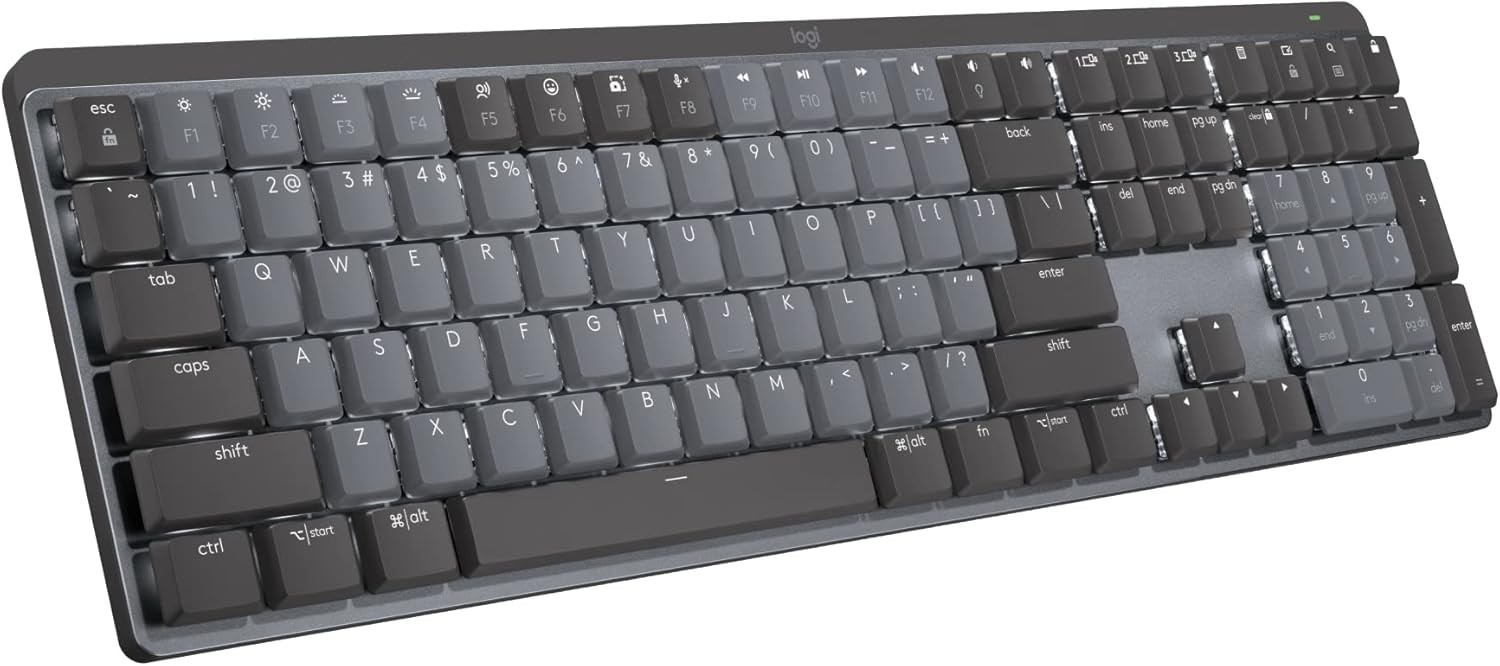

Photos from current listings. Actual item, color, and included accessories may vary.
Logitech MX Mechanical Buying Guide
The Logitech MX Mechanical is a low-profile wireless mechanical keyboard built for multi-device productivity, distinguished from gaming boards by its quiet tactile switches, aluminum top plate, and Logi Bolt/Bluetooth dual connectivity. The core trade-off is low-profile key travel and quiet tactility versus the deep keyfeel and hot-swappable customization of standard-height mechanical keyboards. Buy the full-size MX Mechanical for spreadsheet and numpad workflows, the Mini for travel and minimal desk footprint—and skip both if you demand hot-swap switches or deep 4mm travel.
Key takeaways
- Low-profile mechanical switches (Tactile Quiet, Linear, or Clicky) with roughly 3.2mm total travel versus 4mm on standard boards—faster actuation but shallower feel.
- Aluminum top plate and dual-mode connectivity: Logi Bolt USB receiver plus Bluetooth, pairing up to three devices with a hardware switch.
- Full-size adds a numpad and dedicated media keys; the Mini (75% layout) removes the numpad and compresses arrows—same switch architecture, different footprint.
At a glance
- Category
- Mechanical Keyboards
- Status
- Listings available
- Last updated
- Nov 24, 2026
Current offers
Highlights
- Low-profile mechanical switches (Tactile Quiet, Linear, or Clicky) with roughly 3.2mm total travel versus 4mm on standard boards—faster actuation but shallower feel.
- Aluminum top plate and dual-mode connectivity: Logi Bolt USB receiver plus Bluetooth, pairing up to three devices with a hardware switch.
- Full-size adds a numpad and dedicated media keys; the Mini (75% layout) removes the numpad and compresses arrows—same switch architecture, different footprint.
- Smart backlighting auto-adjusts to ambient light and activates on hand proximity, rated for up to 15 days with backlight or 10 months with it off.
Best use cases
- Best fit: multi-device office and home-office users switching between Windows, macOS, and iPad via Easy-Switch—pick the full-size if you enter numbers daily, the Mini if desk space is tight.
- Best fit: quiet shared workspaces and open offices—choose the Tactile Quiet switch variant; avoid the Clicky version if coworkers sit within earshot.
- Wrong fit: competitive gamers needing sub-1ms wired polling and hot-swappable switches—choose a standard-height wired gaming board instead.
- Wrong fit: users who want to mod switches or keycaps—the low-profile switch footprint and proprietary keycap mount limit third-party customization.
Buying tips
- Choose full-size (with numpad) if your work involves spreadsheets, accounting, or data entry; choose Mini if your mouse hand needs closer proximity to reduce shoulder reach.
- Match the switch to your environment: Tactile Quiet for shared offices, Linear for fast typing with minimal bump, Clicky only for private rooms.
- Confirm your OS mix: the board ships with both Windows and macOS keycap legends and supports Logi Options+ for per-app customization on both platforms.
- For corporate fleets, standardize on the Logi Bolt receiver version—Bluetooth-only setups complicate IT provisioning and can conflict with crowded 2.4GHz office environments.
Specs
| Layout | Full-size (numpad) / 75% Mini |
|---|---|
| Switch Type | Low-profile mechanical: Tactile Quiet/Linear/Clicky |
| Connectivity | Logi Bolt USB + Bluetooth (3 devices) |
| Battery | USB-C; up to 15 days backlit / 10 months off |
Alternatives to compare
Related searches
What to check before buying
- Measure your desk depth: the full-size is roughly 17 inches wide; the Mini is about 12 inches—ensure room for a mouse alongside.
- Verify Bluetooth version (5.0+) or an available USB-A port for the Logi Bolt receiver on your computer.
- Check that your OS is supported by Logi Options+ (Windows 10+, macOS 10.15+, or recent iPadOS) for backlight and key customization.
- If you use a Mac with Thunderbolt-only ports, plan for a USB-C to USB-A adapter to use the Bolt receiver.
FAQ
Data sources: eBay / Amazon listings and product attribute feeds. Updated Nov 24, 2026.
Some links on this page are affiliate links. If you buy after clicking one, we may earn a commission at no extra cost to you. This does not change which products appear here or their order. Affiliate disclosure.