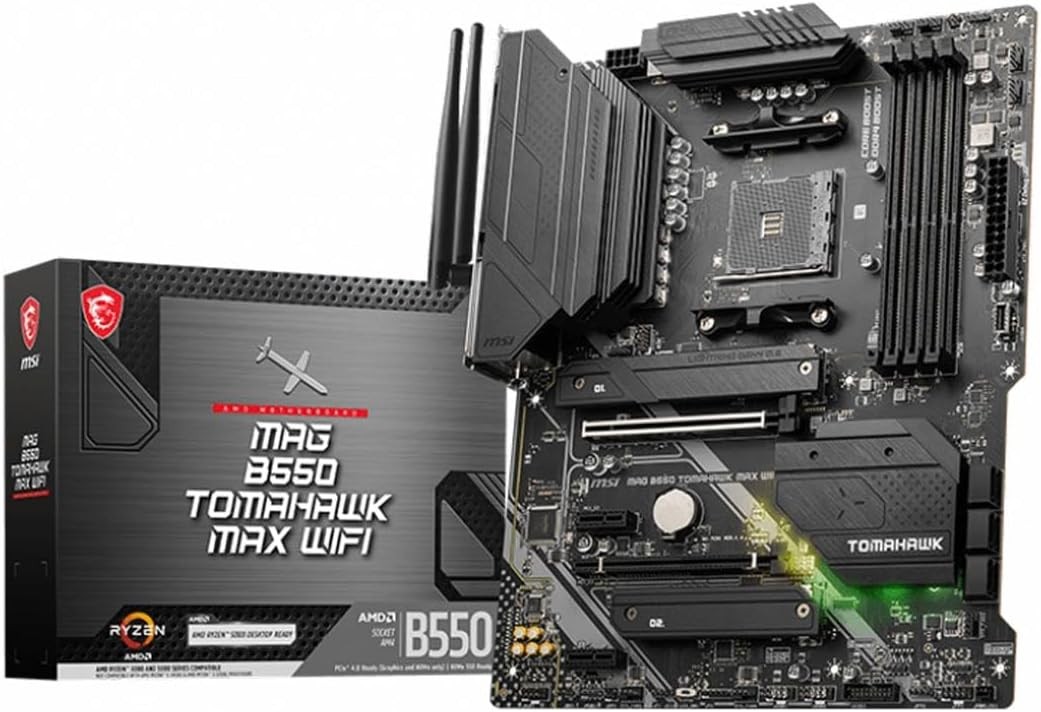

Photos from current listings. Actual item, color, and included accessories may vary.
Msi B550 Buying Guide
The MSI B550 line is AMD's mid-range AM4 chipset family, offering PCIe 4.0 for the primary GPU and NVMe slot, while B550A boards are rebranded PCIe 3.0 designs. The key trade-off is chipset variant and VRM quality: true B550 boards deliver Gen4 storage and stronger power delivery, whereas B550A or entry models cap you at Gen3 and lower current headroom. Choose a true B550 board with a documented VRM heatsink and BIOS Flashback for a durable AM4 build; skip any B550A or unheatsinked entry tier if you plan to run 105W+ CPUs or Gen4 NVMe.
Key takeaways
- B550 chipset provides PCIe 4.0 lanes from the CPU for one x16 GPU slot and one M.2 slot; B550A boards are PCIe 3.0 only rebrands.
- MSI MAG B550 Tomahawk uses a 10+2+1 Duet Rail VRM with 60A power stages and two MOSFET heatsinks for 105W+ AM4 CPUs.
- MAG B550 Tomahawk MAX WiFi adds Wi-Fi 6 (802.11ax) and Bluetooth 5.2 over the non-MAX version's Wi-Fi 5 or no wireless.
At a glance
- Category
- CPUs, Motherboards & Memory
- Last updated
- Nov 23, 2026
Current offers
Highlights
- B550 chipset provides PCIe 4.0 lanes from the CPU for one x16 GPU slot and one M.2 slot; B550A boards are PCIe 3.0 only rebrands.
- MSI MAG B550 Tomahawk uses a 10+2+1 Duet Rail VRM with 60A power stages and two MOSFET heatsinks for 105W+ AM4 CPUs.
- MAG B550 Tomahawk MAX WiFi adds Wi-Fi 6 (802.11ax) and Bluetooth 5.2 over the non-MAX version's Wi-Fi 5 or no wireless.
- Entry MSI B550 boards (e.g., B550M Pro) often omit BIOS Flashback and use smaller VRM heatsinks, limiting upgrade headroom.
Best use cases
- Pick the MAG B550 Tomahawk MAX WiFi for a Ryzen 7 5800X3D or Ryzen 9 5900X build needing strong VRM, Gen4 NVMe, and built-in Wi-Fi 6.
- Choose a micro-ATX MSI B550M board only for compact builds with 65W CPUs like Ryzen 5 5600; skip it for 105W+ chips or heavy overclocking.
- Skip any B550A variant if you require PCIe 4.0 SSD speeds; pick true B550 for Gen4 storage or stay on B450 to save budget without losing Gen4 GPU support.
- Avoid B550 boards without BIOS Flashback if you buy a newer Ryzen 5000 CPU and lack a compatible older AM4 chip for BIOS updating.
Buying tips
- Match VRM to CPU TDP: 105W Ryzen 7/9 chips need a board with at least 8+2 power stages and heatsinks on both VRM banks, like the Tomahawk.
- Confirm true B550 vs B550A by checking the chipset name in the specifications; B550A is PCIe 3.0 only and often lacks Gen4 M.2.
- For Wi-Fi 6 and Bluetooth 5.2, choose a MAX WiFi model; non-MAX MSI B550 boards typically ship Wi-Fi 5 or require a separate M.2 Wi-Fi card.
- ATX B550 boards fit standard ATX and E-ATX cases with 9 standoffs; micro-ATX B550M boards use 8 standoffs and fit smaller cases but sacrifice PCIe slots.
Specs
| Chipset | AMD B550 vs B550A (PCIe 3.0) |
|---|---|
| CPU Socket | AM4 (Ryzen 3000/5000) |
| PCIe Gen | 4.0 x16 GPU + 4.0 x4 M.2 |
| Form Factor | ATX / Micro-ATX |
Related searches
What to check before buying
- Measure your case for ATX (305×244mm) vs micro-ATX (244×244mm) clearance and confirm standoff positions match the board form factor.
- Verify your CPU is on the board's QVL or supported list; Ryzen 5000 may require a BIOS update, so prefer a board with BIOS Flashback.
- Check PSU connectors: MSI B550 boards need one 24-pin ATX and one 8-pin EPS (Tomahawk has 8+4-pin), so confirm your PSU has the right cables.
- Confirm RAM slots: most MSI B550 boards have 4 DIMM slots supporting up to 128GB DDR4; two-DIMM boards cap at 64GB and limit dual-channel upgrades.
FAQ
Data sources: eBay / Amazon listings and product attribute feeds. Updated Nov 23, 2026.
Some links on this page are affiliate links. If you buy after clicking one, we may earn a commission at no extra cost to you. This does not change which products appear here or their order. Affiliate disclosure.