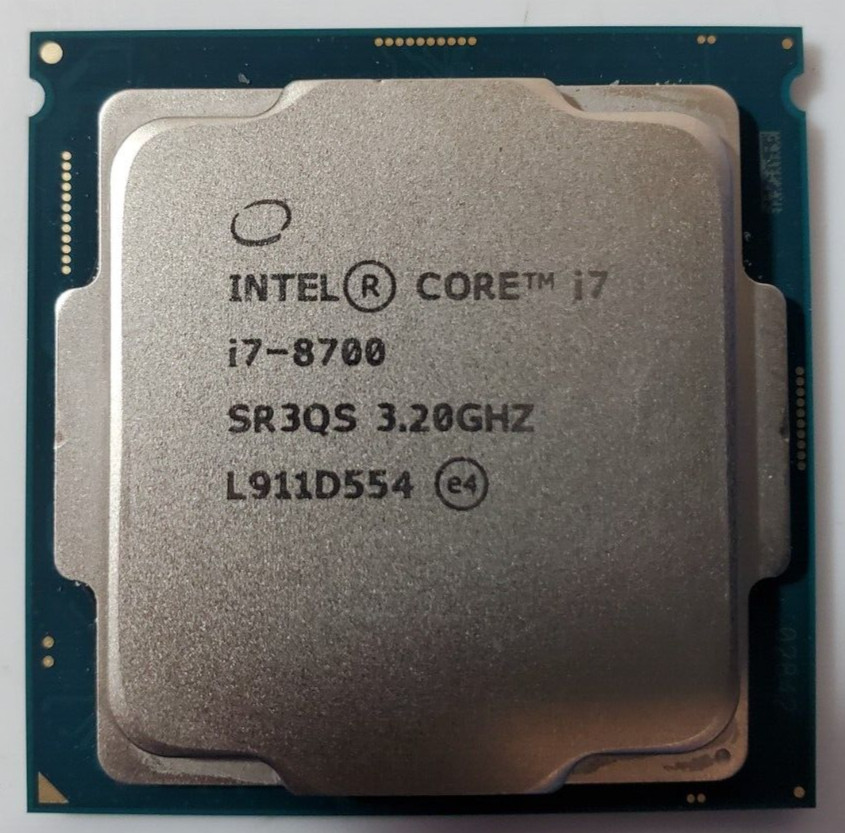

Photos from current listings. Actual item, color, and included accessories may vary.
Lga 1151 CPU Buying Guide
LGA 1151 CPUs are Intel desktop processors spanning two electrically incompatible generations: 6th/7th Gen (Skylake/Kaby Lake) and 8th/9th Gen (Coffee Lake/Coffee Lake Refresh). The critical trade-off is that while both use the same physical socket, only 300-series chipsets support 8th/9th Gen, while 100/200-series boards support 6th/7th Gen—so pairing the right CPU with the right motherboard generation is the make-or-break decision. Buy a CPU only after confirming your chipset generation; otherwise you waste money on a chip that physically fits but won't POST.
Key takeaways
- LGA 1151 v1 (100/200-series chipsets) supports 6th/7th Gen Core up to 4 cores; LGA 1151 v2 (300-series) supports 8th/9th Gen up to 8 cores—pin layout is identical but electrical signaling differs.
- 8th/9th Gen Core i7 (e.g., i7-8700) delivers 6 cores/12 threads at 65W TDP, a major multi-thread jump over 7th Gen's 4-core ceiling, but requires a 300-series board (Z370/B360/H370/Z390).
- K-series CPUs (unlocked multiplier) need a Z-series chipset for overclocking; B/H-series boards lock CPU ratio, so paying for a K chip on a B360 is wasted capability.
At a glance
- Category
- CPUs, Motherboards & Memory
- Last updated
- Nov 23, 2026
Current offers
Highlights
- LGA 1151 v1 (100/200-series chipsets) supports 6th/7th Gen Core up to 4 cores; LGA 1151 v2 (300-series) supports 8th/9th Gen up to 8 cores—pin layout is identical but electrical signaling differs.
- 8th/9th Gen Core i7 (e.g., i7-8700) delivers 6 cores/12 threads at 65W TDP, a major multi-thread jump over 7th Gen's 4-core ceiling, but requires a 300-series board (Z370/B360/H370/Z390).
- K-series CPUs (unlocked multiplier) need a Z-series chipset for overclocking; B/H-series boards lock CPU ratio, so paying for a K chip on a B360 is wasted capability.
- DDR4 memory support is universal across LGA 1151, but 100/200-series boards cap at DDR4-2400/2666 officially while 300-series Z boards allow higher XMP speeds—memory kit choice should match board tier.
Best use cases
- Best fit: upgrading an existing 300-series (B360/H370/Z390) desktop—pick an 8th/9th Gen i5/i7 for a 6-core drop-in that transforms multi-tasking and gaming 1% lows without a platform rebuild.
- Best fit: budget 1080p gaming build—an i5-8400/9400F paired with a B360/B365 board delivers 6 cores at low cost; skip K-series chips and Z boards unless overclocking is the goal.
- Wrong fit: buying an i7-8700 for a 100/200-series (Z170/B250) board—it will not POST despite fitting the socket; for those boards, cap your upgrade at 7th Gen (i7-7700K).
- Wrong fit: expecting PCIe 4.0 or native USB 3.2 Gen 2—LGA 1151 is PCIe 3.0 only; if you need modern I/O, move to LGA 1200/1700 instead of over-investing here.
Buying tips
- Match CPU generation to chipset first: 6th/7th Gen → 100/200-series; 8th/9th Gen → 300-series. The socket fits both, but only the correct chipset boots.
- For gaming value, target 8th/9th Gen i5 (6 cores/6 threads) or i7 (6/12); avoid 6th/7th Gen i3/i5 dual/quad-core chips unless the board is already 100/200-series.
- Buy 'F' suffix chips (e.g., i5-9400F, i7-8700 not applicable) only if you have a discrete GPU—F chips lack integrated graphics and are cheaper for the same compute.
- Verify the CPU is not an engineering sample (ES/QS) unless priced accordingly—retail or OEM tray chips carry proper microcode support and warranty; ES chips can have stability and BIOS compatibility issues.
Specs
| Socket | LGA 1151 (v1 & v2, not cross-compatible) |
|---|---|
| Generation Split | 6th/7th Gen (100/200) vs 8th/9th Gen (300) |
| Core Ceiling | 4 cores (v1) / 8 cores (v2) |
| Memory Support | DDR4 dual-channel, up to 128GB |
Related searches
What to check before buying
- Confirm your motherboard chipset model (H110/B250/Z170 vs B360/Z370/Z390) before buying—this alone determines which CPU generations will boot.
- Check BIOS version support: 8th Gen on Z370 may need a BIOS update for 9th Gen, and some B365 boards ship 9th Gen-ready; verify the board's CPU support list.
- Measure CPU cooler clearance and socket mounting: LGA 1151 uses the same 75mm mounting pattern as 1150/1200, so most coolers carry over, but check TDP (65W vs 95W) against your cooler rating.
- Confirm DDR4 memory is already installed or budgeted—LGA 1151 does not support DDR3, and 100/200-series boards may not hit high XMP speeds without a Z chipset.
FAQ
Data sources: eBay / Amazon listings and product attribute feeds. Updated Nov 23, 2026.
Some links on this page are affiliate links. If you buy after clicking one, we may earn a commission at no extra cost to you. This does not change which products appear here or their order. Affiliate disclosure.