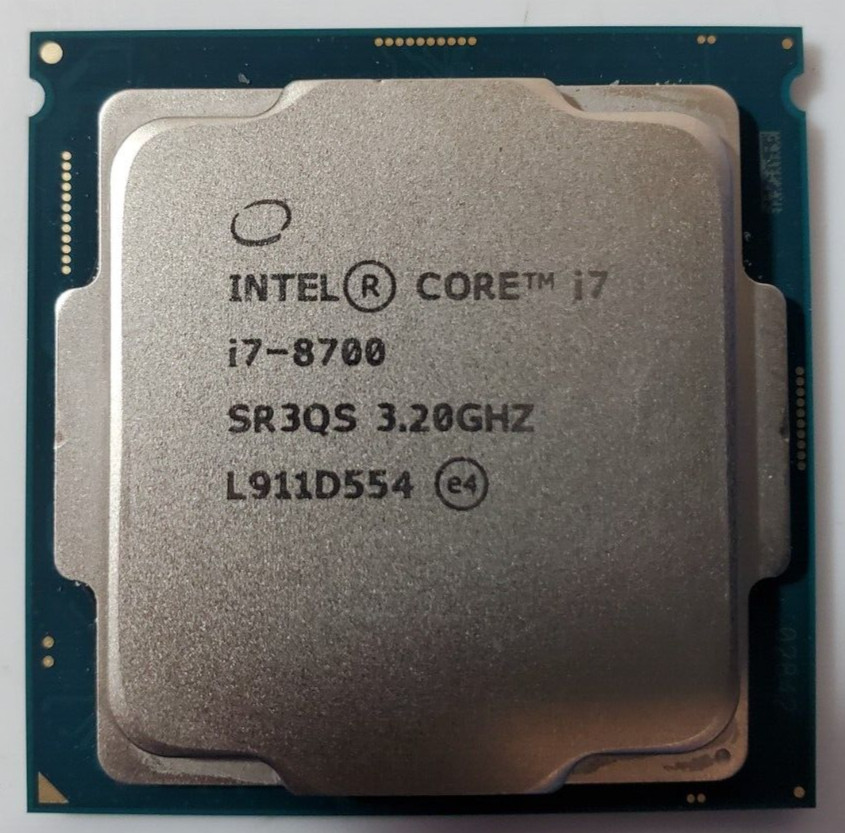

Photos from current listings. Actual item, color, and included accessories may vary.
Intel Processor Buying Guide
Intel desktop processors span multiple socket generations and performance tiers, where core/thread count, clock speed, and platform compatibility dictate real-world speed more than marketing names. The key trade-off is buying into a current LGA1700/1851 platform for longevity versus a used LGA1151/1200 chip for budget builds. Always match the CPU to the motherboard chipset and cooling capacity before chasing clock speeds.
Key takeaways
- LGA socket generations are not cross-compatible: 8th/9th Gen use LGA1151 (300-series), 10th/11th Gen use LGA1200 (400/500-series), 12th-14th Gen use LGA1700 (600/700-series), and Core Ultra 200S uses LGA1851 (800-series).
- Core i7-8700 (6C/12T, 3.2 GHz base, 4.6 GHz turbo, 65W TDP) remains a viable budget gaming chip but lacks PCIe 4.0 and requires a 300-series board with BIOS support.
- K-series CPUs have unlocked multipliers but require Z-series chipsets for overclocking; non-K chips lock memory speed on B/H boards (e.g., 12th Gen non-K caps DDR4 at 3200 or DDR5 at 4800).
At a glance
- Category
- CPUs, Motherboards & Memory
- Last updated
- Nov 23, 2026
Current offers
Highlights
- LGA socket generations are not cross-compatible: 8th/9th Gen use LGA1151 (300-series), 10th/11th Gen use LGA1200 (400/500-series), 12th-14th Gen use LGA1700 (600/700-series), and Core Ultra 200S uses LGA1851 (800-series).
- Core i7-8700 (6C/12T, 3.2 GHz base, 4.6 GHz turbo, 65W TDP) remains a viable budget gaming chip but lacks PCIe 4.0 and requires a 300-series board with BIOS support.
- K-series CPUs have unlocked multipliers but require Z-series chipsets for overclocking; non-K chips lock memory speed on B/H boards (e.g., 12th Gen non-K caps DDR4 at 3200 or DDR5 at 4800).
- Integrated graphics (UHD 630 on 8th/9th Gen, UHD 770 on 12th-14th Gen) allow display output without a GPU but are insufficient for modern gaming at 1080p.
Best use cases
- Best fit: 1080p gaming on a budget — pair a used i7-8700 with a B360/B365 board and DDR4-2666; skip if you need PCIe 4.0 NVMe or upgrade headroom.
- Best fit: new mid-range gaming build — choose i5-12400F or i5-13400F on B660/B760 with DDR4-3200; skip K-series unless you buy a Z790 board and aftermarket cooler.
- Best fit: high-refresh 1440p gaming — i7-13700K or i9-14900K on Z790 with DDR5-6000 and a 240mm+ AIO; skip if case airflow or PSU (850W+) is inadequate.
- Wrong fit: mini-ITX or low-profile builds with 125W+ K-series chips unless using a low-profile cooler rated for the TDP; choose non-K 65W variants instead.
Buying tips
- Match CPU generation to motherboard socket before buying: LGA1151 (8th/9th Gen), LGA1200 (10th/11th Gen), LGA1700 (12th-14th Gen), LGA1851 (Core Ultra 200S). No adapter exists between these.
- For used chips like i7-8700, verify the board has a BIOS version supporting 9th Gen if applicable, and budget for a 120mm tower cooler — the stock cooler is inadequate under sustained loads.
- Prioritize core/thread count for multitasking: 6C/12T is the floor for modern gaming; 8C/16T or higher for streaming and productivity. Clock speed matters most for single-threaded esports titles.
- Check memory support: 12th Gen and newer support DDR4 or DDR5 depending on board; 10th/11th Gen is DDR4-only. Buy RAM in matched kits to avoid stability issues.
Specs
| Socket | LGA1151 / 1200 / 1700 / 1851 |
|---|---|
| Core/Thread Tier | 4C/8T to 24C/32T |
| TDP Range | 35W to 253W (K-series) |
| Memory Support | DDR4-2666 to DDR5-5600+ |
Related searches
What to check before buying
- Confirm motherboard socket and chipset support the exact CPU generation — LGA1700 boards may need BIOS update for 13th/14th Gen out of the box.
- Measure case clearance for CPU cooler height (often 150-170mm for tower coolers) and verify PSU wattage: 65W CPUs need 450W+, 125W+ K-series need 750W+.
- Check RAM slot type and speed support on the motherboard QVL — DDR5-6000 is a sweet spot for 12th-14th Gen, DDR4-3200 for 10th-12th Gen.
- Verify integrated graphics presence if no GPU: F-series Intel chips lack iGPU and require a discrete graphics card for display output.
FAQ
Data sources: eBay / Amazon listings and product attribute feeds. Updated Nov 23, 2026.
Some links on this page are affiliate links. If you buy after clicking one, we may earn a commission at no extra cost to you. This does not change which products appear here or their order. Affiliate disclosure.