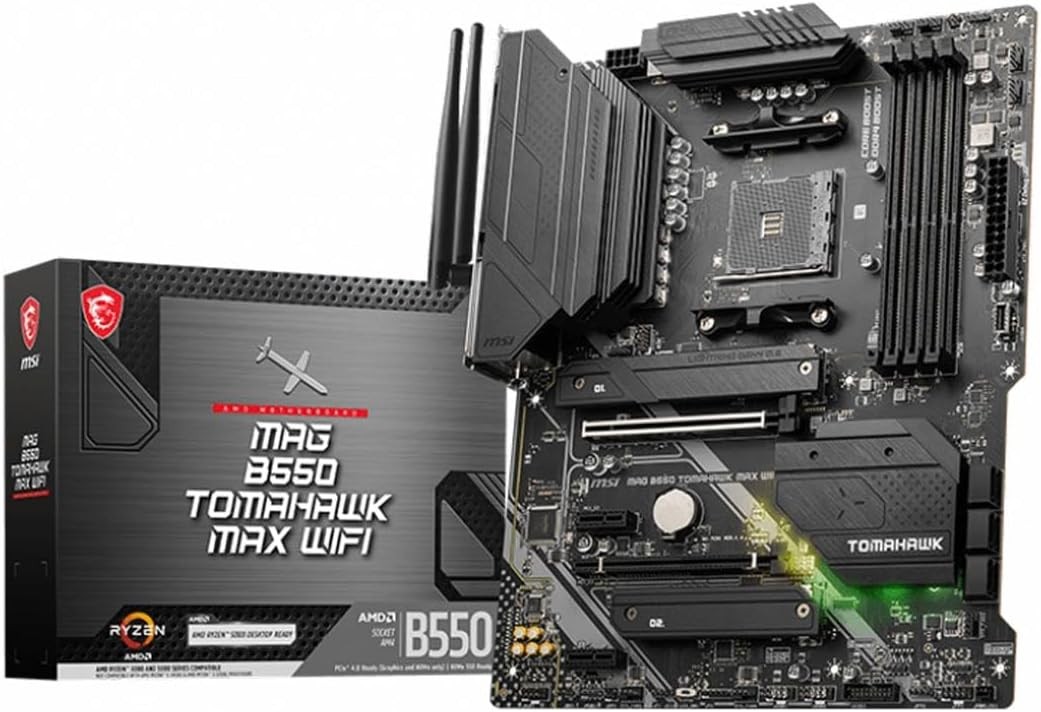

Photos from current listings. Actual item, color, and included accessories may vary.
Am4 Motherboard Buying Guide
AM4 motherboards are the AMD socket platform spanning 2017–2022 Ryzen generations, where chipset tier (A320/B450/B550/X470/X570) and VRM quality decide whether you get PCIe 4.0, CPU overclocking, and stable power for 105W+ chips. The core trade-off is B550's modern PCIe 4.0 GPU+NVMe support versus X570's higher lane count and active chipset cooling, while legacy A320/B450 boards save cost but cap you at PCIe 3.0 and weaker power delivery. Buy B550 as the default durable choice for Ryzen 5000, choose X570 only for dual-GPU or heavy NVMe workloads, and skip A320 entirely for anything above a 65W Ryzen 5.
Key takeaways
- Chipset tier sets PCIe: B550 gives PCIe 4.0 to one x16 GPU slot and one M.2; X570 gives PCIe 4.0 across more lanes but usually needs a chipset fan.
- VRM determines CPU ceiling: 8+2 or better DrMOS phases with heatsinks handle Ryzen 7/9 105W parts; entry 4+2 boards throttle above 65W TDP.
- B550/X570 officially support Ryzen 5000 out of the box; A320/B450 often need a BIOS flash via USB before a 5000-series chip will POST.
At a glance
- Category
- CPUs, Motherboards & Memory
- Last updated
- Nov 23, 2026
Current offers
Highlights
- Chipset tier sets PCIe: B550 gives PCIe 4.0 to one x16 GPU slot and one M.2; X570 gives PCIe 4.0 across more lanes but usually needs a chipset fan.
- VRM determines CPU ceiling: 8+2 or better DrMOS phases with heatsinks handle Ryzen 7/9 105W parts; entry 4+2 boards throttle above 65W TDP.
- B550/X570 officially support Ryzen 5000 out of the box; A320/B450 often need a BIOS flash via USB before a 5000-series chip will POST.
- ATX gives 4 DIMM slots and more M.2/SATA headers; Micro-ATX typically trims to 2–4 DIMMs and fewer fan headers, so verify slot count for your build.
Best use cases
- Best fit: Ryzen 5 5600/5600X or Ryzen 7 5700X gaming build — pick a B550 ATX board with heatsinked 8+2 VRM and PCIe 4.0 M.2; skip X570 unless you need extra PCIe lanes.
- Best fit: Ryzen 9 5900X/5950X workstation — choose X570 or premium B550 with 10+2 VRM phases and strong VRM heatsinks; skip budget A520/B450 boards that throttle under all-core loads.
- Best fit: compact Micro-ATX or budget media build — a B550M board keeps PCIe 4.0 in a smaller footprint; skip full ATX if your case is Micro-ATX and you do not need four DIMM slots.
- Wrong fit: buying A320 for a Ryzen 5000 chip — no guaranteed BIOS support and PCIe 3.0 only; buy B550 instead unless you already own a compatible older CPU to flash the BIOS.
Buying tips
- Match VRM to CPU TDP: 65W Ryzen 5 needs a 6+2 phase board minimum; 105W Ryzen 7/9 needs 8+2 or better with metal VRM heatsinks and 8-pin EPS power.
- Confirm DDR4 only — all AM4 boards use DDR4 DIMMs (not DDR5); buy a 2×8GB or 2×16GB kit at 3200–3600 MHz and populate slots A2/B2 for dual-channel.
- Check BIOS support generation: B550 and X570 support Ryzen 5000 natively; B450/A320 may require a BIOS update, so pair with a board that has USB BIOS Flashback if buying used.
- Size the board to the case: ATX is 305×244mm, Micro-ATX is 244×244mm, Mini-ITX is 170×170mm — buy the largest form factor your case accepts for more DIMM and M.2 slots.
Specs
| Chipset Tier | A320 / B450 / B550 / X470 / X570 |
|---|---|
| CPU Socket | AM4 (Ryzen 1000–5000) |
| Memory Type | DDR4 DIMM, 2 or 4 slots |
| PCIe Generation | PCIe 3.0 (A320/B450) vs 4.0 (B550/X570) |
Related searches
What to check before buying
- Measure your case's motherboard standoff pattern and maximum board size (ATX vs Micro-ATX vs Mini-ITX) before choosing form factor.
- Verify the CPU you plan to install is on the board's supported list or that the board has BIOS Flashback for updating without a CPU.
- Count required DIMM slots, M.2 sockets, and SATA ports against your storage and memory plan; B550 typically gives one PCIe 4.0 M.2 plus one PCIe 3.0 M.2.
- Confirm PSU connectors: most AM4 boards need a 24-pin ATX plus an 8-pin EPS12V (some high-end boards add a second 4-pin) and a clear GPU clearance path.
FAQ
Data sources: eBay / Amazon listings and product attribute feeds. Updated Nov 23, 2026.
Some links on this page are affiliate links. If you buy after clicking one, we may earn a commission at no extra cost to you. This does not change which products appear here or their order. Affiliate disclosure.