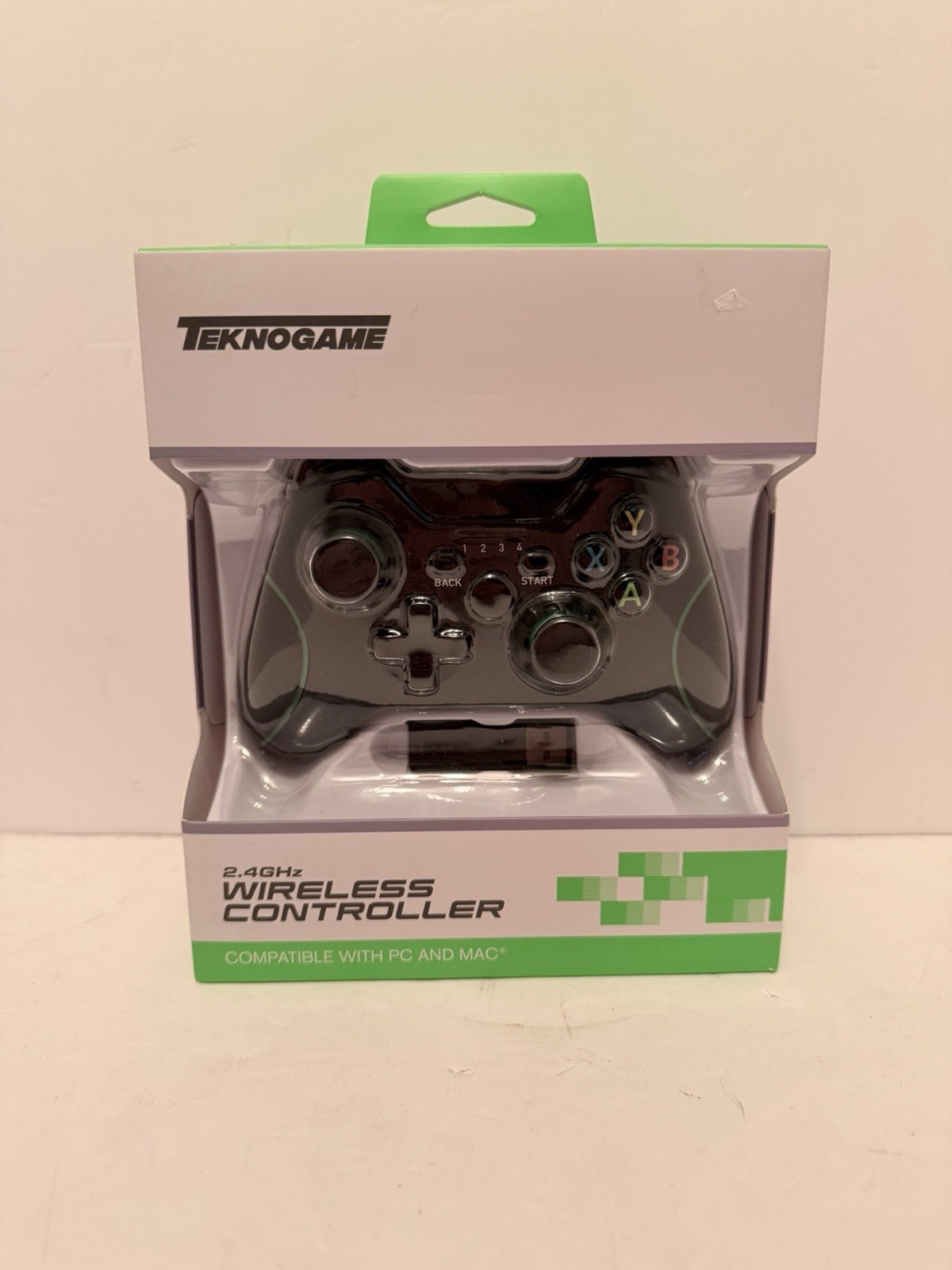

Photos from current listings. Actual item, color, and included accessories may vary.
Teknogame Xbox 360 Buying Guide
The Teknogame Xbox 360 controller is a third-party 2.4GHz wireless gamepad built for the Xbox 360 console and PC/Mac, offering a budget alternative to Microsoft's discontinued first-party pad. The core trade-off is wireless convenience versus latency, stick longevity, and official XInput certification that determines true plug-and-play behavior. Buy it only if you accept third-party build tolerances; skip it if you need tournament-grade stick precision or guaranteed console firmware compatibility.
Key takeaways
- 2.4GHz RF dongle-based wireless, not Bluetooth: requires the bundled USB receiver on PC/Mac and a free USB port on the 360.
- Third-party Xbox 360 pads emulate the official layout but often lack Microsoft XInput certification, so PC games may need x360ce wrappers.
- Plastic shell with membrane face buttons and potentiometer sticks: service life typically 300k-500k button presses versus 1M+ on first-party pads.
At a glance
- Category
- Controllers & Gaming Accessories
- Status
- Listings available
- Last updated
- Nov 28, 2026
Current offers
Highlights
- 2.4GHz RF dongle-based wireless, not Bluetooth: requires the bundled USB receiver on PC/Mac and a free USB port on the 360.
- Third-party Xbox 360 pads emulate the official layout but often lack Microsoft XInput certification, so PC games may need x360ce wrappers.
- Plastic shell with membrane face buttons and potentiometer sticks: service life typically 300k-500k button presses versus 1M+ on first-party pads.
- Dual AA battery power with no built-in rechargeable cell: plan for NiMH AA cells or disposables, since no USB-C charging is included.
Best use cases
- Best fit: retro Xbox 360 console owners replacing a worn first-party pad for casual single-player titles and 2-player couch sessions.
- Best fit: PC/Mac players running emulators or older XInput-era games who want a cheap wireless pad and will use x360ce if needed.
- Wrong fit: competitive shooter or fighting-game players needing low-latency wired input and precise stick dead zones—choose a wired first-party or Hall-effect stick pad.
- Skip if you need Xbox One/Series X|S compatibility: the 360 2.4GHz protocol does not handshake with newer consoles despite some listing claims.
Buying tips
- Confirm the bundle includes the 2.4GHz USB receiver—without it the pad cannot pair to PC or Mac and is unusable.
- Prefer pads explicitly labeled XInput-compatible for PC; XInput avoids manual button-mapping wrappers in most modern titles.
- Check stick type: potentiometer sticks drift over time; Hall-effect or metal-shaft sticks cost more but eliminate dead-zone creep.
- For 360 console use, verify the listing states Xbox 360 console compatibility—not just 'Xbox'—since 360 RF and Xbox One wireless are incompatible protocols.
Specs
| Connectivity | 2.4GHz wireless via USB dongle |
|---|---|
| Platform Support | Xbox 360, PC, Mac |
| Power Source | 2x AA batteries |
| Input Standard | XInput-style (third-party) |
Alternatives to compare
Related searches
What to check before buying
- Measure your seating distance: 2.4GHz dongles typically hold a reliable link to roughly 8-10 meters line-of-sight in a typical room.
- Count free USB-A ports on your PC, Mac, or 360 front panel—the receiver occupies one and needs direct, unhindered line of sight.
- Budget for AA batteries: buy 4 rechargeable NiMH AAs and a charger, since the pad ships without a rechargeable pack or charging cable.
- Verify your console model: this pad targets Xbox 360 consoles and PC/Mac; do not expect pairing with Xbox One, Series X|S, or PlayStation.
FAQ
Data sources: eBay / Amazon listings and product attribute feeds. Updated Nov 28, 2026.
Some links on this page are affiliate links. If you buy after clicking one, we may earn a commission at no extra cost to you. This does not change which products appear here or their order. Affiliate disclosure.