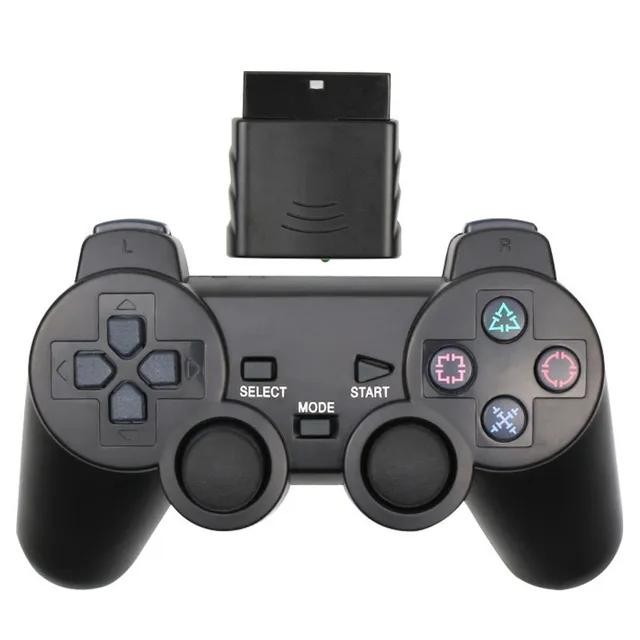

Photos from current listings. Actual item, color, and included accessories may vary.
Ps2 Controller Buying Guide
Shopping for a PS2 controller in 2025 means navigating original DualShock 2 hardware, licensed replicas, and generic 2.4G wireless pads—each with different pressure-sensitivity and connector behavior. The console's controller port and game-level pressure-button support dictate what actually works, so connector type and analog fidelity matter more than vibration gimmicks. Most buyers should prioritize a genuine or high-grade replica wired pad for latency-sensitive fighters and platformers, and reserve wireless 2.4G dongles for casual and multiplayer sessions.
Key takeaways
- Original DualShock 2 uses a 9-pin controller plug with pressure-sensitive face and shoulder buttons; many third-party pads omit true pressure sensing.
- 2.4G wireless PS2 pads bundle a USB receiver that plugs into the console's controller port adapter or a PC USB port for emulator use.
- Genuine Sony DualShock 2 analog sticks use potentiometer modules rated for roughly 1-2 million cycle life; cheap replicas often drift within months.
At a glance
- Category
- Controllers & Gaming Accessories
- Last updated
- Nov 28, 2026
Current offers
Highlights
- Original DualShock 2 uses a 9-pin controller plug with pressure-sensitive face and shoulder buttons; many third-party pads omit true pressure sensing.
- 2.4G wireless PS2 pads bundle a USB receiver that plugs into the console's controller port adapter or a PC USB port for emulator use.
- Genuine Sony DualShock 2 analog sticks use potentiometer modules rated for roughly 1-2 million cycle life; cheap replicas often drift within months.
- Generic wireless pads typically pair one receiver per pad; multiplayer wireless setups require one dongle per controller and free USB/controller ports.
Best use cases
- Pick a genuine or premium wired DualShock 2 replica for fighting games, racing, and Metal Gear Solid–style pressure-sensitive titles—skip generic wireless pads that lack true pressure buttons.
- Choose a 2.4G wireless pad with USB dongle for couch multiplayer and PC emulation where cable clutter matters more than frame-perfect latency.
- Avoid single-port 'PS2-to-PC' USB adapters unless they explicitly support two-player DualShock 2 mapping; pick a pad with native USB PC mode for emulator setups.
Buying tips
- Prioritize authentic Sony DualShock 2 or a clearly labeled pressure-sensitive replica if your library includes MGS2/MGS3, Gran Turismo, or racing titles.
- Check the connector: original PS2 pads use the 9-pin plug; USB-only pads need a PS2-to-USB adapter or are PC/emulator-only.
- Inspect analog stick material—rubberized concave caps resist thumb slip better than flat hard-plastic replicas on long sessions.
- Compare wireless receiver type: 2.4G dongles are plug-and-play on PS2 and PC, while Bluetooth pads generally require a separate adapter on original hardware.
Specs
| Connection Type | Wired 9-pin vs 2.4G wireless dongle |
|---|---|
| Pressure Buttons | True analog (DualShock 2) vs on/off |
| Analog Stick Life | 1-2M cycles (OEM) vs lower on replicas |
| Player Support | 2 native ports; 4 with multitap |
Related searches
What to check before buying
- Count your PS2 controller ports (two on all models) and USB ports if using a wireless dongle plus a multitap for 3-4 players.
- Measure cable length on wired pads—original DualShock 2 cables run about 2.4 m, shorter than many replicas.
- Confirm your display/console region matches the pad's button labeling (Japanese vs Western layouts differ on Circle/Cross function).
- Verify the pad includes or supports a multitap if you plan four-player sessions, since PS2 has only two native controller ports.
FAQ
Data sources: eBay / Amazon listings and product attribute feeds. Updated Nov 28, 2026.
Some links on this page are affiliate links. If you buy after clicking one, we may earn a commission at no extra cost to you. This does not change which products appear here or their order. Affiliate disclosure.