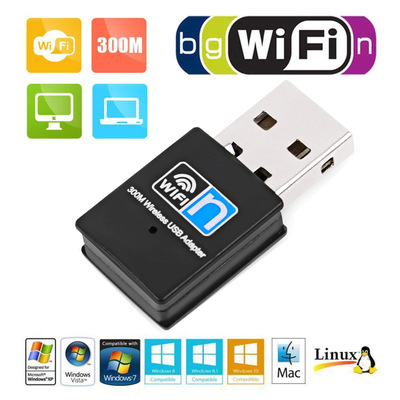

Photos from current listings. Actual item, color, and included accessories may vary.
WiFi Card Buying Guide
A WiFi card is the internal or external radio module that lets a desktop or laptop connect to wireless networks, and the primary trade-off is between older interface standards (PCIe x1, M.2 A/E-key, USB 2.0) and modern Wi-Fi 6E/7 radios that require the right slot, antenna leads, and OS driver support. The decision rule: buy only a card whose host interface and keying match your board or slot exactly, and whose radio tier (Wi-Fi 5 vs 6 vs 6E/7) matches your router; any card that needs an adapter to fit is a compromise, not a durable upgrade.
Key takeaways
- Desktop PCIe cards use PCIe x1 edge connectors and usually include a magnetic antenna base; M.2 modules use A/E-key slots and need two IPEX/U.FL antenna leads already routed in the laptop.
- Wi-Fi 6 (802.11ax) adds OFDMA and 1024-QAM for real multi-device throughput gains; Wi-Fi 6E adds the clean 6 GHz band, while Wi-Fi 7 (802.11be) adds 320 MHz channels and multi-link operation.
- Intel AX200/AX210 are Wi-Fi 6/6E M.2 modules with Bluetooth 5.x over USB; MediaTek MT7921/MT7922 and Realtek RTL8852 are common OEM alternatives with driver maturity differences on Linux.
At a glance
- Category
- Computers & Peripherals
- Last updated
- Nov 28, 2026
Current offers
Highlights
- Desktop PCIe cards use PCIe x1 edge connectors and usually include a magnetic antenna base; M.2 modules use A/E-key slots and need two IPEX/U.FL antenna leads already routed in the laptop.
- Wi-Fi 6 (802.11ax) adds OFDMA and 1024-QAM for real multi-device throughput gains; Wi-Fi 6E adds the clean 6 GHz band, while Wi-Fi 7 (802.11be) adds 320 MHz channels and multi-link operation.
- Intel AX200/AX210 are Wi-Fi 6/6E M.2 modules with Bluetooth 5.x over USB; MediaTek MT7921/MT7922 and Realtek RTL8852 are common OEM alternatives with driver maturity differences on Linux.
- External USB WiFi adapters cap at USB 2.0 (480 Mbps) or USB 3.0 (5 Gbps) bus limits; only USB 3.0 models with 2x2 MIMO approach the throughput of an internal PCIe card.
Best use cases
- Best fit: a desktop with a free PCIe x1 slot and a Wi-Fi 6/6E router — pick a PCIe x1 card with external antenna and Bluetooth header; skip USB nano adapters, which throttle at USB 2.0 speeds.
- Best fit: a laptop with an M.2 A/E-key slot and two antenna leads — pick an M.2 2230 Wi-Fi 6E module matched to your OEM whitelist; skip full-height PCIe cards and mini-PCIe modules, which will not fit.
- Best fit: a rental or locked-down machine where opening the case is not allowed — pick a USB 3.0 external adapter with a detachable antenna; skip internal cards that require disassembly and may void warranty.
- Wrong fit: an older laptop with a mini-PCIe (not M.2) slot — a modern M.2 card physically will not seat; choose a mini-PCIe Wi-Fi 5 card or a USB adapter instead.
Buying tips
- Measure the slot: PCIe x1 is about 25 mm long with a notch near the front; M.2 A/E-key is 22 mm wide with a single notch offset from center — confirm both keying and 2230/2242 length before buying.
- Match radio generation to the router: Wi-Fi 5 (802.11ac) cards cap at 80 MHz channels; only a Wi-Fi 6E or 7 card can use the 6 GHz band, so buying 6E with a Wi-Fi 5 router wastes the upgrade.
- Check antenna connectors: M.2 modules use IPEX MHF4 (smaller) or MHF1 (larger) plugs — a card with the wrong connector will not accept your existing laptop antenna leads without an adapter pigtail.
- Confirm Bluetooth path: on M.2 cards Bluetooth runs over a separate USB 2.0 header; on PCIe cards a USB header cable must reach the motherboard, or Bluetooth stays disabled.
Specs
| Host Interface | PCIe x1 / M.2 A/E-key / USB 3.0 |
|---|---|
| Wi-Fi Standard | Wi-Fi 5 / 6 / 6E / 7 (802.11ax/be) |
| Antenna Connector | MHF4 / MHF1 / external RP-SMA |
| Bluetooth Path | USB 2.0 header / integrated |
Related searches
What to check before buying
- Open the case or laptop bottom and identify the exact slot: PCIe x1, M.2 A/E-key (2230/2242), or mini-PCIe — measure length and notch position.
- Count available antenna leads and note the connector type (MHF4 vs MHF1) and whether the desktop card needs an external magnetic antenna base.
- Confirm OS support: Windows 10/11 has inbox drivers for Intel AX200/AX210, but Linux needs kernel 5.10+ for Wi-Fi 6E; older macOS may not support third-party cards.
- Verify router band support: 2.4/5 GHz only means Wi-Fi 6 is enough; a 6 GHz router justifies 6E/7, and a Wi-Fi 7 router needs a Wi-Fi 7 card for multi-link gains.
FAQ
Data sources: eBay / Amazon listings and product attribute feeds. Updated Nov 28, 2026.
Some links on this page are affiliate links. If you buy after clicking one, we may earn a commission at no extra cost to you. This does not change which products appear here or their order. Affiliate disclosure.