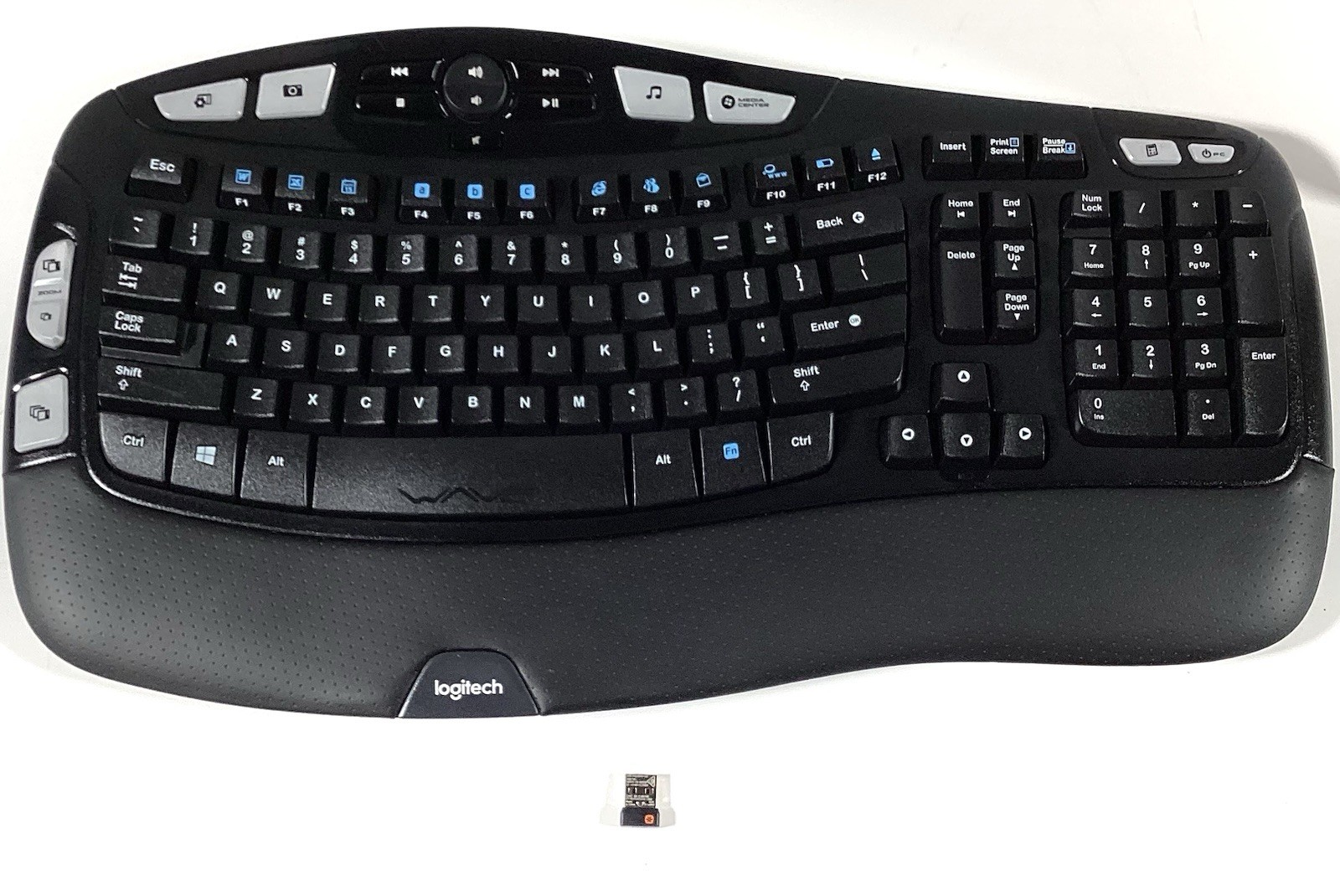

Photos from current listings. Actual item, color, and included accessories may vary.
Logitech Keyboard Buying Guide
A Logitech keyboard spans membrane, scissor-switch, and mechanical architectures across three core lines: entry-level K-series, productivity MX-series, and low-profile/craft variants. The primary trade-off is switch mechanism versus layout and connectivity—membrane offers cushioned quiet typing at low cost, scissor switches deliver laptop-style precision, and mechanical switches provide tactile durability and repairability. The decision rule: buy a model with a documented switch type, 2.4 GHz Unifying/Bolt or Bluetooth multi-device pairing, and replaceable AA/AAA or USB-C charging—skip any listing lacking a receiver or with undisclosed switch architecture.
Key takeaways
- Logitech K350 uses a curved 'wave' membrane layout with cushioned palm rest and 2.4 GHz Unifying receiver—requires the dongle for wireless; Bluetooth is absent on this model.
- MX-series keyboards (MX Keys, MX Mechanical) add Bluetooth LE plus Logi Bolt/Unifying multi-device pairing across three hosts and USB-C charging.
- Scissor-switch low-profile models (MX Keys, Craft) have ~1.8 mm key travel; full-travel membrane (K350) and mechanical (MX Mechanical) differ significantly in actuation feel and noise.
At a glance
- Category
- Computers & Peripherals
- Last updated
- Nov 28, 2026
Current offers
Highlights
- Logitech K350 uses a curved 'wave' membrane layout with cushioned palm rest and 2.4 GHz Unifying receiver—requires the dongle for wireless; Bluetooth is absent on this model.
- MX-series keyboards (MX Keys, MX Mechanical) add Bluetooth LE plus Logi Bolt/Unifying multi-device pairing across three hosts and USB-C charging.
- Scissor-switch low-profile models (MX Keys, Craft) have ~1.8 mm key travel; full-travel membrane (K350) and mechanical (MX Mechanical) differ significantly in actuation feel and noise.
- Mechanical MX models use hot-swappable or fixed Kailh/Logitech switches rated for tens of millions of keystrokes; membrane domes degrade faster under heavy daily use.
Best use cases
- Best fit: quiet office or shared-room typing—choose a scissor-switch MX Keys or K-series membrane; skip loud mechanical models that disturb coworkers.
- Best fit: multi-device productivity across laptop, desktop, and tablet—pick MX Keys/Mechanical with Bluetooth + Logi Bolt three-device switching; skip single-receiver K350 if you need cross-platform Bluetooth.
- Best fit: ergonomic wrist comfort for long sessions—select the K350 wave layout or an MX with palm rest; skip flat low-profile boards if wrist pronation is a concern.
- Wrong fit: competitive gaming—skip Logitech office lines entirely; their 2.4 GHz and membrane/scissor latency and rollover are not built for twitch input.
Buying tips
- Match connectivity to your host: K350 requires the included Unifying USB-A receiver; MX models support Bluetooth LE plus Bolt/Unifying—confirm your laptop has USB-A or a USB-C adapter.
- Verify layout before buying: K350 French Canadian (CF) and other regional layouts differ in key legends and Enter/Shift shapes; pick the layout matching your OS language settings.
- For multi-device workflows, choose models with three-channel Easy-Switch (MX Keys, MX Mechanical); single-channel K350 cannot toggle between computers without re-pairing.
- Check switch type in the model name: 'Mechanical' means full-travel tactile switches; 'Keys' or 'Craft' means low-profile scissor; K-series is membrane dome—each has different noise and lifespan.
Specs
| Switch Type | Membrane / Scissor / Mechanical |
|---|---|
| Connectivity | 2.4 GHz Unifying / Bluetooth / Bolt |
| Power Source | AA/AAA batteries or USB-C rechargeable |
| Layout Form | Full-size with numpad / TKL / compact |
Related searches
What to check before buying
- Confirm your computer has an available USB-A port for the Unifying/Bolt receiver, or budget for a USB-C to USB-A adapter if using a modern laptop.
- Measure desk depth and keyboard footprint: full-size models with number pads (K350, MX Keys full) need roughly 45 cm width; tenkeyless variants save space.
- Verify OS compatibility: Logitech Options+ software supports Windows and macOS for MX-series; K350 works plug-and-play but advanced features need the receiver.
- Check layout region (US, UK, French Canadian, etc.) against your typing habit—mismatched legends cause constant friction even if the keyboard is functionally fine.
FAQ
Data sources: eBay / Amazon listings and product attribute feeds. Updated Nov 28, 2026.
Some links on this page are affiliate links. If you buy after clicking one, we may earn a commission at no extra cost to you. This does not change which products appear here or their order. Affiliate disclosure.