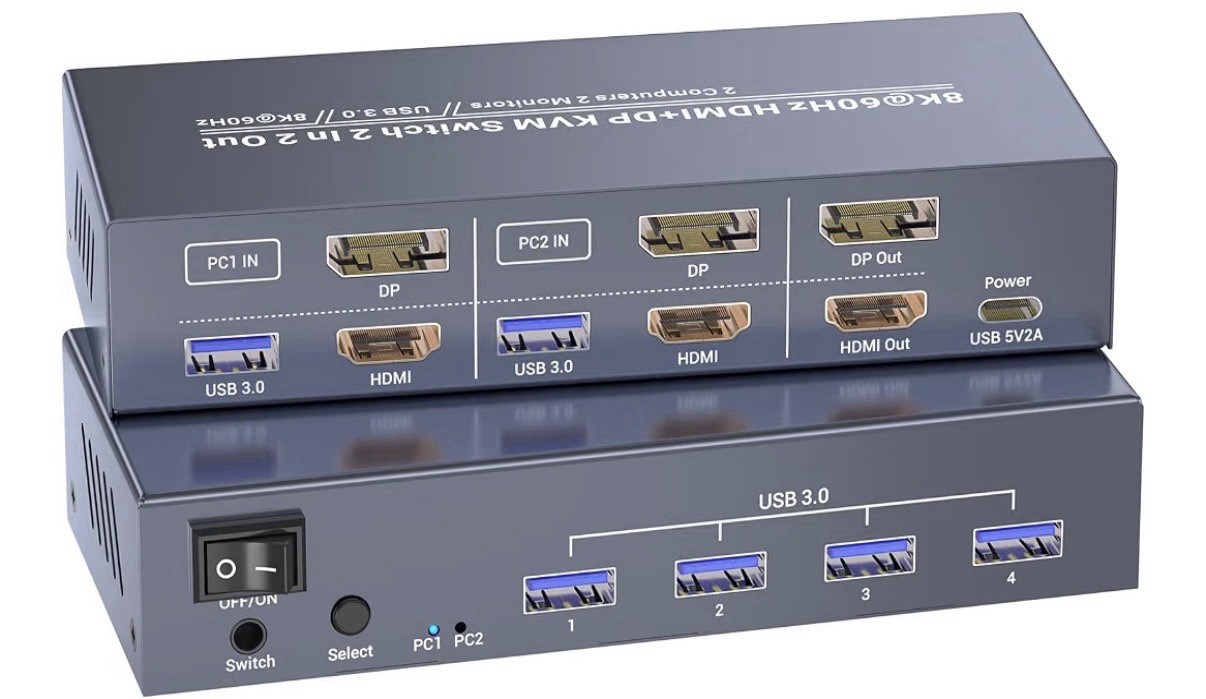

Photos from current listings. Actual item, color, and included accessories may vary.
HDMI Splitter Buying Guide
An HDMI splitter duplicates one HDMI source to multiple displays, while a KVM switch adds keyboard/mouse control and often DisplayPort or USB-C inputs. The core trade-off is HDCP/EDID handling and bandwidth tier: 4K60 4:4:4 requires HDMI 2.0 with 18 Gbps, and HDCP 2.2/2.3 compliance determines whether streaming services will handshake. Buy a powered splitter with EDID management for dual-display mirroring; buy a true KVM only if you need one keyboard/mouse across two computers.
Key takeaways
- HDMI 2.1 splitters support 8K60 or 4K120 at 48 Gbps; HDMI 2.0 handles 4K60 4:4:4 at 18 Gbps; HDMI 1.4 caps at 4K30 4:2:0 and cannot carry HDR.
- HDCP 2.2/2.3 compliance is mandatory for Netflix, Disney+, and 4K Blu-ray; a splitter with HDCP 1.4 only will show a black screen on protected content.
- Powered splitters with EDID copy or fixed EDID prevent resolution drops when one display is 1080p and the other is 4K; bus-powered units often fail at long cable runs.
At a glance
- Category
- Computers & Peripherals
- Last updated
- Nov 28, 2026
Current offers
Highlights
- HDMI 2.1 splitters support 8K60 or 4K120 at 48 Gbps; HDMI 2.0 handles 4K60 4:4:4 at 18 Gbps; HDMI 1.4 caps at 4K30 4:2:0 and cannot carry HDR.
- HDCP 2.2/2.3 compliance is mandatory for Netflix, Disney+, and 4K Blu-ray; a splitter with HDCP 1.4 only will show a black screen on protected content.
- Powered splitters with EDID copy or fixed EDID prevent resolution drops when one display is 1080p and the other is 4K; bus-powered units often fail at long cable runs.
- A KVM switch is not a splitter: it switches one keyboard/mouse/monitor between two computers, while a splitter mirrors one source to two displays simultaneously.
Best use cases
- Dual-monitor mirroring from one laptop or console: pick a powered 1x2 HDMI 2.0 splitter with EDID management and HDCP 2.2; skip unpowered Y-cables that drop 4K to 1080p.
- Two computers sharing one monitor and keyboard/mouse: pick a true HDMI or DisplayPort KVM with USB passthrough; skip splitters, which cannot switch inputs between computers.
- Home theater feeding a TV and projector: pick an HDMI 2.1 splitter with 48 Gbps and HDCP 2.3 for 4K120 HDR; skip HDMI 1.4 units if either display supports HDR or 120 Hz.
- Extending rather than mirroring across two screens: skip splitters entirely; use a DisplayPort MST hub or a USB-C dock with dual HDMI outputs for independent desktops.
Buying tips
- Match bandwidth to your hardest display: 18 Gbps HDMI 2.0 for 4K60 4:4:4, 48 Gbps HDMI 2.1 for 4K120 or 8K60, and 10.2 Gbps HDMI 2.0a only for 4K30.
- Confirm HDCP version on every port: HDCP 2.2 or 2.3 for streaming and 4K discs; HDCP 1.4 will fail on protected 4K content even if the splitter claims 4K support.
- Choose EDID copy or a fixed EDID dip switch when mixing resolutions; without EDID management the source negotiates the lowest common display and caps both outputs.
- For runs over 3 meters use active or fiber HDMI cables and a powered splitter; passive copper beyond 5 meters at 18 Gbps causes sparkles and handshake drops.
Specs
| HDMI Bandwidth | HDMI 1.4 10.2 / 2.0 18 / 2.1 48 Gbps |
|---|---|
| Max Resolution | 4K30 / 4K60 4:4:4 / 8K60 |
| HDCP Version | 1.4 vs 2.2/2.3 for 4K streaming |
| Port Config | 1x2 splitter / 2x1 switch / 2x2 matrix |
Related searches
What to check before buying
- Measure display resolutions and refresh rates first: a 1080p60 TV plus a 4K60 monitor needs a splitter that outputs 4K60 on one port without downscaling the other.
- Count source and display ports: 1x2 mirrors one input to two outputs; 2x1 switches two inputs to one display; 2x2 matrix routes either input to either output.
- Verify HDCP needs: if any display is used for Netflix, Prime Video, or a 4K Blu-ray player, every splitter port must list HDCP 2.2 or 2.3.
- Check power and cable length: powered splitters include a DC adapter; for in-wall runs over 5 meters plan active HDMI cables and confirm the splitter supplies enough current.
FAQ
Data sources: eBay / Amazon listings and product attribute feeds. Updated Nov 28, 2026.
Some links on this page are affiliate links. If you buy after clicking one, we may earn a commission at no extra cost to you. This does not change which products appear here or their order. Affiliate disclosure.