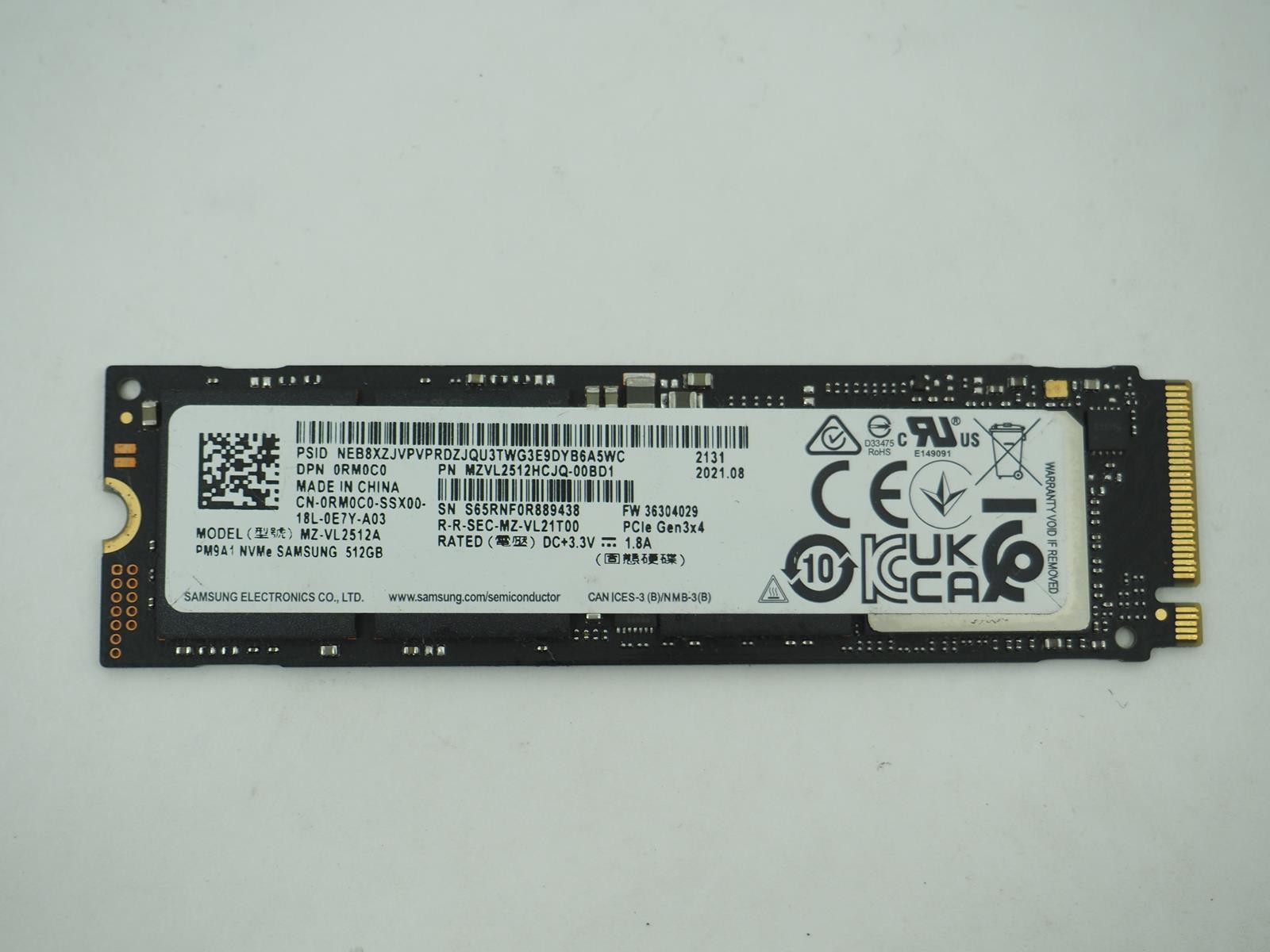

Photos from current listings. Actual item, color, and included accessories may vary.
Samsung SSD PC Buying Guide
Samsung SSDs for PCs span OEM PM-series drives (like the PM9A1) and retail 980/990 families, all using in-house NAND and controllers. The core trade-off is between OEM bulk drives with no warranty and retail models with 5-year coverage; always confirm the interface (SATA vs NVMe) and form factor (M.2 vs 2.5-inch) before buying.
Interface:NVMe PCIe vs SATA 2.5-inchForm Factor:M.2 2280 / 2.5-inch 7mmPCIe Generation:3.0 / 4.0 / 5.0 (backward compatible)Warranty Tier:Retail 5-yr vs OEM none
Typical price range$65.00
Key takeaways
- PM9A1 is an OEM PCIe 4.0 x4 NVMe drive (MZ-VL2512A) with no Samsung retail warranty; retail 980 Pro/990 Pro include 5-year limited warranty.
- M.2 2280 is the standard consumer form factor; SATA 2.5-inch drives cap at ~560 MB/s while NVMe PCIe 4.0 reaches 7,000 MB/s sequential.
- DRAM-less designs (980 non-Pro, some PM9A1 variants) rely on HMB and slow under sustained writes; DRAM-equipped models (970 EVO Plus, 990 Pro) maintain speed.
At a glance
- Category
- PC Storage Upgrades
- Last updated
- Nov 28, 2026
Current offers
Highlights
- PM9A1 is an OEM PCIe 4.0 x4 NVMe drive (MZ-VL2512A) with no Samsung retail warranty; retail 980 Pro/990 Pro include 5-year limited warranty.
- M.2 2280 is the standard consumer form factor; SATA 2.5-inch drives cap at ~560 MB/s while NVMe PCIe 4.0 reaches 7,000 MB/s sequential.
- DRAM-less designs (980 non-Pro, some PM9A1 variants) rely on HMB and slow under sustained writes; DRAM-equipped models (970 EVO Plus, 990 Pro) maintain speed.
- Key interface generations: PCIe 3.0 (970 EVO), PCIe 4.0 (980 Pro, PM9A1), PCIe 5.0 (9100 Pro); backward compatible but capped by the slower link.
Best use cases
- Pick a retail 990 Pro or 980 Pro for a primary OS/game drive in a desktop or laptop with M.2 NVMe support—you get warranty and consistent sustained performance.
- Choose an OEM PM9A1 only for secondary storage or budget builds where you accept no warranty and verify the seller's tested/wiped status; skip it for critical data.
- Use a 2.5-inch SATA Samsung SSD (870 EVO) for older laptops or desktops lacking M.2 slots; do not buy NVMe for a SATA-only machine.
- Skip high-end PCIe 4.0/5.0 drives for PCIe 3.0-only systems—you pay for speed the slot cannot deliver; a 970 EVO Plus is the ceiling there.
Buying tips
- Match the M.2 key and length: most PC slots accept M.2 2280; confirm the slot supports NVMe (PCIe) not just SATA before buying an NVMe drive.
- For sustained writes over 100GB, choose a DRAM-equipped model (970 EVO Plus, 980 Pro, 990 Pro); DRAM-less drives drop to HDD-like speeds once cache empties.
- OEM PM9A1 drives carry no retail warranty—budget for self-insurance and only buy from sellers who show SMART health and wipe confirmation.
- PCIe generation matters: a PCIe 4.0 drive in a PCIe 3.0 slot runs at 3.0 speeds; buy the generation your CPU/chipset supports to avoid wasted spend.
Specs
| Interface | NVMe PCIe vs SATA 2.5-inch |
|---|---|
| Form Factor | M.2 2280 / 2.5-inch 7mm |
| PCIe Generation | 3.0 / 4.0 / 5.0 (backward compatible) |
| Warranty Tier | Retail 5-yr vs OEM none |
Related searches
What to check before buying
- Measure your M.2 slot: 2280 (22mm wide, 80mm long) is standard; check for 2242/2230 in compact laptops and confirm screw/mounting hardware.
- Verify slot protocol in the motherboard manual: M-key PCIe NVMe vs B+M-key SATA; a SATA-only M.2 slot will not accept an NVMe drive.
- Confirm free PCIe lanes and generation from your CPU/chipset (e.g., PCIe 4.0 needs Ryzen 3000+ or Intel 11th gen+) to avoid bottlenecking.
- For SATA 2.5-inch upgrades, check 7mm/9.5mm bay height and ensure SATA data and power cables are available.
FAQ
Data sources: eBay / Amazon listings and product attribute feeds. Updated Nov 28, 2026.
Some links on this page are affiliate links. If you buy after clicking one, we may earn a commission at no extra cost to you. This does not change which products appear here or their order. Affiliate disclosure.