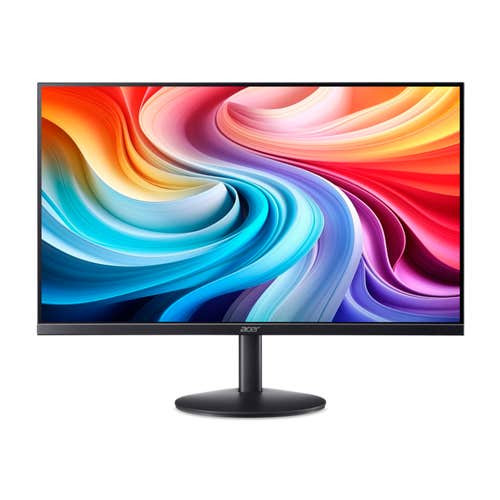

Photos from current listings. Actual item, color, and included accessories may vary.
Black Computer Monitor Buying Guide
A black computer monitor is a display chosen primarily for its black chassis and bezel, which minimizes visual distraction and blends into dark rooms and multi-monitor arrays. The core trade-off is panel technology versus chassis finish: matte black plastic and metal frames reduce glare and reflection, but cheap glossy black bezels smudge and reflect light. The decision rule is simple: prioritize panel type (IPS vs VA vs TN), resolution, and VESA mount compatibility first, then confirm the black finish is matte rather than glossy for a durable, low-distraction setup.
Key takeaways
- Panel type drives black-level performance: VA panels deliver deep native contrast (3000:1–4000:1) for dark-room blacks, while IPS offers superior color accuracy and viewing angles but lower contrast (1000:1–1300:1).
- Matte black bezels and anti-glare coatings reduce reflections and fingerprint visibility; glossy black plastic frames show smudges and mirror ambient light, undermining the purpose of a black monitor.
- VESA mount compatibility (75x75mm or 100x100mm) determines arm and wall-mount flexibility; monitors without VESA holes force desk-stand-only placement and limit ergonomic adjustment.
At a glance
- Category
- Computer Monitors
- Last updated
- Nov 28, 2026
Current offers
Highlights
- Panel type drives black-level performance: VA panels deliver deep native contrast (3000:1–4000:1) for dark-room blacks, while IPS offers superior color accuracy and viewing angles but lower contrast (1000:1–1300:1).
- Matte black bezels and anti-glare coatings reduce reflections and fingerprint visibility; glossy black plastic frames show smudges and mirror ambient light, undermining the purpose of a black monitor.
- VESA mount compatibility (75x75mm or 100x100mm) determines arm and wall-mount flexibility; monitors without VESA holes force desk-stand-only placement and limit ergonomic adjustment.
- Resolution and size scale together: 24-inch panels suit 1080p (92 PPI), 27-inch demands 1440p (109 PPI) for sharp text, and 32-inch or larger requires 4K (138 PPI) to avoid visible pixelation.
Best use cases
- Best fit: dark-room productivity or coding — choose a matte-black VA or IPS panel at 27-inch 1440p with VESA 100x100mm and height-adjustable stand; skip glossy black TN panels that wash out at angles.
- Best fit: multi-monitor wall or arm array — pick identical black monitors with narrow uniform bezels (under 8mm) and matching VESA patterns; skip mismatched bezel thicknesses and non-VESA models that break alignment.
- Best fit: color-critical photo or video editing — choose a black IPS panel with 99% sRGB or 95% DCI-P3 coverage and factory calibration; skip VA panels with black crush and high-contrast smearing in shadows.
- Wrong fit: bright sunlit rooms — black glossy bezels and low-brightness panels (under 250 nits) become mirrors; instead pick a matte black finish with 300+ nits and an anti-glare coating, or skip black entirely for a light silver frame that hides dust.
Buying tips
- Measure your desk depth: a 27-inch monitor needs at least 24 inches (60cm) viewing distance; 32-inch needs 30 inches (76cm). Subtract stand footprint (typically 8–10 inches) from desk depth before choosing size.
- Verify VESA pattern before buying: 100x100mm covers most 24–32-inch monitors; 75x75mm appears on compact 22–24-inch models. Confirm the monitor includes standoffs or a quick-release plate for your arm.
- Check panel coating: anti-glare (matte) is standard on business monitors; glossy coatings appear on some consumer and OLED models. For a black monitor in a lit room, specify matte to avoid reflections on the bezel and screen.
- Match ports to your devices: HDMI 2.0 supports 4K at 60Hz; DisplayPort 1.4 supports 4K at 120Hz or 1440p at 240Hz. USB-C with 65W–90W power delivery reduces cable clutter for laptops; skip models with only VGA or DVI for modern setups.
Specs
| Panel Type | IPS / VA / TN / OLED |
|---|---|
| VESA Mount | 75x75mm or 100x100mm |
| Bezel Finish | Matte black vs glossy black |
| Resolution by Size | 24" 1080p / 27" 1440p / 32" 4K |
Related searches
What to check before buying
- Measure desk width and depth: ensure the monitor stand footprint plus clearance fits, and that viewing distance matches screen size (24-inch: 20–24 inches; 27-inch: 24–30 inches; 32-inch: 30–36 inches).
- Confirm room lighting: black glossy bezels reflect lamps and windows; choose matte black finish for bright rooms, and verify screen brightness (250–350 nits typical) suits your ambient light.
- Check voltage and plug standard: monitors sold in North America use 100–120V 60Hz with Type B or grounded plug; confirm the power brick or internal PSU matches your region before importing.
- Verify companion parts: if wall-mounting or arm-mounting, confirm VESA pattern, screw size (M4 x 10mm typical), and that the arm supports the monitor weight (typically 8–15 lbs for 27-inch).
FAQ
Data sources: eBay / Amazon listings and product attribute feeds. Updated Nov 28, 2026.
Some links on this page are affiliate links. If you buy after clicking one, we may earn a commission at no extra cost to you. This does not change which products appear here or their order. Affiliate disclosure.