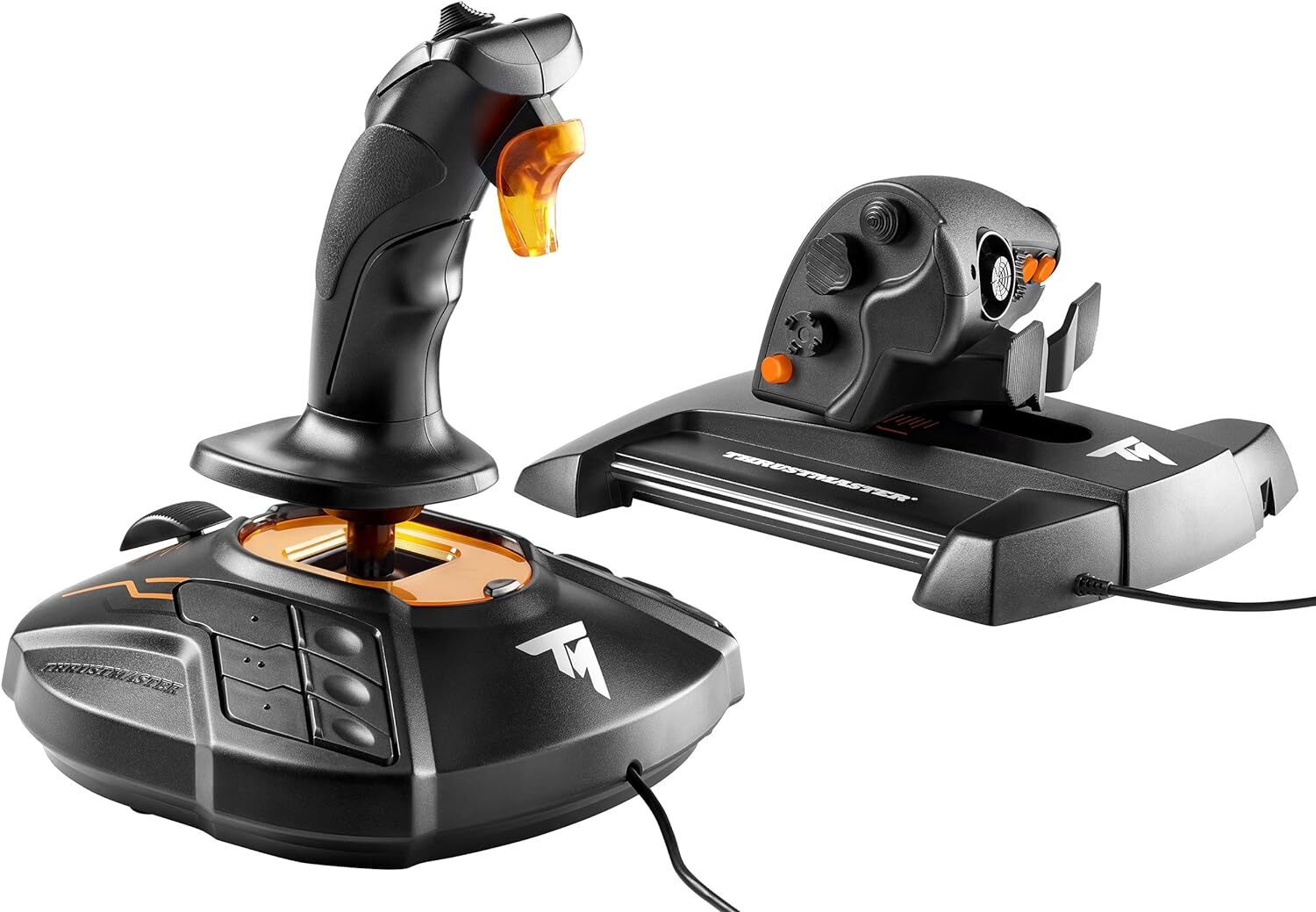

Photos from current listings. Actual item, color, and included accessories may vary.
Thrustmaster T16000m Fcs HOTAS Buying Guide
The Thrustmaster T16000M FCS HOTAS is a PC flight-sim control set pairing the T.16000M stick with the TWCS throttle, built around Hall-effect magnetic sensors. The core trade-off is that it delivers precision sensing and a full HOTAS layout at an entry tier, but uses a plastic gimbal and slide-rail throttle rather than the metal cams and bearings of premium gear. Buy it if you want accurate, drift-free axes for atmospheric and space sims on a starter budget; skip it if you need long-term heavy-use durability or force-feedback.
Key takeaways
- Hall-effect magnetic sensors on the stick's X/Y axes and throttle axis resist wear-related drift that potentiometer sticks develop.
- 16-bit stick resolution gives fine input granularity for formation flying and precision gunnery.
- TWCS throttle uses a sliding rail rather than a rotating arc, with a paddle-style rudder axis and an analog ministick for extra control.
At a glance
- Category
- Flight Sim Joysticks & HOTAS
- Status
- Listings available
- Last updated
- Nov 27, 2026
Current offers
Highlights
- Hall-effect magnetic sensors on the stick's X/Y axes and throttle axis resist wear-related drift that potentiometer sticks develop.
- 16-bit stick resolution gives fine input granularity for formation flying and precision gunnery.
- TWCS throttle uses a sliding rail rather than a rotating arc, with a paddle-style rudder axis and an analog ministick for extra control.
- Plastic gimbal and throttle rails are the durability weak points under aggressive or prolonged use; aftermarket slider mods exist to smooth the throttle.
Best use cases
- Best fit: PC users entering DCS, Elite Dangerous, Star Citizen, or Microsoft Flight Simulator who need a full stick-plus-throttle HOTAS without premium pricing.
- Best fit: Space-sim pilots who want a twist-rudder stick and analog ministick for six-degree-of-freedom control out of the box.
- Wrong fit: Buyers wanting console compatibility — this is a PC-only USB set, so skip it for Xbox or PlayStation flight sims.
- Wrong fit: Heavy daily users prioritizing long-term durability should step up to metal-gimbal or cam-and-bearing sticks instead.
Buying tips
- Confirm PC-only USB-A connectivity; budget for a powered USB hub if your motherboard ports are limited or shared with other peripherals.
- The stick's ambidextrous design includes swappable left/right hand grips — decide your handedness before first assembly.
- Plan for the throttle's sliding-rail feel: if smoothness matters, budget for a third-party slider mod or accept the stock friction.
- Check desk or mount space for the throttle's footprint; both units are separate and need stable, non-slip placement.
Specs
| Sensor Type | Hall-effect magnetic (stick & throttle) |
|---|---|
| Stick Resolution | 16-bit |
| Platform | PC / Windows USB |
| Throttle Design | Sliding rail with ministick |
Alternatives to compare
Related searches
What to check before buying
- Measure desk or mount width for two separate units — stick base plus throttle base side by side.
- Verify your PC has free USB-A ports and that your sim supports DirectInput/XInput device mapping.
- Confirm you have a stable, flat surface or compatible mounting plate; the throttle slides and needs resistance against movement.
- Check that your chosen sim supports axis mapping for twist rudder and the throttle ministick if you plan to use them.
FAQ
Data sources: eBay / Amazon listings and product attribute feeds. Updated Nov 27, 2026.
Some links on this page are affiliate links. If you buy after clicking one, we may earn a commission at no extra cost to you. This does not change which products appear here or their order. Affiliate disclosure.