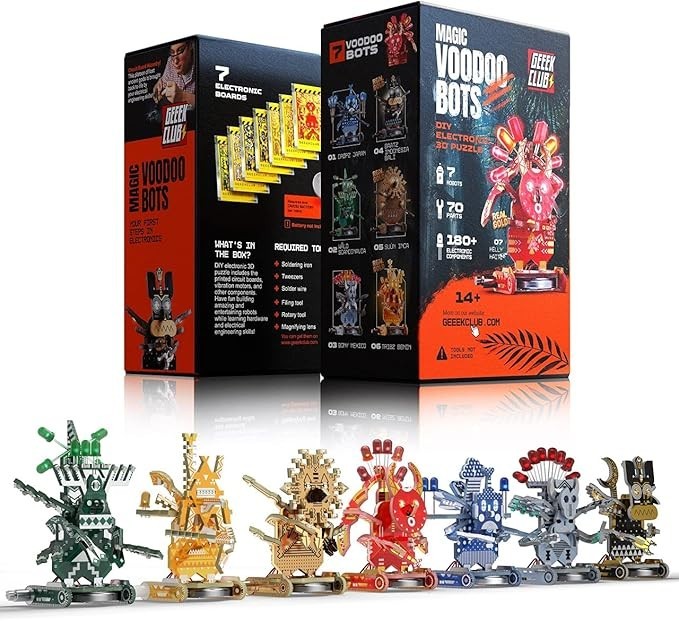

Photos from current listings. Actual item, color, and included accessories may vary.
Robot Kit Buying Guide
Robot kits are build-it-yourself robotics packages that combine structural parts, actuators, sensors, and a controller into a single learning platform. The key trade-off is educational depth versus immediate playability: microcontroller-based kits (Arduino, Raspberry Pi, micro:bit) teach real coding and wiring, while snap-together or remote-controlled kits prioritize fast assembly and mechanical fun. Choose a microcontroller kit for transferable STEM skills, or a pre-soldered RC kit for younger builders who want motion without programming.
Key takeaways
- Controller architecture defines the learning curve: Arduino/micro:bit kits use block or C++ coding with exposed GPIO pins; Raspberry Pi kits add Linux and Python but need a monitor and keyboard.
- Actuator type sets capability: brushed DC motors with plastic gearboxes suit line-followers and sumo bots; metal-gear servos and stepper motors are required for arm articulation and precise positioning.
- Age grading tracks assembly complexity: 8–10 year-old kits use snap-fit or screw-terminal wiring with 20–60 parts; 12+ kits involve 100+ pieces, soldering, and multi-file code uploads.
At a glance
- Category
- Robotics Motors & Maker Kits
- Last updated
- Nov 23, 2026
Current offers
Highlights
- Controller architecture defines the learning curve: Arduino/micro:bit kits use block or C++ coding with exposed GPIO pins; Raspberry Pi kits add Linux and Python but need a monitor and keyboard.
- Actuator type sets capability: brushed DC motors with plastic gearboxes suit line-followers and sumo bots; metal-gear servos and stepper motors are required for arm articulation and precise positioning.
- Age grading tracks assembly complexity: 8–10 year-old kits use snap-fit or screw-terminal wiring with 20–60 parts; 12+ kits involve 100+ pieces, soldering, and multi-file code uploads.
- Power and chassis standards matter: 4×AA (6V) holders suit basic DC motor kits; 18650 Li-ion packs or 6×AA (9V) are needed for motor drivers and servo arrays that draw over 1A.
Best use cases
- Best fit for a 10-year-old: a snap-together or screw-terminal kit with a remote control and pre-built motor driver, 30–60 parts, no soldering. Skip Arduino kits that require code editing and breadboard wiring.
- Best fit for a 12-year-old: a micro:bit or Arduino UNO kit with block-based coding, 2–4 DC motors, and a line-following or obstacle-avoidance sensor pack. Skip Raspberry Pi kits unless a spare monitor and keyboard are available.
- Best fit for adults and teens: a Raspberry Pi 4/5 or Arduino Mega kit with metal-gear servos, ultrasonic and IMU sensors, and Python/C++ libraries. Skip branded movie-tie-in or 'voodoo' novelty bots that offer no programmable controller.
Buying tips
- Match the controller to the goal: Arduino UNO/Nano for C++ and wiring basics, micro:bit for block coding with built-in radio and accelerometer, Raspberry Pi for Python, camera vision, and ROS-style projects.
- Count motors and check the driver: kits with 4+ DC motors or 2+ servos need an L298N or TB6612 driver board and a 6–9V supply; kits without a driver board will stall under load.
- For ages 10–12, choose kits rated 100+ parts with a printed or online curriculum; part count under 50 often means a single-function toy rather than a rebuildable robotics platform.
- Verify battery format before buying: AA holders are safe for kids; 18650 Li-ion cells require a charger and protection circuit and are not suitable for unsupervised builders under 12.
Specs
| Controller Type | Arduino / micro:bit / Raspberry Pi |
|---|---|
| Age Range | 8+ snap-fit / 12+ coding & wiring |
| Motor & Drive | DC gearmotor / servo / stepper |
| Power Source | 4–6×AA or 18650 Li-ion |
Related searches
What to check before buying
- Confirm your computer has the required port and OS: Arduino IDE needs USB-A or USB-C and Windows/macOS/Linux; Raspberry Pi kits need HDMI, USB keyboard, and a microSD card reader.
- Measure build space and storage: completed kits range from a 15 cm line-follower to a 30 cm robotic arm; plan a flat work surface at least 60×40 cm and a box for loose parts.
- Check battery availability: 4×AA, 6×AA, or 18650 cells plus a compatible charger; rechargeable NiMH AA cells are the safest reusable option for motor-heavy kits.
- Confirm companion parts: some kits require a separate microcontroller board (micro:bit or Raspberry Pi not included), a soldering iron for header pins, or a smartphone app for Bluetooth control.
FAQ
Data sources: eBay / Amazon listings and product attribute feeds. Updated Nov 23, 2026.
Some links on this page are affiliate links. If you buy after clicking one, we may earn a commission at no extra cost to you. This does not change which products appear here or their order. Affiliate disclosure.