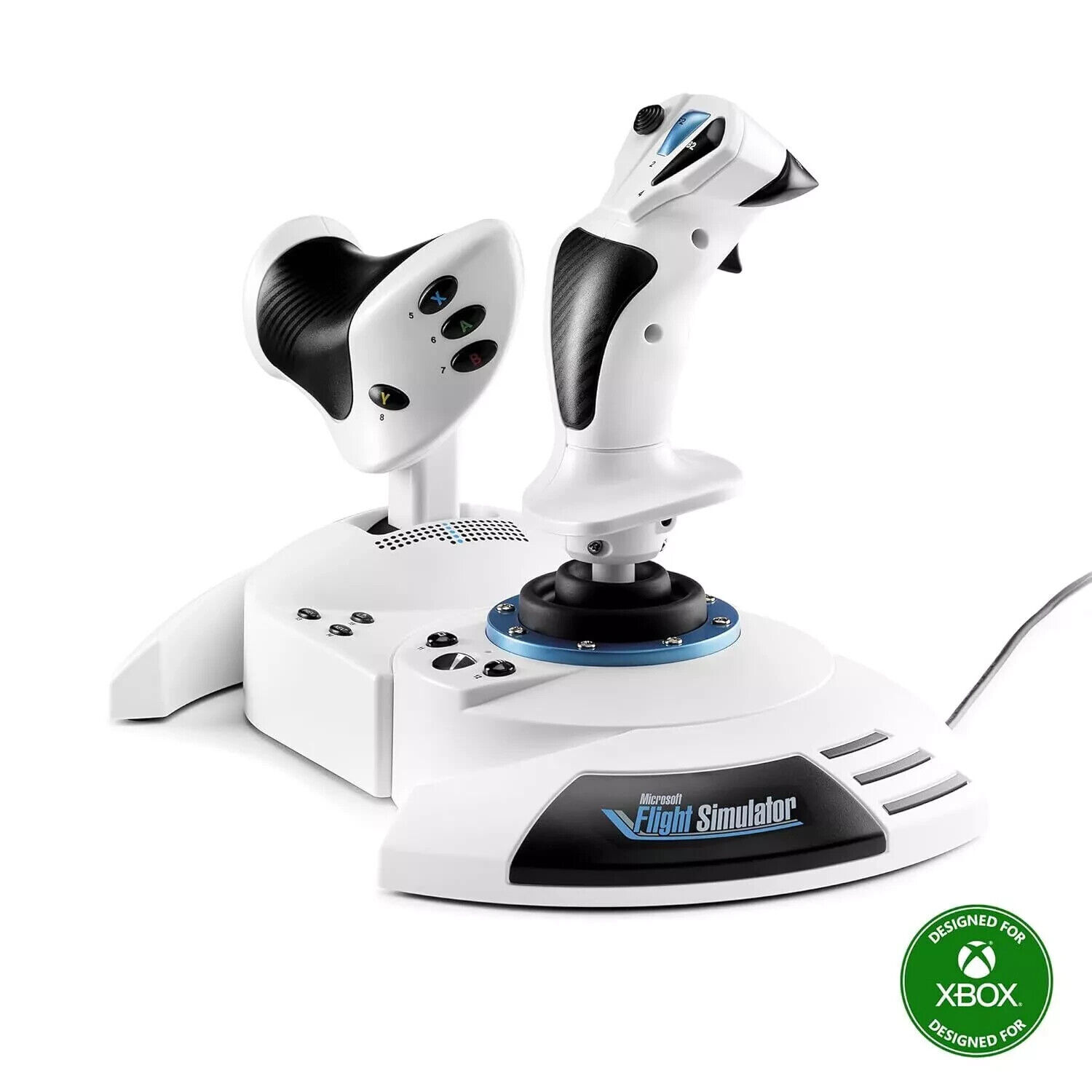

Photos from current listings. Actual item, color, and included accessories may vary.
T Flight HOTAS One Buying Guide
The T-Flight HOTAS One is the entry-level, Xbox-licensed all-in-one stick-and-throttle set that buyers choose when they need a single-box solution for Microsoft Flight Simulator on console or PC. Its fixed ergonomics and non-serviceable potentiometers mean fit—hand size, desk depth, and button layout—matters more than any spec sheet. Skip it if you need hall-effect longevity or a split-throttle layout for twin-engine jets.
Key takeaways
- Xbox-licensed: native plug-and-play on Xbox Series X|S and Xbox One; PC requires Thrustmaster driver for full button mapping.
- Stick and throttle ship pre-assembled but separate via a captive cable—desk depth must fit the combined footprint or both modules straddling a keyboard tray.
- Potentiometer-based X/Y and throttle axes (non-Hall-effect) deliver adequate resolution for MSFS but wear faster under high-cycle use than magnetic sensors.
At a glance
- Category
- Flight Sim Joysticks & HOTAS
- Last updated
- Nov 27, 2026
Current offers
Highlights
- Xbox-licensed: native plug-and-play on Xbox Series X|S and Xbox One; PC requires Thrustmaster driver for full button mapping.
- Stick and throttle ship pre-assembled but separate via a captive cable—desk depth must fit the combined footprint or both modules straddling a keyboard tray.
- Potentiometer-based X/Y and throttle axes (non-Hall-effect) deliver adequate resolution for MSFS but wear faster under high-cycle use than magnetic sensors.
- Plastic gimbal and single-spring centering give light, linear resistance; no user-adjustable spring or damping out of the box.
Best use cases
- Best fit: Microsoft Flight Simulator on Xbox Series X|S with a living-room TV setup—the Xbox-licensed handshake and built-in button legends make it the lowest-friction console HOTAS.
- Best fit: PC flight-sim beginners who want one purchase covering stick, throttle, and twist-rudder without a separate rudder pedal outlay.
- Wrong fit: DCS or competitive air-combat players needing split throttles, detents, or Hall-effect sensors—step up to a dual-throttle HOTAS with magnetic axes.
- Wrong fit: Desk setups under roughly 60 cm of usable depth—the separated stick and throttle eat more front-to-back space than a single desktop stick.
Buying tips
- Confirm platform first: the HOTAS One is Xbox-licensed and works on Xbox consoles and PC; PlayStation buyers need the separate T.Flight HOTAS 4 variant instead.
- Measure desk depth before ordering—budget space for the stick base plus the throttle module side by side, since the captive link cable limits how far apart they sit.
- Choose it for MSFS-style civil flying and casual combat; avoid it if you plan hundreds of hours of high-cycle joystick use, where potentiometer drift appears sooner than on Hall-effect sticks.
- Inspect the twist-rudder axis: it is the most common failure point on entry HOTAS units, so buy from a seller with a workable warranty path rather than the absolute lowest gray-market listing.
Specs
| Platform | Xbox One / Series X|S / PC |
|---|---|
| Sensor Type | Potentiometer (non-Hall) |
| Throttle | Single-axis, detachable |
| Rudder | Twist axis on stick |
Related searches
What to check before buying
- Confirm your console generation (Xbox One or Series X|S) and that you are not on PlayStation, which requires the HOTAS 4 model.
- Measure usable desk width and depth for both modules side by side, plus clearance for the stick's full pitch/roll throw.
- Check PC OS support and plan to install the Thrustmaster driver for button remapping beyond MSFS defaults.
- Verify you have a spare USB-A port within cable reach—the HOTAS One uses a wired USB connection, not wireless.
FAQ
Data sources: eBay / Amazon listings and product attribute feeds. Updated Nov 27, 2026.
Some links on this page are affiliate links. If you buy after clicking one, we may earn a commission at no extra cost to you. This does not change which products appear here or their order. Affiliate disclosure.