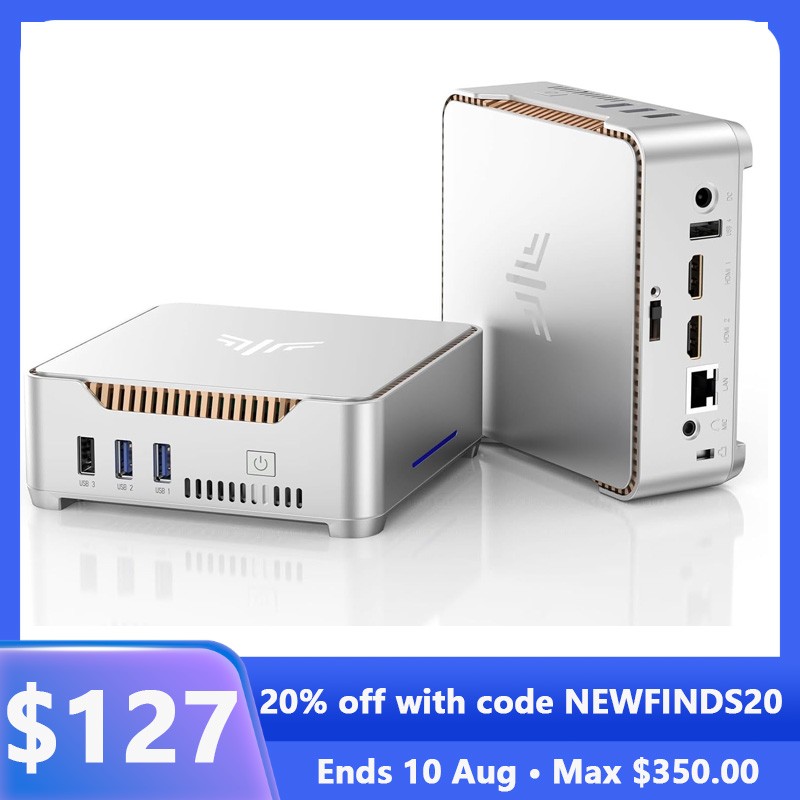

Photos from current listings. Actual item, color, and included accessories may vary.
Kamrui Mini PC Buying Guide
Kamrui mini PCs are budget-focused small-form-factor desktops built around low-power Intel Celeron and Pentium Silver processors, typically sold as barebones or preconfigured Windows 11 systems for light office, media, and signage duty. The decisive trade-off is between the older GK-series N5030/N5095 DDR4 platforms and newer AK-series N95/N97/N100 DDR5 models: the former cap out at single-channel memory and WiFi 5, while the latter add dual-channel DDR5, PCIe 3.0 NVMe, and WiFi 6. Buy the AK-series if you need modern I/O and memory bandwidth; accept the GK-series only as a disposable media or kiosk box with no upgrade path beyond storage.
Median $434.00
Key takeaways
- GK3Plus uses Intel Pentium Silver N5030 (4C/4T, 1.1–3.1 GHz, 6W TDP) with single-channel LPDDR4 soldered memory, so 12GB is the ceiling and cannot be upgraded.
- AK-series models step up to Intel N95/N97/N100 (Alder Lake-N, 6W–15W TDP) with dual-channel DDR5 SO-DIMM slots and PCIe 3.0 x2 NVMe support, roughly doubling memory bandwidth.
- GK3Plus provides dual HDMI 2.0 (4K60) plus one VGA, Gigabit Ethernet, WiFi 5 (802.11ac), and Bluetooth 4.2; AK-series adds WiFi 6, Bluetooth 5.2, and often dual 2.5GbE.
At a glance
- Category
- Servers & Mini PCs
- Last updated
- Nov 28, 2026
Current offers
Highlights
- GK3Plus uses Intel Pentium Silver N5030 (4C/4T, 1.1–3.1 GHz, 6W TDP) with single-channel LPDDR4 soldered memory, so 12GB is the ceiling and cannot be upgraded.
- AK-series models step up to Intel N95/N97/N100 (Alder Lake-N, 6W–15W TDP) with dual-channel DDR5 SO-DIMM slots and PCIe 3.0 x2 NVMe support, roughly doubling memory bandwidth.
- GK3Plus provides dual HDMI 2.0 (4K60) plus one VGA, Gigabit Ethernet, WiFi 5 (802.11ac), and Bluetooth 4.2; AK-series adds WiFi 6, Bluetooth 5.2, and often dual 2.5GbE.
- Storage on all Kamrui units is a single M.2 2280 SATA or NVMe slot plus an optional 2.5-inch SATA bay, so plan capacity around one primary drive and one 2.5-inch SSD/HDD.
Best use cases
- Best fit: digital signage, light web browsing, and 1080p/4K video playback — pick the GK3Plus N5030 12GB/256GB if the workload is browser tabs and a media player, not multitasking.
- Wrong fit: software development, virtual machines, or photo editing — choose an AK-series N100/N97 with 16GB dual-channel DDR5 and NVMe instead, or skip Kamrui for a Ryzen 7 mini PC.
- Best fit: home lab always-on node or pfSense/OPNsense router — select a dual-2.5GbE AK-series model with N100 and 8–16GB RAM; avoid the GK3Plus single-GbE for routing.
- Wrong fit: gaming or GPU-accelerated tasks — no Kamrui model has discrete graphics or Thunderbolt, so pick a different segment entirely.
Buying tips
- Match the CPU suffix: N5030/N5095 (GK3Plus) is Gemini Lake Refresh at 6W with LPDDR4; N95/N97/N100 (AK-series) is Alder Lake-N at 6–15W with DDR5 and PCIe 3.0 — the latter is the only future-proof pick.
- Choose 16GB dual-channel DDR5 on AK-series over 12GB single-channel LPDDR4 on GK-series; integrated UHD graphics gain roughly 40–70% in memory-bound tasks from dual-channel alone.
- Confirm the M.2 slot type: GK3Plus ships SATA or PCIe 3.0 x2 NVMe depending on batch, so a PCIe 4.0 drive will downclock; buy a DRAM-less PCIe 3.0 SSD for best value.
- For router or firewall duty, require dual 2.5GbE (AK-series) rather than single Gigabit; the N100’s AES-NI handles 1–2 Gbps NAT without offload.
Specs
| CPU Platform | Intel N5030 (GK) vs N95/N100 (AK) |
|---|---|
| Memory Type | LPDDR4 soldered vs DDR5 SO-DIMM |
| Max RAM | 12–16GB single vs 32GB dual-channel |
| Network | Gigabit WiFi 5 vs 2.5GbE WiFi 6 |
Related searches
What to check before buying
- Measure your desk or VESA mount: Kamrui chassis are roughly 5.1 × 5.1 × 2.0 inches and include a 75×75mm VESA plate — verify monitor or wall clearance before mounting behind a display.
- Confirm your monitor inputs: GK3Plus outputs dual HDMI 2.0 plus VGA, so a DisplayPort-only monitor needs an active HDMI-to-DP adapter.
- Check your region’s plug: Kamrui ships 12V/3A (36W) or 12V/2.5A external adapters with US/EU/UK plugs — the barrel jack is 5.5×2.5mm, non-interchangeable with 5.5×2.1mm.
- Plan storage expansion: one M.2 2280 slot plus one 2.5-inch SATA bay means a 2.5-inch SSD is the cheapest capacity add; no second M.2 slot exists on any Kamrui model.
FAQ
Data sources: eBay / Amazon listings and product attribute feeds. Updated Nov 28, 2026.
Some links on this page are affiliate links. If you buy after clicking one, we may earn a commission at no extra cost to you. This does not change which products appear here or their order. Affiliate disclosure.