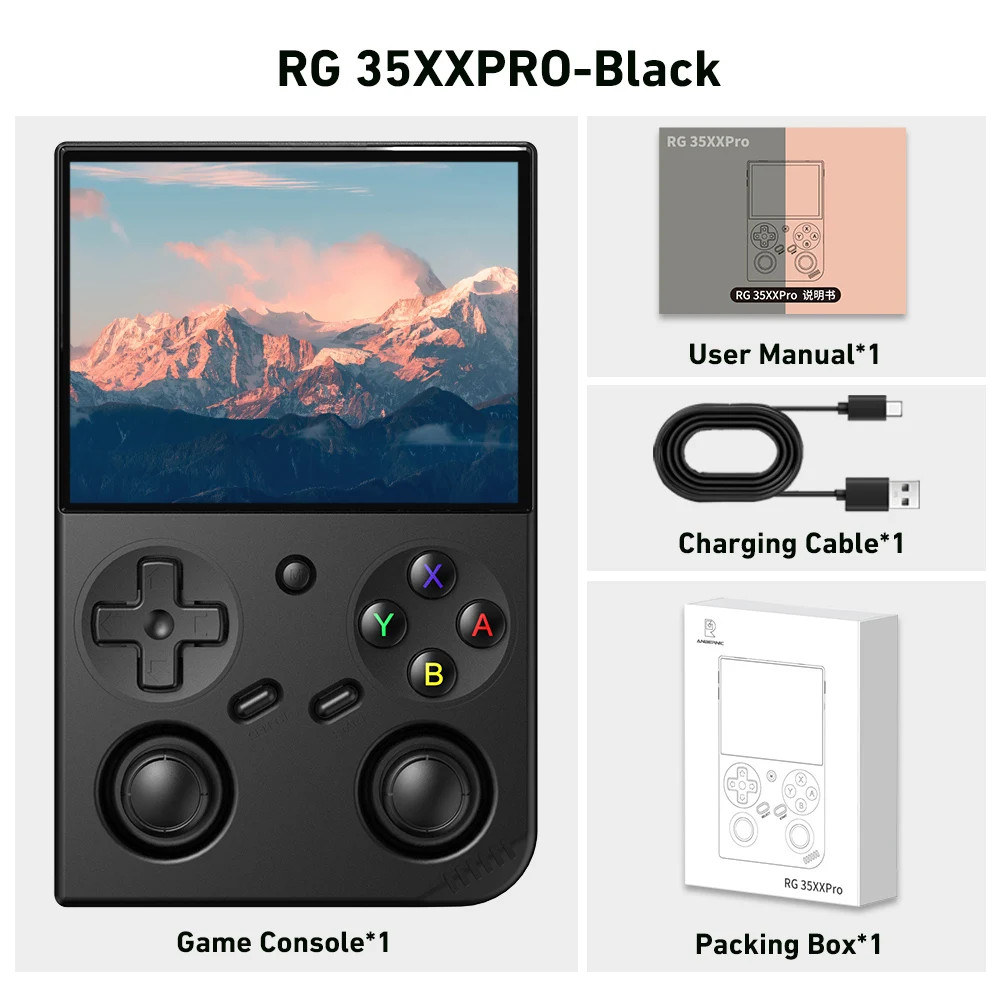

Photos from current listings. Actual item, color, and included accessories may vary.
ANBERNIC RG 35XXPRO Buying Guide
The ANBERNIC RG 35XXPRO is a horizontal Linux-based retro handheld built around a 3.5-inch IPS display and an Allwinner H700 quad-core ARM Cortex-A53 SoC, aimed at 8-bit through 16-bit emulation plus limited 32-bit and PSP-class play. The core trade-off is chipset class versus screen and shell quality: the H700 with 1GB DDR4 handles 2D systems cleanly but caps out on demanding 3D titles, so buyers must match the device to the console generations they actually intend to play. The decision rule: choose the RG 35XXPRO for portability-first 2D retro gaming, and step up to a more powerful handheld if N64, Dreamcast, Saturn, or PSP are priorities.
Key takeaways
- Allwinner H700 quad-core Cortex-A53 CPU with Mali-G31 MP2 GPU and 1GB LPDDR4 RAM sets a firm performance ceiling around 16-bit and light 32-bit emulation.
- 3.5-inch IPS panel at 640x480 delivers integer-scaled 4:3 output for NES, SNES, Genesis, and PS1 without shimmer or non-square pixels.
- Dual microSD architecture separates the OS card from the ROM library card, so a corrupted game card never bricks the firmware.
At a glance
- Category
- Console & Handheld Hardware
- Status
- Listings available
- Last updated
- Nov 29, 2026
Current offers
Highlights
- Allwinner H700 quad-core Cortex-A53 CPU with Mali-G31 MP2 GPU and 1GB LPDDR4 RAM sets a firm performance ceiling around 16-bit and light 32-bit emulation.
- 3.5-inch IPS panel at 640x480 delivers integer-scaled 4:3 output for NES, SNES, Genesis, and PS1 without shimmer or non-square pixels.
- Dual microSD architecture separates the OS card from the ROM library card, so a corrupted game card never bricks the firmware.
- Linux-based custom firmware (Anbernic OS, plus community builds like muOS and Knulli) is flashable and far more flexible than locked Android handhelds at this tier.
Best use cases
- Best fit: commuting and pocket-carry retro play of NES, SNES, Genesis, Game Boy, GBA, and PS1 — the 3.5-inch 4:3 IPS screen and H700 hit full speed on all of these.
- Best fit: tinkerers who want to reflash muOS or Knulli and curate a two-card setup; the Linux bootloader and dual-slot design reward firmware swapping.
- Wrong fit: buyers chasing N64, Dreamcast, Saturn, GameCube, or PSP libraries — the H700 drops frames and stutters on most of these; choose an RK3588-class or Android handheld instead.
- Wrong fit: users wanting built-in Wi-Fi, Bluetooth, or HDMI-out as standard — the base RG 35XXPRO omits these, so plan for a USB-C OTG adapter or pick a higher-tier model.
Buying tips
- Budget the microSD card separately: bundles ship with a 64GB card of unknown grade, and a name-brand A1/A2 card prevents save corruption and slow boot times.
- Match the card to the library: 64GB fits roughly the full 8/16-bit and PS1 sets, while 128GB is the practical floor if you add CD-based systems.
- Confirm the screen spec is the 3.5-inch 640x480 IPS version — the RG 35XX family uses this panel across variants, and the 4:3 ratio is what keeps retro scaling clean.
- Treat the H700 as a 2D-first chip: if more than a quarter of your planned library is 3D-era, reallocate budget to a stronger SoC rather than fighting frame drops.
Specs
| SoC Class | Allwinner H700 quad-core Cortex-A53 |
|---|---|
| Display | 3.5" IPS 640x480 4:3 |
| RAM | 1GB LPDDR4 |
| Storage Design | Dual microSD (OS + ROMs) |
Alternatives to compare
Related searches
What to check before buying
- Measure your pocket or pouch: the horizontal shell is roughly the size of a large phone plus grips, so a soft sleeve is the practical carry option.
- Confirm your charger: the device charges over USB-C, but use a standard 5V/1A–5V/2A source rather than a high-wattage PD brick to avoid charge-negotiation quirks.
- Decide your video-out need up front: base units lack HDMI, so if TV play matters, budget for a USB-C-to-HDMI adapter or choose a model with native HDMI.
- Check your ROM sourcing and legal position: the handheld ships with a loaded card, but long-term ownership means maintaining your own legally obtained ROM library.
FAQ
Data sources: eBay / Amazon listings and product attribute feeds. Updated Nov 29, 2026.
Some links on this page are affiliate links. If you buy after clicking one, we may earn a commission at no extra cost to you. This does not change which products appear here or their order. Affiliate disclosure.