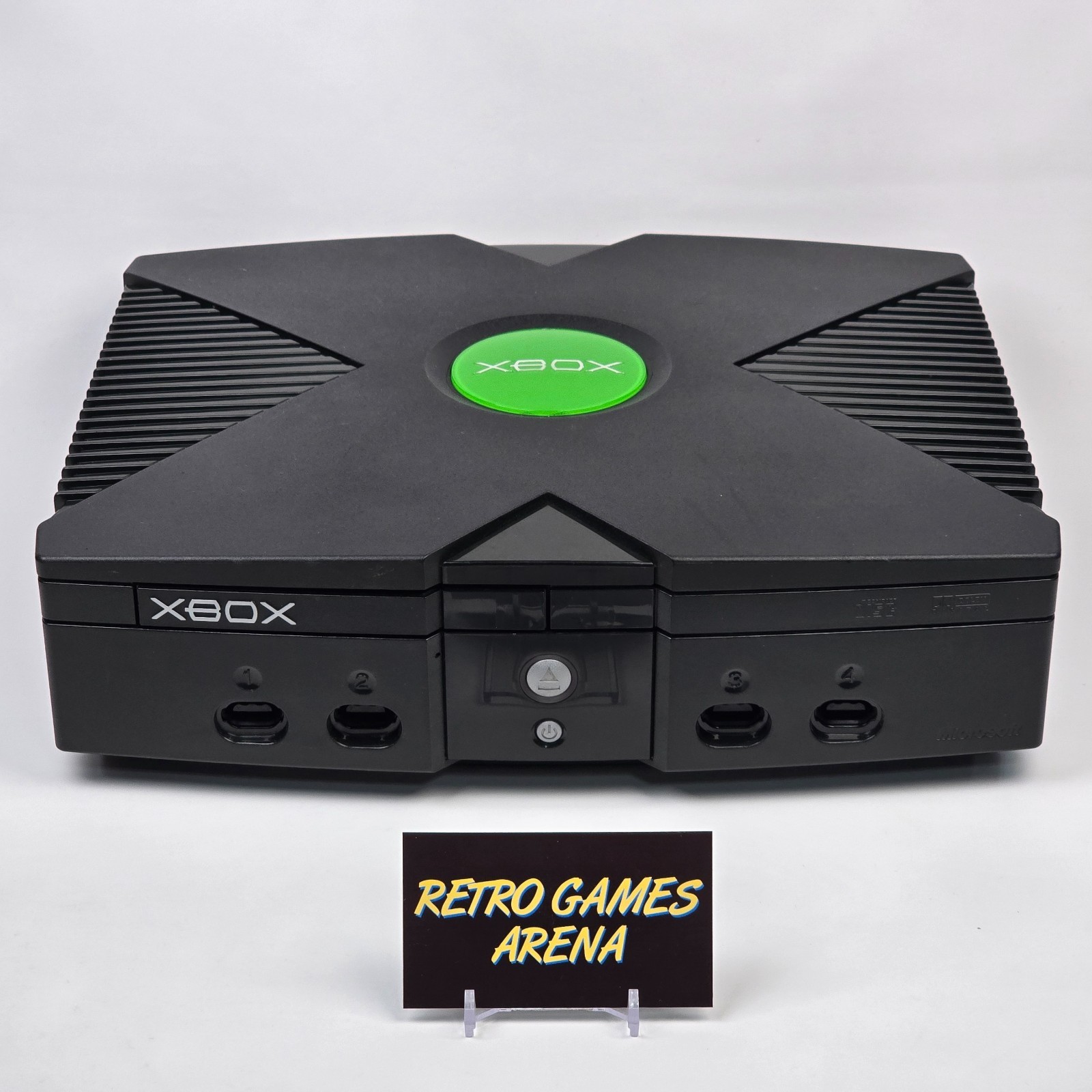

Photos from current listings. Actual item, color, and included accessories may vary.
Microsoft Xbox Buying Guide
Microsoft Xbox spans four console generations—original, Xbox 360, Xbox One, and Xbox Series X/S—each with distinct disc formats, online-service status, and controller compatibility. The core buying trade-off is backward compatibility and 4K performance versus price tier: Series S is all-digital 1440p, Series X adds a 4K UHD Blu-ray drive and 12 TFLOPS GPU.
Console Generation:Original / 360 / One / Series X|SGPU Performance:Series X 12 TFLOPS vs Series S 4 TFLOPSDisc Drive:4K UHD Blu-ray (X) vs none (S)Controller Connectivity:Bluetooth (One/Series) vs proprietary (360)
Typical price range$299.95
Key takeaways
- Xbox Series X delivers 12 TFLOPS GPU, 4K/120Hz output, 1TB NVMe SSD, and a 4K UHD Blu-ray drive; Series S is 4 TFLOPS all-digital at 1440p/120Hz with 512GB SSD.
- Xbox One X (6 TFLOPS, 4K) and One S (1.4 TFLOPS, 1080p) use external power bricks on early models and support 4K Blu-ray on One S/X only.
- Xbox 360 uses proprietary hard drives, 3-core Xenon CPU, and controllers without Bluetooth; Xbox One introduced Bluetooth-enabled controllers and HDMI passthrough.
At a glance
- Category
- Console & Handheld Hardware
- Status
- Listings available
- Last updated
- Nov 29, 2026
Current offers
Highlights
- Xbox Series X delivers 12 TFLOPS GPU, 4K/120Hz output, 1TB NVMe SSD, and a 4K UHD Blu-ray drive; Series S is 4 TFLOPS all-digital at 1440p/120Hz with 512GB SSD.
- Xbox One X (6 TFLOPS, 4K) and One S (1.4 TFLOPS, 1080p) use external power bricks on early models and support 4K Blu-ray on One S/X only.
- Xbox 360 uses proprietary hard drives, 3-core Xenon CPU, and controllers without Bluetooth; Xbox One introduced Bluetooth-enabled controllers and HDMI passthrough.
- Original Xbox (2001) uses 733MHz Pentium III, 8GB HDD, and DVD drive—online service is discontinued and only disc-based play works.
Best use cases
- Best fit: Series X for 4K TV owners who want a disc drive, 12 TFLOPS performance, and full backward compatibility to Xbox 360/One titles; skip Series S if you own physical discs.
- Best fit: Series S for 1080p/1440p budget setups and Game Pass digital libraries; skip it if you need a 4K Blu-ray player or maximum storage without expansion cards.
- Best fit: Refurbished Xbox 360 for cheap local multiplayer and disc-based classics; skip it for online play—Xbox 360 Live is discontinued and controllers lack Bluetooth.
- Wrong fit: Original Xbox for online or modern TV setups—it lacks HDMI, requires component/SCART adapters, and Xbox Live is permanently offline.
Buying tips
- Match console to TV: Series X/One X for 4K panels; Series S/One S for 1080p-1440p. Series S has no disc drive, so disc-based backward-compatible titles won't play.
- Controller generation matters: Xbox One and Series controllers use Bluetooth; Xbox 360 controllers use proprietary 2.4GHz wireless and require a PC receiver for use on computers.
- Storage expansion: Series X/S use proprietary Seagate expansion cards; Xbox One supports USB 3.0 external drives for games, while 360 uses proprietary internal drives.
- Backward compatibility: Series X/S play select Xbox 360 and Xbox One discs and digital titles; original Xbox backward compatibility is limited to a small curated list on Xbox One/Series.
Specs
| Console Generation | Original / 360 / One / Series X|S |
|---|---|
| GPU Performance | Series X 12 TFLOPS vs Series S 4 TFLOPS |
| Disc Drive | 4K UHD Blu-ray (X) vs none (S) |
| Controller Connectivity | Bluetooth (One/Series) vs proprietary (360) |
Alternatives to compare
Related searches
What to check before buying
- Measure TV stand or shelf clearance: Series X is 5.9×5.9×11.9 inches vertical; Series S is 2.9×5.9×7.9 inches—ensure ventilation space around vents.
- Confirm display inputs: Series X/S and One S/X use HDMI 2.1/2.0; original Xbox and 360 need HDMI (360 S/E) or component/SCART adapters for modern TVs.
- Verify controller pairing: Bluetooth-enabled Xbox One/Series controllers pair with PC/mobile; 360 controllers need a wireless receiver or wired USB connection.
- Check power standards: all Xbox consoles use region-specific AC adapters or internal PSUs; imported original Xbox/360 units may need a step-down transformer.
FAQ
Data sources: eBay / Amazon listings and product attribute feeds. Updated Nov 29, 2026.
Some links on this page are affiliate links. If you buy after clicking one, we may earn a commission at no extra cost to you. This does not change which products appear here or their order. Affiliate disclosure.