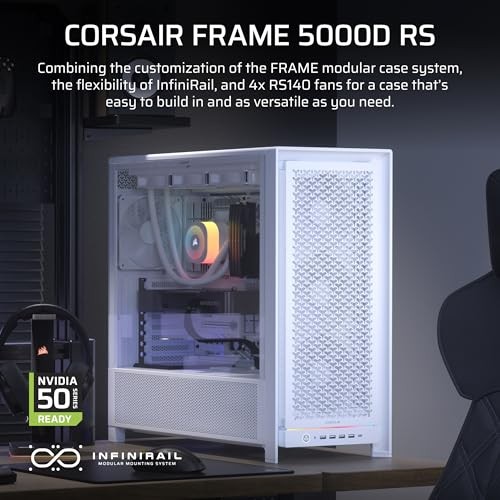

Photos from current listings. Actual item, color, and included accessories may vary.
Airflow PC Case Buying Guide
An airflow PC case prioritizes mesh front intakes, high CFM fan support, and unobstructed internal volume—the opposite of sound-dampened or solid-panel designs. The core trade-off is thermal headroom versus noise and dust ingress: mesh trades filtration and acoustics for lower component temperatures. The decision rule: pick a case with ≥50% front-panel perforation, support for 3× 120mm front intakes, and a GPU clearance of at least your card length plus 30mm for cable bend.
Key takeaways
- Mesh front panels with ≥50% perforation and no solid filter layer behind the mesh deliver the lowest intake restriction; removable fine-mesh filters add dust control at the cost of 10-15% airflow.
- Fan mount quantity and spacing matter more than stock fan count: three 120mm front intakes at 50-70 CFM each with a 140mm rear exhaust create positive pressure and reduce GPU temps by 5-8°C versus two-fan setups.
- GPU clearance is the binding constraint: mid-tower airflow cases typically support 330-400mm cards, but front fan brackets reduce usable length by 25-30mm when populated.
At a glance
- Category
- PC Cases & Cooling
- Last updated
- Nov 23, 2026
Current offers
Highlights
- Mesh front panels with ≥50% perforation and no solid filter layer behind the mesh deliver the lowest intake restriction; removable fine-mesh filters add dust control at the cost of 10-15% airflow.
- Fan mount quantity and spacing matter more than stock fan count: three 120mm front intakes at 50-70 CFM each with a 140mm rear exhaust create positive pressure and reduce GPU temps by 5-8°C versus two-fan setups.
- GPU clearance is the binding constraint: mid-tower airflow cases typically support 330-400mm cards, but front fan brackets reduce usable length by 25-30mm when populated.
- Modular frames like the Corsair FRAME 5000D RS allow reconfigurable motherboard trays and side-mount radiators, while fixed-layout cases like the Phanteks XT Pro offer simpler builds at lower cost.
Best use cases
- Best for high-wattage gaming builds (GPU ≥250W, CPU ≥125W TDP): choose a mesh-front mid-tower with 3× 120mm front intake mounts, top 360mm radiator support, and ≥160mm CPU cooler height.
- Best for multi-GPU or custom-loop builds: pick a modular full-tower with side radiator mounts and ≥8 PCIe slots; skip mid-towers with fixed trays that block 360mm front radiators when a 3.5-inch HDD cage is installed.
- Wrong fit for silent-office or bedroom builds: solid-panel or sound-dampened cases with restricted intakes will run fans faster and louder under load; choose a low-RPM airflow case with dust filters and fan curves capped at 800 RPM instead.
Buying tips
- Measure GPU length (including power connectors) and add 30mm clearance; confirm front fan bracket thickness does not reduce the published max GPU length below your card.
- Match fan mounts to radiator size: a 360mm radiator needs 3× 120mm spacing with ≥30mm top clearance for fans plus 30mm for motherboard VRM heatsinks.
- Prefer cases with ≥160mm CPU cooler clearance and ≥25mm cable-routing depth behind the motherboard tray; below 20mm, stiff 24-pin cables strain side panels.
- Check PSU shroud length: a 180mm ATX PSU plus 30mm cable bend needs ≥210mm shroud depth; short shrouds force cables into the main chamber and block bottom intake fans.
Specs
| Front Panel Type | Mesh / Perforated vs Solid |
|---|---|
| Front Fan Support | 3× 120mm / 2× 140mm typical |
| Max GPU Clearance | 330-400mm (minus 25mm w/ fans) |
| Radiator Support | Top 240/280mm; Front 280/360mm |
Related searches
What to check before buying
- Measure your desk or floor space: mid-towers typically run 450-500mm tall and 210-230mm wide; confirm clearance for side-panel removal and rear cable access.
- Verify motherboard form factor: ATX cases accept ATX, micro-ATX, and mini-ITX; E-ATX support requires ≥270mm tray width and is not universal on mid-towers.
- Confirm fan header count on your motherboard: 3 front + 1 rear + 2 top fans need 6 headers or a fan hub; low-end boards often have only 2-3.
- Check radiator and fan clearance with your CPU cooler: top-mounted 280mm radiators conflict with tall VRM heatsinks or 8-pin EPS cables on many mid-towers.
FAQ
Data sources: eBay / Amazon listings and product attribute feeds. Updated Nov 23, 2026.
Some links on this page are affiliate links. If you buy after clicking one, we may earn a commission at no extra cost to you. This does not change which products appear here or their order. Affiliate disclosure.