Meza Ignition Panel USB Review: Is It Right for Your Home Flight Sim Cockpit?
The Meza Ignition Panel USB adds keyed ignition, aircraft-style switches, and lighting, fuel, and avionics controls for MSFS2020 and X-Plane setups.
Last updated Oct 7, 2026
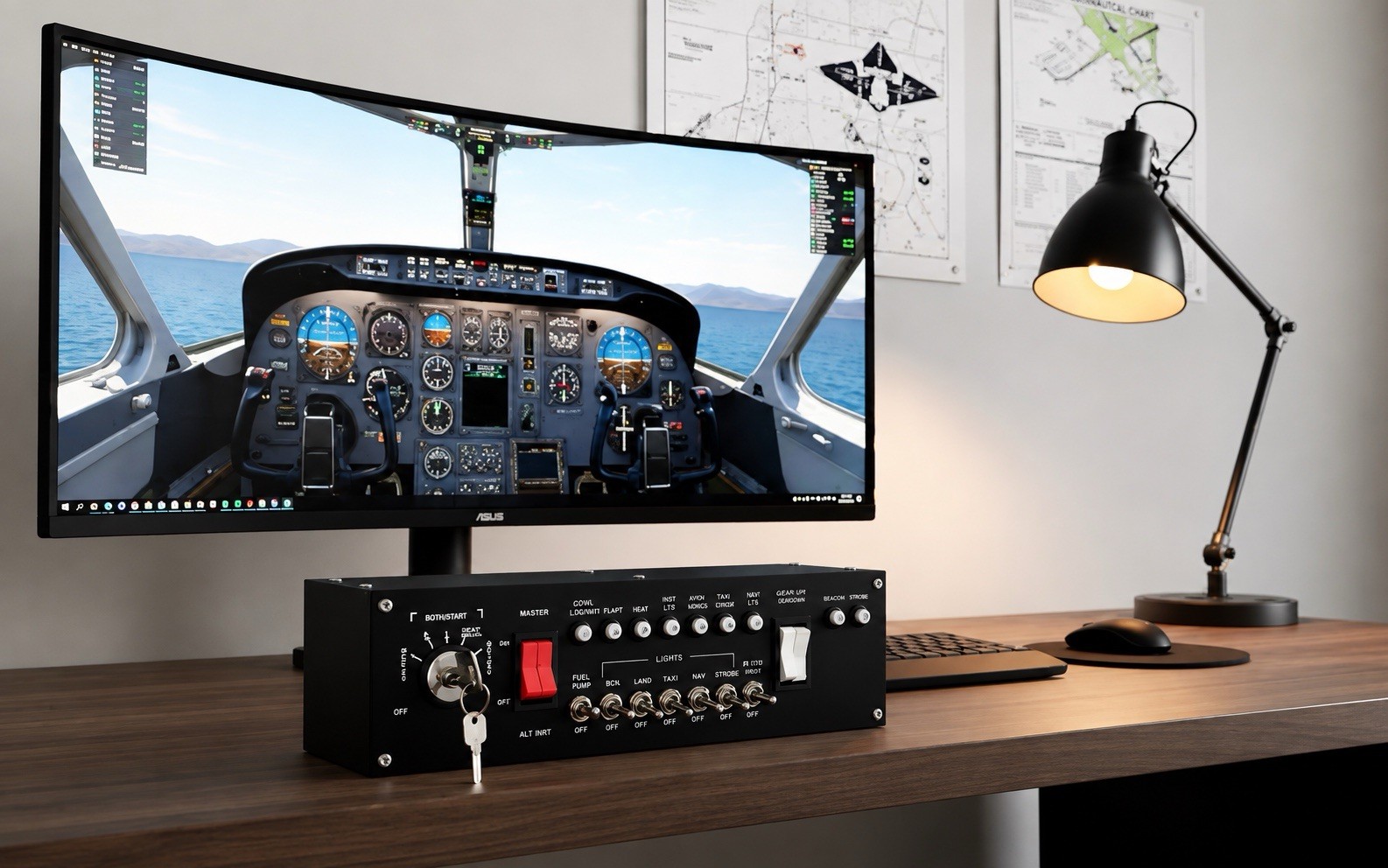
Meza Ignition Panel USB
$209.99Listed at review time
Original listing may be ended — you can still view it or find similar offers.
Affiliate disclosure: We may earn a commission if you buy through links on this page, at no extra cost to you. Confirm live price, stock, and return terms on the seller page. Affiliate disclosure.
Choosing flight sim panels & instruments comes down to one practical question: do you want broad cockpit coverage, or a dedicated physical control cluster for a specific aircraft function? The Meza Ignition Panel USB takes the focused route, adding a keyed ignition and aircraft-style switches for Microsoft Flight Simulator 2020 and X-Plane. That makes it especially relevant to simmers who want tactile controls in a desktop setup or a larger home cockpit.
Quick verdict
The Meza Ignition Panel USB makes sense when physical ignition, master, lighting, fuel pump, pitot heat, and avionics controls are the priority. Its USB plug-and-play design keeps the connection straightforward, while the listed PC compatibility supports the intended computer-based simulator setup.
The trade-off is scope. The named controls center on an ignition and switch panel, so shoppers specifically looking for an MFD flight simulator display or a flight sim autopilot panel should see this as a focused cockpit addition rather than a control solution for every instrument function.
Meza Ignition Panel USB for MSFS2020 X-Plane Home Cockpit Flight Simulator
The strongest reason to choose the Meza panel is its combination of a realistic keyed ignition switch and aircraft-style toggle switches. The metal construction, black finish, included ignition key, and USB cable give the setup a defined physical control point instead of relying entirely on on-screen controls.
A concrete limitation is the listed price of USD 209.99 for a panel centered on ignition and switch functions. That can be a sensible allocation for a home cockpit build, but it is a more deliberate purchase than a basic software control accessory. The panel is also listed for a maximum of one player, matching its individual cockpit-control role.
Who it suits
- MSFS2020 or X-Plane users who want dedicated controls for ignition, master switches, lighting, fuel pump, pitot heat, or avionics functions.
- Desktop simulator owners who want to add a physical control surface without describing a full cockpit build as a requirement.
- Home cockpit builders who can use a black metal USB panel and a keyed ignition as part of a broader aircraft-style layout.
What stands out from the listed details
USB plug-and-play connectivity is the clearest convenience feature. The control layout also covers several cockpit tasks in one unit: ignition, master switching, lighting, fuel pump, pitot heat, and avionics. That combination gives the Meza panel a more specific role than a generic game controller, while the included key and cable make the package feel oriented toward immediate physical setup.
Meaningful trade-offs
The Meza panel's appeal depends on wanting switches you can operate by touch. If your priority is an MFD, autopilot controls, or a broader set of home cockpit instruments, the ignition-panel format may not align with that particular build goal. Its listed compatibility is also tied to PC use and specifically names MSFS2020 and X-Plane, so the fit is clearest for those simulator environments.
Bottom line
For a PC-based MSFS2020 or X-Plane cockpit, the Meza Ignition Panel USB is a focused way to add keyed ignition and aircraft-style switch controls. Choose it for the physical interaction and named cockpit functions; pass on it when your main need is an MFD or autopilot-focused panel instead.
Meza Ignition Panel USB$209.99May be endedView on eBayFind Similar on eBay