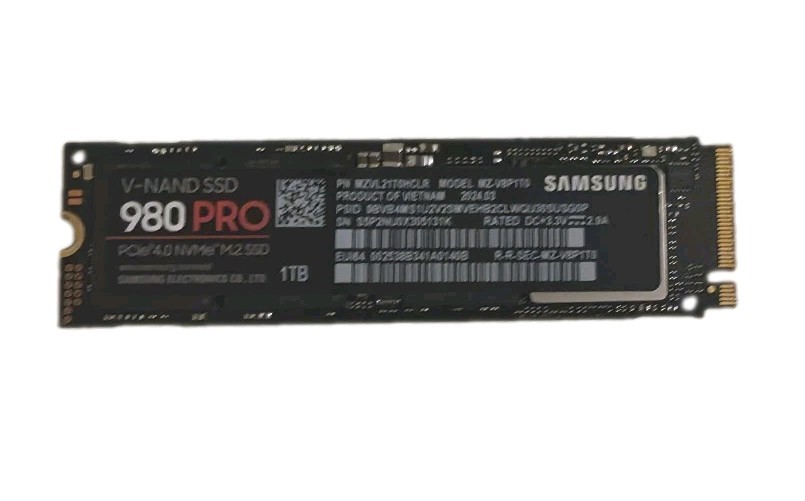

Photos from current listings. Actual item, color, and included accessories may vary.
Samsung MZ-V8P1T0 Buying Guide
The Samsung MZ-V8P1T0 is the model number for the 1TB Samsung 980 PRO, a PCIe 4.0 x4 M.2 2280 NVMe SSD built for high-speed consumer storage upgrades. The core trade-off is DRAM-cached TLC performance with sustained-write throttling versus cheaper DRAM-less or QLC drives that slow dramatically under long writes. Choose the 980 PRO for PS5 expansion, large game libraries, and sustained content work; skip it for budget bulk storage or legacy PCIe 3.0 systems where its ceiling is wasted.
Key takeaways
- PCIe 4.0 x4 interface with NVMe 1.3c delivers sequential reads up to ~7,000 MB/s, roughly double PCIe 3.0 drives and matching the PS5's minimum expansion requirement.
- 1TB TLC NAND with 1GB LPDDR4 DRAM cache and Samsung Elpis controller sustains far higher write speeds than DRAM-less QLC drives during large transfers.
- Endurance rated at 600 TBW for the 1TB model with a 5-year limited warranty — about 0.3 drive writes per day, adequate for gaming and mixed productivity.
At a glance
- Category
- PC Storage Upgrades
- Status
- Listings available
- Last updated
- Nov 24, 2026
Current offers
Highlights
- PCIe 4.0 x4 interface with NVMe 1.3c delivers sequential reads up to ~7,000 MB/s, roughly double PCIe 3.0 drives and matching the PS5's minimum expansion requirement.
- 1TB TLC NAND with 1GB LPDDR4 DRAM cache and Samsung Elpis controller sustains far higher write speeds than DRAM-less QLC drives during large transfers.
- Endurance rated at 600 TBW for the 1TB model with a 5-year limited warranty — about 0.3 drive writes per day, adequate for gaming and mixed productivity.
- Single-sided M.2 2280 (22 x 80 mm) PCB fits PS5 expansion, most laptops, and desktop M.2 slots; heatsink versions add height and may not fit tight laptop or console bays.
Best use cases
- Best fit: PS5 storage expansion — pick the 980 PRO 1TB with a low-profile M.2 heatsink, since Sony requires PCIe 4.0 and a heatsink in the expansion bay.
- Best fit: high-end desktop or laptop upgrade for large game libraries and video editing — choose the bare 980 PRO when the motherboard or laptop already has an M.2 heatsink or airflow.
- Wrong fit: legacy PCIe 3.0-only systems — skip the 980 PRO and buy a cheaper PCIe 3.0 drive, since the slot caps speed near 3,500 MB/s anyway.
- Wrong fit: cold bulk archive or NAS cache use — choose a higher-endurance drive or HDD for write-heavy 24/7 workloads instead of a consumer TLC SSD.
Buying tips
- Match the slot: the 980 PRO is M.2 2280 PCIe 4.0 x4; confirm your board or laptop supports NVMe M.2 (not SATA M.2) and that the slot is keyed M.
- For PS5, buy a version with a heatsink no taller than ~8 mm or add a separate low-profile heatsink; bare drives can overheat in the console bay.
- Capacity math: 1TB yields roughly 930 GiB usable after formatting; reserve 10-20% free space to preserve write speed and endurance.
- Verify firmware: early 980 PRO units need the latest firmware to fix a health-decline bug — update via Samsung Magician immediately after installation.
Specs
| Interface | PCIe 4.0 x4 NVMe 1.3c |
|---|---|
| Form Factor | M.2 2280 single-sided |
| NAND & DRAM | TLC NAND + 1GB LPDDR4 |
| Endurance | 600 TBW / 5-yr warranty |
Alternatives to compare
Related searches
What to check before buying
- Measure your M.2 slot: confirm 2280 (80 mm) length and single-sided clearance; some laptops only accept single-sided drives.
- Check platform generation: PCIe 4.0 CPU/chipset (AMD Ryzen 3000+, Intel 11th gen+) to reach full speed; PCIe 3.0 systems will run it at reduced speed.
- For PS5, confirm you have a heatsink solution under ~8 mm tall and the console's expansion slot is enabled in system settings.
- Verify you have the mounting screw and standoff for your motherboard or laptop, since bare OEM drives may not include them.
FAQ
Data sources: eBay / Amazon listings and product attribute feeds. Updated Nov 24, 2026.
Some links on this page are affiliate links. If you buy after clicking one, we may earn a commission at no extra cost to you. This does not change which products appear here or their order. Affiliate disclosure.