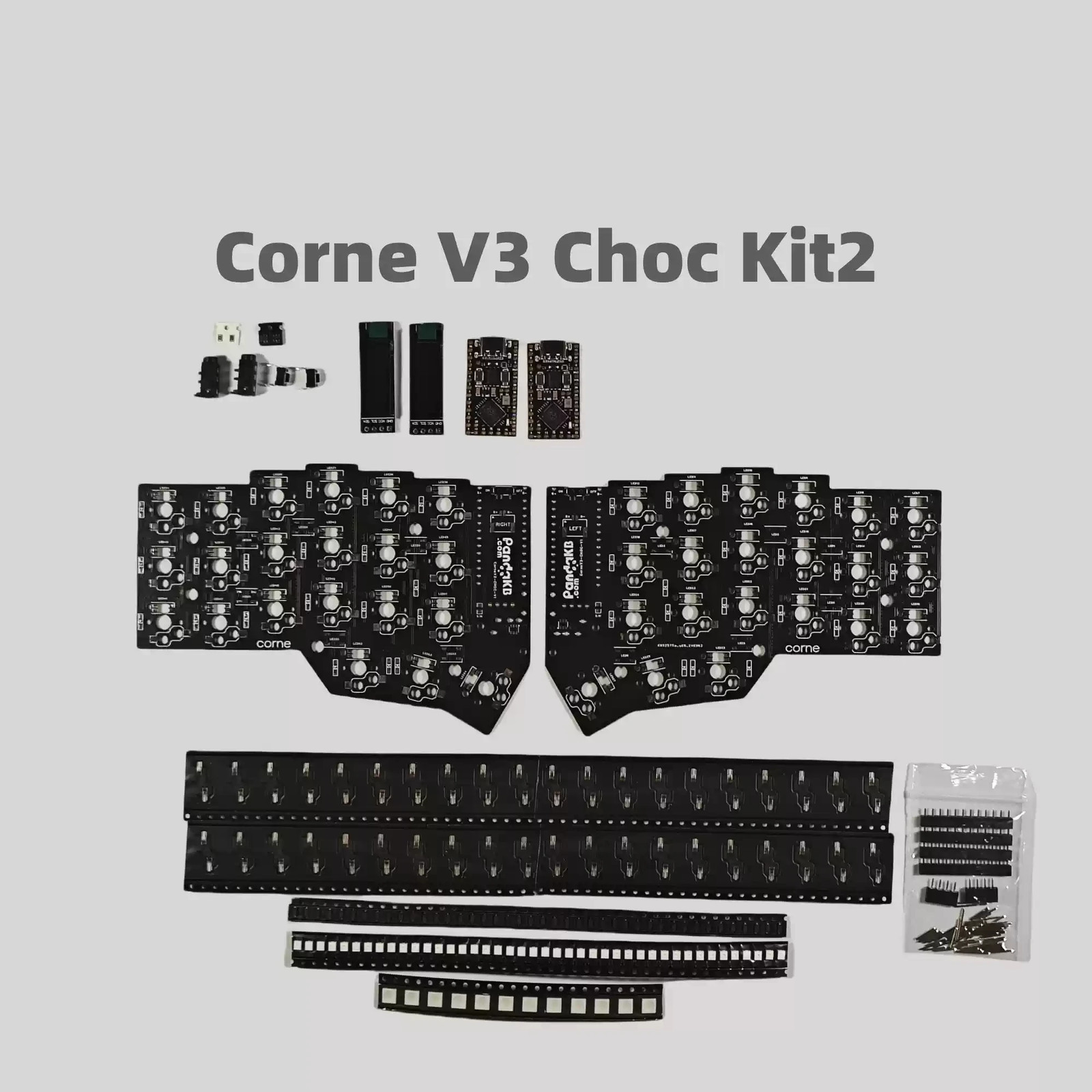

Photos from current listings. Actual item, color, and included accessories may vary.
Custom Mechanical Keyboard Kit Buying Guide
A custom mechanical keyboard kit is really a compatibility contract: you must lock in PCB layout, case mounting style, and plate material before buying a single switch. The most common mistake is buying a beautiful case first, then discovering the PCB only supports a 60% tray mount or that the plate is 1.5 mm and cannot accept 5-pin switches without clipping. Treat the PCB as the spine of the build and choose every other part to fit its footprint, USB connector position, and stabilizer standard.
Key takeaways
- PCB layout determines everything: 60%, 65%, 75%, TKL, and split boards like Corne V3 use different screw patterns, USB cutouts, and stabilizer counts, so cases and plates are never cross-compatible.
- Mounting style changes feel and sound: tray mount uses standoffs in the case, gasket mount floats the plate on foam or silicone strips, and top mount screws the plate to the case top—each needs a matching PCB and plate.
- Plate material and thickness control stiffness: 1.5 mm aluminum or brass is stiff and clacky, 1.5 mm polycarbonate or FR4 is flexible and quieter, and 5-pin switch support depends on plate cutout diameter.
At a glance
- Category
- Keyboard PCBs, Cases & Plates
- Last updated
- Nov 24, 2026
Current offers
Highlights
- PCB layout determines everything: 60%, 65%, 75%, TKL, and split boards like Corne V3 use different screw patterns, USB cutouts, and stabilizer counts, so cases and plates are never cross-compatible.
- Mounting style changes feel and sound: tray mount uses standoffs in the case, gasket mount floats the plate on foam or silicone strips, and top mount screws the plate to the case top—each needs a matching PCB and plate.
- Plate material and thickness control stiffness: 1.5 mm aluminum or brass is stiff and clacky, 1.5 mm polycarbonate or FR4 is flexible and quieter, and 5-pin switch support depends on plate cutout diameter.
- Switch footprint and hot-swap sockets are fixed on the PCB: MX vs Choc spacing differs, 3-pin vs 5-pin PCB holes decide whether you must clip switch legs, and Kailh or Gateron hot-swap sockets are rated for a limited number of insertions.
Best use cases
- Best fit for a first build: choose a 65% or 75% tray-mount kit with a hot-swap PCB, pre-installed stabilizers, and an aluminum plate so you can learn switch swapping without soldering.
- Best fit for a split ergonomic setup: a Corne V3 or similar split PCB kit with MX/Choc dual compatibility lets you build two halves with separate USB-C or TRRS connections, but you must buy two cases and two plates.
- Wrong fit to skip: buying a gasket-mount case and a tray-mount PCB together; the screw holes and plate supports will not line up, and no adapter exists for that mismatch.
Buying tips
- Check the PCB's stabilizer standard first: most 65% and larger boards use PCB-mount stabilizers, while many 60% trays use plate-mount, and mixing them causes rattle or impossible installation.
- Prioritize hot-swap sockets if you plan to change switches often; soldered PCBs are cheaper but require desoldering for every switch swap and are best reserved for a final build.
- Avoid 5-pin switch frustration by confirming the plate cutouts are at least 1.5 mm wide or the PCB has 5-pin holes; otherwise you must clip the two extra plastic legs on every switch.
- Size the case to the PCB's USB connector position: a left-side USB-C cutout will not align with a center-mounted PCB port, and there is no safe way to relocate the port without a new PCB.
Specs
| PCB Layout | 60% / 65% / 75% / TKL / Split |
|---|---|
| Switch Compatibility | MX 3-pin / 5-pin / Choc low-profile |
| Mounting Style | Tray / Gasket / Top mount |
| Plate Material | Aluminum / Brass / FR4 / PC |
Related searches
What to check before buying
- Measure your intended case interior and compare it to the PCB's official dimensions and screw hole coordinates; a few millimeters of difference means the standoffs will not align.
- Confirm your switch type matches the PCB footprint: MX-compatible boards accept Cherry, Gateron, and Kailh MX switches, while Choc-only boards accept only low-profile Kailh Choc switches.
- Check the plate file or included plate against your layout: a 65% plate will not fit a 60% PCB, and a split Corne plate is two separate pieces, not one.
- Verify the kit includes or excludes stabilizers, switches, and keycaps; most PCB kits ship bare, so budget for a stabilizer set, a switch pack, and a keycap set that matches your layout.
FAQ
Data sources: eBay / Amazon listings and product attribute feeds. Updated Nov 24, 2026.
Some links on this page are affiliate links. If you buy after clicking one, we may earn a commission at no extra cost to you. This does not change which products appear here or their order. Affiliate disclosure.