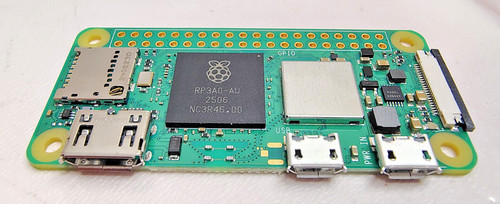

Photos from current listings. Actual item, color, and included accessories may vary.
Raspberry Pi Zero Wh Buying Guide
The Raspberry Pi Zero WH is a pre-soldered-header variant of the Zero W, combining a 1 GHz single-core ARM11 CPU, 512 MB RAM, and 2.4 GHz Wi-Fi/Bluetooth 4.1 in a 65 × 30 mm board. The core trade-off is soldering convenience versus raw performance: the WH saves you a 40-pin header job, but every Zero-tier board stays limited by single-core CPU and 512 MB RAM. Buy the WH only if you need GPIO access without soldering; skip it if your workload needs multi-core throughput or more memory.
Median $41.49
Key takeaways
- Zero WH = Zero W + pre-soldered 40-pin male header; identical Broadcom BCM2835 SoC, 1 GHz single-core, 512 MB LPDDR2.
- Zero W family (W, WH) adds 2.4 GHz 802.11 b/g/n Wi-Fi and Bluetooth 4.1; the plain Zero lacks both radios.
- 40-pin GPIO is unpopulated on base Zero/W and pre-soldered on WH, matching full-size Pi HAT pinout and 3.3 V logic.
At a glance
- Category
- Microcontrollers & Dev Boards
- Last updated
- Nov 25, 2026
Current offers
Highlights
- Zero WH = Zero W + pre-soldered 40-pin male header; identical Broadcom BCM2835 SoC, 1 GHz single-core, 512 MB LPDDR2.
- Zero W family (W, WH) adds 2.4 GHz 802.11 b/g/n Wi-Fi and Bluetooth 4.1; the plain Zero lacks both radios.
- 40-pin GPIO is unpopulated on base Zero/W and pre-soldered on WH, matching full-size Pi HAT pinout and 3.3 V logic.
- Micro-USB OTG data port and micro-USB power input; no Ethernet, no USB-A host ports, no onboard audio jack.
Best use cases
- Best fit: solder-free GPIO projects — sensor hats, relay boards, LED matrices — where a pre-attached 40-pin header saves assembly time.
- Best fit: headless Wi-Fi nodes (MQTT sensors, Pi-hole, camera streamers) that fit in 65 × 30 mm and run from a 5 V micro-USB supply.
- Wrong fit: desktop, browser, or multi-service workloads — 512 MB RAM and a single-core CPU choke on Chromium and heavy Docker stacks.
- Wrong fit: projects needing USB-A ports, Gigabit Ethernet, or 5 GHz Wi-Fi — step up to Pi 4/5 or add a USB hub and adapter.
Buying tips
- Pick WH over Zero W only when you will use GPIO and lack soldering tools; otherwise a Zero W plus your own header costs less and is equally capable.
- Budget a 5 V/2.5 A micro-USB supply and a microSD card (8–32 GB, A1/A2 rated); the board has no storage and no bundled PSU.
- For Wi-Fi range, plan an external USB Wi-Fi adapter via the OTG port if the 2.4 GHz onboard radio is weak through walls.
- Check header orientation: WH ships with the 40-pin male header soldered on the component side, so HATs mount directly; tall hats may need spacers.
Specs
| SoC / CPU | BCM2835, 1 GHz single-core ARM11 |
|---|---|
| RAM | 512 MB LPDDR2 |
| Wireless | 2.4 GHz Wi-Fi b/g/n + BT 4.1 |
| GPIO Header | 40-pin male, pre-soldered (WH) |
Related searches
What to check before buying
- Measure your enclosure or HAT footprint: board is 65 × 30 mm; pre-soldered header adds ~8.5 mm height above the PCB.
- Confirm your project needs 3.3 V GPIO logic (not 5 V) and that your HAT or sensor matches the 40-pin layout.
- Verify you have a 5 V micro-USB power source rated at least 2.5 A and a microSD card ready before first boot.
- Check Wi-Fi environment: 2.4 GHz only; if your router is 5 GHz-only, add a USB adapter or choose a different board.
FAQ
Data sources: eBay / Amazon listings and product attribute feeds. Updated Nov 25, 2026.
Some links on this page are affiliate links. If you buy after clicking one, we may earn a commission at no extra cost to you. This does not change which products appear here or their order. Affiliate disclosure.