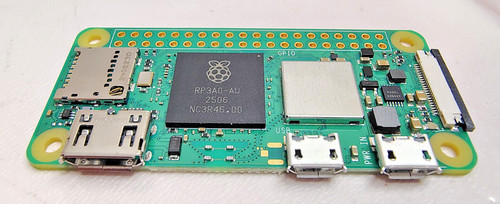

Photos from current listings. Actual item, color, and included accessories may vary.
Raspberry Pi Zero W Buying Guide
The Raspberry Pi Zero W is a tiny, low-cost Linux computer based on the Broadcom BCM2835 with 512MB RAM and 2.4GHz 802.11n Wi-Fi, while the Zero 2 W upgrades to a quad-core BCM2710A1 with 512MB RAM for roughly 3-5x the CPU performance. The key trade-off is single-core BCM2835 vs quad-core BCM2710A1 and micro-USB OTG-only connectivity that requires adapters for standard peripherals. Buy the Zero 2 W for any new build needing real compute; choose the original Zero W only for legacy projects pinned to armv6 compatibility.
Key takeaways
- Original Zero W uses BCM2835 single-core ARMv6 at 1GHz; Zero 2 W uses BCM2710A1 quad-core Cortex-A53 at 1GHz with 512MB LPDDR2.
- Both boards expose a 40-pin GPIO header (unpopulated by default) plus micro-USB OTG data and micro-USB power-only ports.
- Wireless is 2.4GHz 802.11 b/g/n and Bluetooth 4.1 on both; there is no 5GHz Wi-Fi or Bluetooth 5 on either model.
At a glance
- Category
- Microcontrollers & Dev Boards
- Last updated
- Nov 25, 2026
Current offers
Highlights
- Original Zero W uses BCM2835 single-core ARMv6 at 1GHz; Zero 2 W uses BCM2710A1 quad-core Cortex-A53 at 1GHz with 512MB LPDDR2.
- Both boards expose a 40-pin GPIO header (unpopulated by default) plus micro-USB OTG data and micro-USB power-only ports.
- Wireless is 2.4GHz 802.11 b/g/n and Bluetooth 4.1 on both; there is no 5GHz Wi-Fi or Bluetooth 5 on either model.
- Zero 2 W adds a metal-shielded RF module and runs cooler under load, but keeps the same 65mm x 30mm board footprint.
Best use cases
- Best fit: headless IoT sensors, Pi-hole DNS, and camera traps — pick Zero 2 W for headroom and better thermal behavior under sustained load.
- Best fit: retro emulation up to 16-bit consoles and simple Home Assistant nodes — Zero 2 W handles these; original Zero W struggles with N64 or heavy scripts.
- Wrong fit: desktop replacement, 4K video, or machine-learning inference — neither Zero has the RAM or GPU; step up to a Pi 4/5 instead.
- Wrong fit: projects needing full-size USB or Ethernet out of the box — both Zero boards require an OTG adapter or hub; choose a Pi 3/4 for native ports.
Buying tips
- Buy the Zero 2 W unless your code depends on ARMv6 binaries — it costs little more and delivers roughly 3-5x multi-core throughput.
- Confirm the listing specifies 'Zero 2 W' vs 'Zero W'; they share the same form factor but are not interchangeable for CPU-bound workloads.
- If you need GPIO pins immediately, buy a pre-soldered header version or budget for a 40-pin header and soldering — bare boards ship unpopulated.
- Plan for a micro-USB OTG adapter and a 5V/2.5A micro-USB power supply; the Zero 2 W draws more current under load than the original Zero W.
Specs
| SoC Generation | Zero W: BCM2835 ARMv6 | Zero 2 W: BCM2710A1 |
|---|---|
| CPU Cores | Zero W: 1x 1GHz | Zero 2 W: 4x 1GHz |
| RAM | 512MB LPDDR2 (both models) |
| Wireless | 2.4GHz 802.11n Wi-Fi + BT 4.1 |
Related searches
What to check before buying
- Measure your enclosure: both boards are 65mm x 30mm with mounting holes at 58mm x 23mm spacing — cases for full-size Pis will not fit.
- Confirm power: use a regulated 5V/2.5A micro-USB supply; underpowered chargers cause Wi-Fi dropouts and SD card corruption on both models.
- Check storage: a quality 8GB+ microSD card is required; the Zero 2 W benefits from A1/A2-rated cards for faster boot and swap.
- Verify connectivity needs: onboard 2.4GHz Wi-Fi only — for 5GHz or Ethernet, add a USB adapter via OTG or choose a different Pi model.
FAQ
Data sources: eBay / Amazon listings and product attribute feeds. Updated Nov 25, 2026.
Some links on this page are affiliate links. If you buy after clicking one, we may earn a commission at no extra cost to you. This does not change which products appear here or their order. Affiliate disclosure.