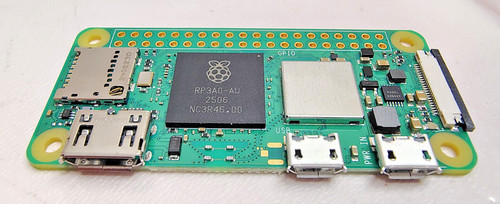

Photos from current listings. Actual item, color, and included accessories may vary.
Raspberry Pi Zero Buying Guide
The Raspberry Pi Zero family is a line of ultra-compact single-board computers (65mm × 30mm) that trade I/O and RAM for size, power draw, and cost, making them ideal for embedded, wearable, and space-constrained projects. The core buying decision is generation and wireless capability: the original Zero (v1.3) and Zero W use a single-core BCM2835 with 512MB RAM, while the Zero 2 W uses a quad-core BCM2710A1 with 512MB RAM for roughly 4–5× the CPU performance. Choose Zero 2 W for any new build needing modern software support or compute headroom; choose the older Zero/Zero W only for legacy compatibility, lowest possible power draw, or projects already designed around the single-core footprint.
Median $41.49
Key takeaways
- Zero 2 W uses a quad-core 64-bit BCM2710A1 at 1GHz vs single-core 32-bit BCM2835 at 1GHz on Zero v1.3 and Zero W—roughly 4–5× CPU throughput.
- All Zero models share 512MB LPDDR2 RAM, a microSD slot, micro-USB OTG data port, micro-USB power port, and a 40-pin unpopulated GPIO header (solder your own or buy pre-soldered).
- Zero 2 W adds dual-band 2.4/5GHz Wi-Fi and Bluetooth 4.2 BLE; Zero W has 2.4GHz Wi-Fi and Bluetooth 4.1; Zero v1.3 has no wireless radio at all.
At a glance
- Category
- Microcontrollers & Dev Boards
- Last updated
- Nov 25, 2026
Current offers
Highlights
- Zero 2 W uses a quad-core 64-bit BCM2710A1 at 1GHz vs single-core 32-bit BCM2835 at 1GHz on Zero v1.3 and Zero W—roughly 4–5× CPU throughput.
- All Zero models share 512MB LPDDR2 RAM, a microSD slot, micro-USB OTG data port, micro-USB power port, and a 40-pin unpopulated GPIO header (solder your own or buy pre-soldered).
- Zero 2 W adds dual-band 2.4/5GHz Wi-Fi and Bluetooth 4.2 BLE; Zero W has 2.4GHz Wi-Fi and Bluetooth 4.1; Zero v1.3 has no wireless radio at all.
- Camera-ready models include a narrower 22-pin FPC CSI connector (vs 15-pin on full-size Pi boards), requiring a Zero-specific camera ribbon cable.
Best use cases
- Best fit: Zero 2 W for RetroPie emulation up to 16-bit consoles, lightweight Linux desktops, and Wi-Fi sensor nodes—its quad-core CPU handles these where the single-core Zero stutters.
- Best fit: Zero v1.3 for USB-gadget projects (keyboard emulation, network adapters) and ultra-low-power battery builds where wireless radios would add idle drain.
- Wrong fit: Any Zero for 4K video playback, machine-learning inference, or multi-service home servers—step up to a Raspberry Pi 4/5 or a CM4 carrier board instead.
- Wrong fit: Zero W/2 W in metal enclosures without an external antenna—the onboard PCB antenna is severely attenuated; use a board with an external antenna connector or a plastic case.
Buying tips
- Match the camera connector: Zero boards use a 22-pin 0.5mm pitch CSI FPC, not the 15-pin cable from full-size Pi cameras—buy a Zero-specific ribbon or the camera won't attach.
- For GPIO work, budget for soldering a 40-pin 2.54mm header or buy a pre-soldered variant; the bare board ships with unpopulated through-holes only.
- Power the board through the micro-USB 'PWR IN' port (not the OTG data port) with a 5V/2.5A supply; the Zero 2 W can draw up to ~600mA under load and browns out on weak chargers.
- Choose Zero 2 W over Zero W for any project running a current Raspberry Pi OS image—the single-core Zero W is effectively legacy for modern browsers and Python packages.
Specs
| SoC / CPU Cores | BCM2835 1-core vs BCM2710A1 4-core |
|---|---|
| RAM | 512MB LPDDR2 (all Zero models) |
| Wireless | None / 2.4GHz / Dual-band 2.4+5GHz |
| Camera Connector | 22-pin 0.5mm CSI FPC (Zero-specific) |
Related searches
What to check before buying
- Measure your enclosure or project footprint: the board is 65mm × 30mm × 5mm; add clearance for USB and microSD plugs protruding from the edges.
- Confirm your camera module uses the 22-pin Zero FPC connector; standard 15-pin Pi camera cables require an adapter.
- Verify your power source delivers a clean 5V at 2.5A via micro-USB, and plan for a heatsink or airflow if the Zero 2 W runs sustained loads.
- Check whether you need wireless: Zero v1.3 has none, and adding a USB Wi-Fi dongle via the single OTG port consumes your only data port unless you use a hub.
FAQ
Data sources: eBay / Amazon listings and product attribute feeds. Updated Nov 25, 2026.
Some links on this page are affiliate links. If you buy after clicking one, we may earn a commission at no extra cost to you. This does not change which products appear here or their order. Affiliate disclosure.