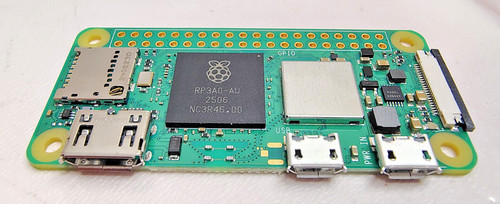

Photos from current listings. Actual item, color, and included accessories may vary.
Raspberry Pi 0 W Buying Guide
The Raspberry Pi Zero W is a 65mm × 30mm single-board computer built around a 1GHz ARM11 core with 512MB RAM and integrated 802.11b/g/n Wi-Fi plus Bluetooth 4.1. Its defining trade-off is ultra-low power and tiny footprint versus limited I/O and a single-core CPU that cannot match multi-core Pi 4/5 boards for desktop or heavy server workloads. Buy the Zero W when you need a solder-free, network-connected sensor node or compact retro-console build; skip it for any task requiring USB 3.0, Gigabit Ethernet, or sustained CPU-heavy processing.
Key takeaways
- Zero W vs Zero 2 W: the original uses a single-core 1GHz ARM11 (BCM2835) with 512MB RAM, while the Zero 2 W uses a quad-core 1GHz Cortex-A53 (BCM2710A1) with 512MB RAM and delivers roughly 5× the multi-threaded throughput.
- Wireless: Zero W ships with 2.4GHz 802.11b/g/n Wi-Fi and Bluetooth 4.1/BLE; the Zero 2 W upgrades to Bluetooth 4.2 and adds a pre-soldered shielded radio module, improving RSSI and reducing interference.
- Physical: 65mm × 30mm × 5mm board with two 40-pin unpopulated GPIO headers (0.1" pitch) and a micro-USB OTG port; you need a 40-pin header solder kit or a pre-soldered variant to use HATs and pHATs.
At a glance
- Category
- Microcontrollers & Dev Boards
- Last updated
- Nov 25, 2026
Current offers
Highlights
- Zero W vs Zero 2 W: the original uses a single-core 1GHz ARM11 (BCM2835) with 512MB RAM, while the Zero 2 W uses a quad-core 1GHz Cortex-A53 (BCM2710A1) with 512MB RAM and delivers roughly 5× the multi-threaded throughput.
- Wireless: Zero W ships with 2.4GHz 802.11b/g/n Wi-Fi and Bluetooth 4.1/BLE; the Zero 2 W upgrades to Bluetooth 4.2 and adds a pre-soldered shielded radio module, improving RSSI and reducing interference.
- Physical: 65mm × 30mm × 5mm board with two 40-pin unpopulated GPIO headers (0.1" pitch) and a micro-USB OTG port; you need a 40-pin header solder kit or a pre-soldered variant to use HATs and pHATs.
- Video/I/O: mini-HDMI output (1080p30 max), CSI-2 camera connector, and microSD storage; no analog audio jack, no USB-A host ports, and no onboard Ethernet — every wired peripheral needs a micro-USB OTG adapter or powered hub.
Best use cases
- Best fit: battery-powered IoT sensor nodes (temperature, humidity, air quality) that transmit over MQTT/Wi-Fi — the 1GHz ARM11 at 0.5–1.2W typical is ideal where a Pi 4 would drain the pack.
- Best fit: compact retro-gaming handhelds or TV dongles running RetroPie/Recalbox up to 16-bit consoles — pair with a mini-HDMI adapter and a 16GB–32GB microSD; skip for N64/PS1 emulation, which needs Zero 2 W or a Pi 4.
- Wrong fit: NAS, Docker hosts, or multi-user web servers — the single-core CPU and 512MB RAM choke on concurrent processes; choose a Pi 4/5 with 4GB+ RAM and Gigabit Ethernet instead.
- Wrong fit: any build needing full-size USB-A ports or wired Ethernet without adapters — the Zero W requires a micro-USB OTG adapter or powered hub for every USB device, adding bulk and failure points.
Buying tips
- Pick the Zero 2 W (quad-core Cortex-A53) over the original Zero W unless you specifically need the lower idle power or already own 32-bit ARMv6 binaries; the Zero 2 W is backward-compatible and roughly 5× faster in multi-threaded work.
- Buy a pre-soldered 40-pin header variant if you plan to use HATs or pHATs; unsoldered boards require a 2.54mm pitch header and soldering iron, and cold joints are the top cause of GPIO failures.
- Budget a 5V/2.5A micro-USB power supply and a quality microSD card (16GB–32GB, A1/A2 rated); undervoltage from weak chargers is the most common cause of Wi-Fi dropouts and SD corruption on Zero boards.
- For camera projects, confirm you have the narrower 22-pin to 15-pin CSI ribbon (Zero-specific) — standard Pi camera cables do not fit the Zero’s smaller CSI connector without an adapter.
Specs
| CPU Core | Single-core 1GHz ARM11 (BCM2835) |
|---|---|
| RAM | 512MB LPDDR2 |
| Wireless | 2.4GHz 802.11b/g/n + BT 4.1 |
| Board Size | 65mm × 30mm × 5mm |
Related searches
What to check before buying
- Measure your enclosure or HAT footprint: the Zero W is 65mm × 30mm, so any case or pHAT designed for a full-size 85mm × 56mm Pi will not fit without an adapter plate.
- Confirm you have a 2.4GHz Wi-Fi network — the Zero W radio is 2.4GHz only; 5GHz-only routers will leave the board offline unless you add a USB Wi-Fi adapter.
- Check your power source delivers a stable 5V at 2.5A via micro-USB; battery packs with auto-shutoff or weak 1A ports cause brownouts during Wi-Fi transmission.
- Plan for micro-USB OTG adapters or a powered hub for every USB peripheral (keyboard, mouse, Ethernet dongle), since the board has only one micro-USB data port and no USB-A.
FAQ
Data sources: eBay / Amazon listings and product attribute feeds. Updated Nov 25, 2026.
Some links on this page are affiliate links. If you buy after clicking one, we may earn a commission at no extra cost to you. This does not change which products appear here or their order. Affiliate disclosure.