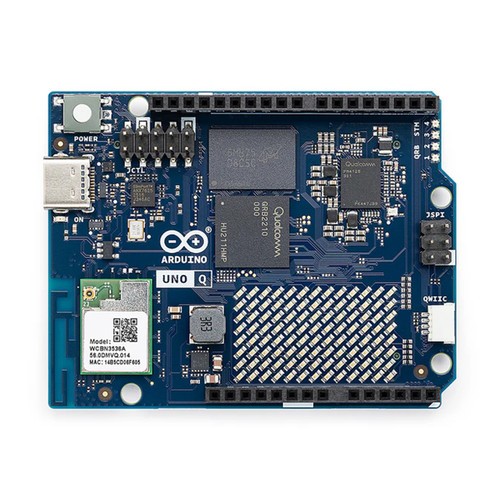

Photos from current listings. Actual item, color, and included accessories may vary.
Arduino ABX00162 Buying Guide
The Arduino ABX00162 is the UNO Q hybrid board, pairing a Qualcomm QRB2210 Linux application processor with an STM32U585 real-time microcontroller in the classic UNO form factor. The core trade-off is dual-architecture complexity versus single-core simplicity: you gain AI vision, wireless IoT, and full Linux in one board, but must manage inter-processor communication and a non-5V-tolerant I/O scheme. The clear decision rule: buy it only if your project needs Linux-class vision or connectivity plus hard real-time control; otherwise a standard UNO R3/R4 or a plain STM32 board is the cheaper, simpler choice.
Key takeaways
- Dual-processor split: Qualcomm QRB2210 (quad-core Arm Cortex-A53, Linux/Android) handles AI vision and networking while STM32U585 (Cortex-M33, 160 MHz, 2 MB flash) runs deterministic real-time control.
- UNO form factor with 5V-tolerant digital pins on the STM32 side preserves shield compatibility, but analog and high-speed I/O have voltage and current limits that differ from classic 5V UNO boards.
- Built-in Wi-Fi 5 and Bluetooth 5.1 plus camera/display interfaces on the QRB2210 side make it a standalone AI-vision IoT node, not just a microcontroller.
At a glance
- Category
- Microcontrollers & Dev Boards
- Status
- Listings available
- Last updated
- Nov 25, 2026
Current offers
Highlights
- Dual-processor split: Qualcomm QRB2210 (quad-core Arm Cortex-A53, Linux/Android) handles AI vision and networking while STM32U585 (Cortex-M33, 160 MHz, 2 MB flash) runs deterministic real-time control.
- UNO form factor with 5V-tolerant digital pins on the STM32 side preserves shield compatibility, but analog and high-speed I/O have voltage and current limits that differ from classic 5V UNO boards.
- Built-in Wi-Fi 5 and Bluetooth 5.1 plus camera/display interfaces on the QRB2210 side make it a standalone AI-vision IoT node, not just a microcontroller.
- Inter-processor link (RPC over shared memory/UART) is the critical integration layer; performance depends on how you partition Linux-side vision from MCU-side actuation.
Best use cases
- Best fit: AI vision at the edge — pick the UNO Q when you need camera inference (object detection, OCR) on Linux plus immediate motor/sensor actuation from the STM32; skip plain UNO R4 and ESP32 boards that lack Linux-class vision throughput.
- Best fit: connected IoT gateways needing real-time I/O — use the QRB2210 for MQTT/cloud/UI and the STM32U585 for interrupt-driven control; skip single-core MCUs if your loop must run while Linux handles networking.
- Wrong fit: simple 5V sensor/relay projects — choose UNO R3 or R4 instead, because the UNO Q's 3.3V-centric high-speed domain and dual-boot complexity add cost and pin-voltage caveats with no benefit.
- Wrong fit: bare-metal ultra-low-power battery nodes — pick an STM32U5 or ESP32-C6 board alone; the QRB2210 Linux side draws far more power than a duty-cycled MCU.
Buying tips
- Budget for companion parts: the UNO Q needs a USB-C power supply sized for the QRB2210 (Linux SoC) plus a microSD card for the Linux image — the STM32 alone will not boot the system.
- Match shields by voltage: verify each shield's logic level; 5V-only shields may need level shifting on the high-speed/analog pins even though many digital pins are 5V tolerant.
- Plan your processor partition early: put latency-critical control on the STM32U585 (hardware timers, ADC, PWM) and keep vision/network stacks on the QRB2210 to avoid RPC latency surprises.
- Choose storage and cooling deliberately: a class-10 or better microSD (16 GB+) is the practical minimum for Linux, and sustained AI inference benefits from a heatsink on the QRB2210.
Specs
| Architecture | Hybrid MPU + MCU (Linux + RTOS) |
|---|---|
| Linux SoC | Qualcomm QRB2210 quad Cortex-A53 |
| MCU | STM32U585 Cortex-M33 160 MHz |
| Form Factor | UNO headers, 5V-tolerant digital I/O |
Alternatives to compare
Related searches
What to check before buying
- Confirm you have a USB-C PD power source with enough current for the Linux SoC plus a microSD card (16 GB+, class 10) for the Linux image before first boot.
- Measure your enclosure and shield stack: the UNO Q keeps UNO mounting holes, but the QRB2210 heatsink and connectors add height — check clearance above the board.
- Audit every shield and sensor for 3.3V versus 5V logic and current draw; list which pins land on the STM32 versus the Linux side.
- Verify your workflow supports dual-target development: Arduino IDE/sketch flow for the STM32 plus Linux/Python tooling for the QRB2210, including the RPC bridge library.
FAQ
Data sources: eBay / Amazon listings and product attribute feeds. Updated Nov 25, 2026.
Some links on this page are affiliate links. If you buy after clicking one, we may earn a commission at no extra cost to you. This does not change which products appear here or their order. Affiliate disclosure.