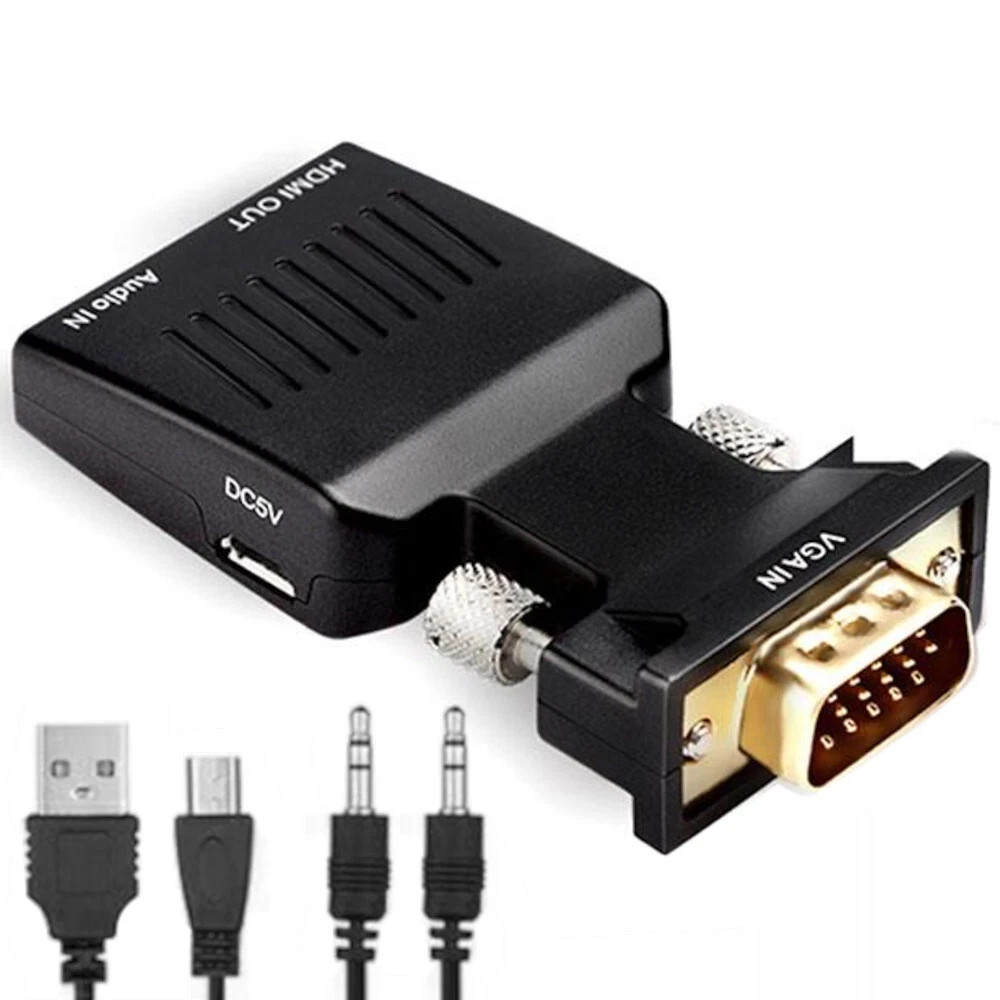

Photos from current listings. Actual item, color, and included accessories may vary.
VGA HDMI Adapter Buying Guide
VGA-to-HDMI adapters convert legacy analog RGBHV video (plus stereo audio via a 3.5mm jack) into a digital HDMI signal for modern TVs, monitors, and projectors. The critical trade-off is active conversion circuitry quality—cheap passive cables that only rewire pins will not work, and you must match the conversion direction (VGA source to HDMI display) plus handle audio separately. The decision rule: buy only an explicitly labeled active VGA-to-HDMI converter with a 3.5mm audio input and USB power port; skip any cable that claims to work both ways or lacks an audio jack.
Key takeaways
- Active conversion required: VGA is analog (RGBHV) and HDMI is digital (TMDS); a passive cable cannot convert—look for an internal scaler/ADC chip and a USB power input.
- Direction is one-way: VGA-to-HDMI (PC/laptop to TV) and HDMI-to-VGA (modern device to old monitor) are different products; most cheap 'bi-directional' cables work in only one direction.
- Audio is not carried by VGA: adapters must include a 3.5mm stereo input jack to embed audio into the HDMI output; HDMI output supports 1080p at 60Hz on quality units.
At a glance
- Category
- AV Cables & Interconnects
- Last updated
- Nov 28, 2026
Current offers
Highlights
- Active conversion required: VGA is analog (RGBHV) and HDMI is digital (TMDS); a passive cable cannot convert—look for an internal scaler/ADC chip and a USB power input.
- Direction is one-way: VGA-to-HDMI (PC/laptop to TV) and HDMI-to-VGA (modern device to old monitor) are different products; most cheap 'bi-directional' cables work in only one direction.
- Audio is not carried by VGA: adapters must include a 3.5mm stereo input jack to embed audio into the HDMI output; HDMI output supports 1080p at 60Hz on quality units.
- Power and resolution: USB-powered adapters (5V) are standard; output resolution is typically 720p/1080p, with 1080p60 requiring a powered converter, not a bus-powered dongle.
Best use cases
- Best fit: connecting an older desktop/laptop with VGA output to a modern TV or projector—choose a VGA-to-HDMI converter with 3.5mm audio input and USB power.
- Wrong fit: trying to connect a modern HDMI-only device (game console, streaming stick) to an old VGA monitor—you need an HDMI-to-VGA adapter, not this product.
- Best fit: presentations from legacy PCs to HDMI projectors—pick a unit with 1080p60 output and a metal housing for durability; skip unbranded plastic dongles for travel.
- Wrong fit: expecting audio passthrough without connecting the 3.5mm cable—VGA carries no audio, so budget for a separate 3.5mm male-to-male cable.
Buying tips
- Confirm the direction explicitly: the source device must have VGA out and the display must have HDMI in; if reversed, buy an HDMI-to-VGA adapter instead.
- Look for a USB power port (micro-USB or USB-C) on the adapter—bus-powered VGA-to-HDMI cables often flicker or drop signal at 1080p.
- Check the audio input: a 3.5mm stereo jack is mandatory to get sound through HDMI; adapters without it output video only.
- Prefer adapters rated for 1080p60 output and constructed with a metal shell and strain relief; plastic-shell units with molded strain relief fail at the connector first.
Specs
| Conversion Direction | VGA source to HDMI display (one-way) |
|---|---|
| Audio Support | 3.5mm stereo input to HDMI audio |
| Max Output | 1080p at 60Hz |
| Power Input | USB 5V (micro-USB or USB-C) |
What to check before buying
- Measure port spacing: ensure the adapter body does not block adjacent HDMI or VGA ports on your laptop or TV; right-angle adapters help in tight spaces.
- Verify source resolution: set your PC to output 1920x1080 at 60Hz; adapters may not support 1440p or ultrawide resolutions.
- Check power availability: confirm a free USB-A port (or USB charger) near the adapter for the 5V power cable.
- Confirm audio cable: have a 3.5mm male-to-male stereo cable ready to run from your PC headphone jack to the adapter's audio input.
FAQ
Data sources: eBay / Amazon listings and product attribute feeds. Updated Nov 28, 2026.
Some links on this page are affiliate links. If you buy after clicking one, we may earn a commission at no extra cost to you. This does not change which products appear here or their order. Affiliate disclosure.