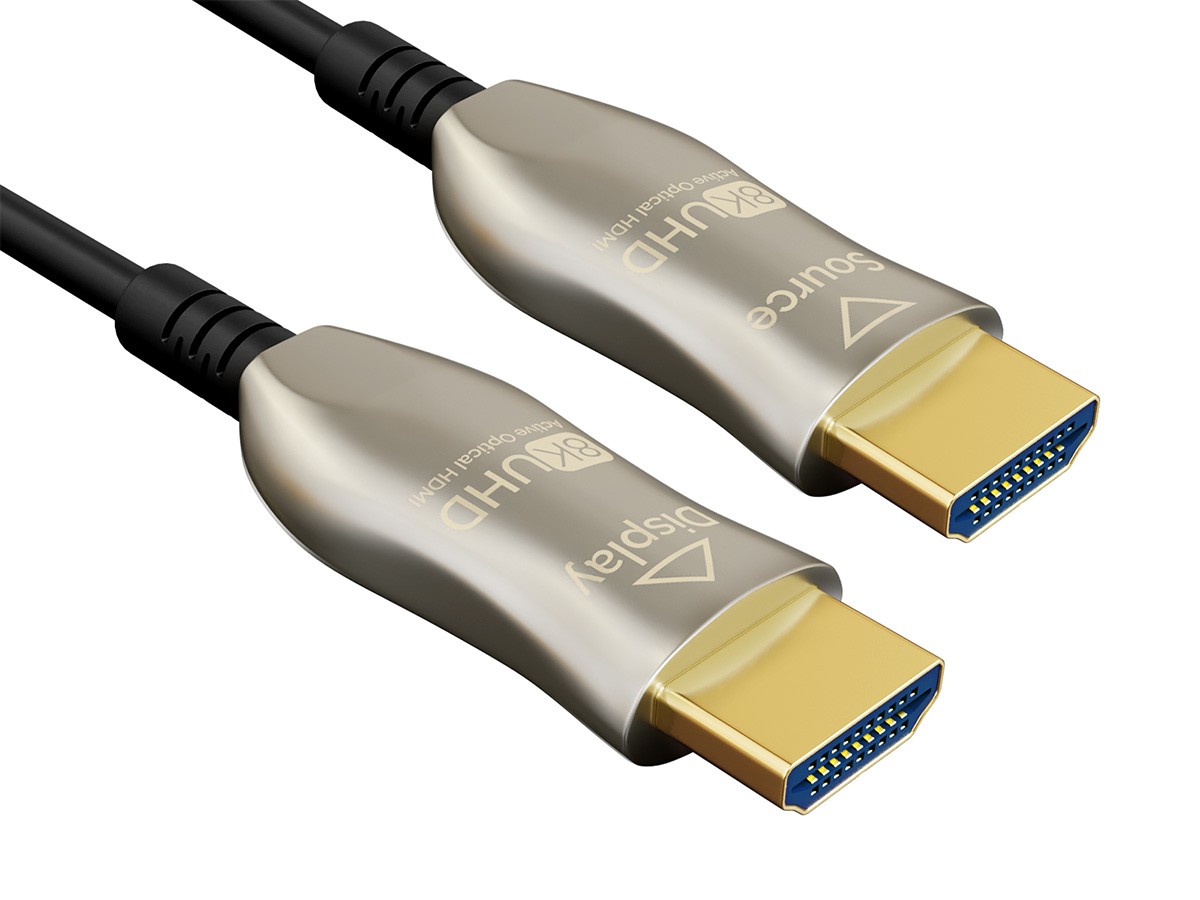

Photos from current listings. Actual item, color, and included accessories may vary.
Fiber Optic HDMI Cable Buying Guide
Fiber optic HDMI cables replace the copper conductors in a standard HDMI cable with optical fibers for the high-speed data lanes, enabling reliable 48Gbps HDMI 2.1 signals over runs of 10–100 feet without the signal degradation or bulk of copper. The core trade-off is directionality and active electronics: every fiber optic HDMI cable is unidirectional and draws power from the source, so it must be installed correctly and sourced reliably. Buy a certified Ultra High Speed (48Gbps) hybrid fiber cable when your run exceeds 15 feet or you need 4K120/8K; stick to passive copper for short 3–6 foot runs.
Key takeaways
- Hybrid construction: optical fiber handles the four high-speed TMDS/FRL lanes; copper wires still carry +5V power, EDID, CEC, and ARC/eARC—so it is not fully optical.
- All fiber HDMI cables are directional: the 'Source' connector plugs into the player/PC and the 'Display' connector into the TV/projector; reversing them yields no picture.
- For full 48Gbps HDMI 2.1 (8K60, 4K120, 10K), the cable must be certified 'Ultra High Speed HDMI'; many fiber cables are only Premium High Speed (18Gbps, 4K60).
At a glance
- Category
- AV Cables & Interconnects
- Last updated
- Nov 28, 2026
Current offers
Highlights
- Hybrid construction: optical fiber handles the four high-speed TMDS/FRL lanes; copper wires still carry +5V power, EDID, CEC, and ARC/eARC—so it is not fully optical.
- All fiber HDMI cables are directional: the 'Source' connector plugs into the player/PC and the 'Display' connector into the TV/projector; reversing them yields no picture.
- For full 48Gbps HDMI 2.1 (8K60, 4K120, 10K), the cable must be certified 'Ultra High Speed HDMI'; many fiber cables are only Premium High Speed (18Gbps, 4K60).
- CL3/CL3P fire rating is required for in-wall installation; CL2 is not sufficient for wall or ceiling runs in most North American codes.
Best use cases
- Best fit: ceiling-mounted projector 25–50 ft from the AV rack—choose a 48Gbps Ultra High Speed fiber cable with CL3 jacket and detachable source-end connector for easier conduit pulls. Skip passive copper at this length—it will not carry 4K120 reliably.
- Best fit: 4K120/8K gaming PC or console to TV across a room—pick a certified Ultra High Speed fiber cable with at least 48Gbps rating and a source-end USB power port if the HDMI +5V rail is weak. Skip 18Gbps fiber if you need 4K120.
- Wrong fit: a 3–6 ft run between a soundbar and TV or a streaming stick and TV—passive copper Ultra High Speed cables are cheaper, bidirectional, and equally reliable at this length; fiber adds cost and directionality risk.
Buying tips
- Match the speed rating to your resolution/frame rate: 48Gbps Ultra High Speed for 8K60/4K120; 18Gbps Premium High Speed for 4K60. A fiber cable that is only 18Gbps will not unlock HDMI 2.1 features.
- Size by actual run length plus 10–15% service loop: measure the path (including conduit bends), not the straight-line room distance. Fiber is available in fixed lengths; order the next size up rather than stretching.
- Check the connector orientation and detachable ends: many fiber cables have a small 'Source' and 'Display' label and a removable source-end HDMI head (micro-HDMI or USB power pigtail) so the cable can pass through 1-inch conduit.
- For in-wall use, demand a CL3/CL3P-rated jacket and solid copper power conductors; for floor runs, a flat or armored jacket resists crushing. Avoid unrated fiber for permanent wall installation.
Specs
| Bandwidth Tier | 48Gbps Ultra High Speed / 18Gbps Premium |
|---|---|
| Construction | Hybrid fiber + copper (power/ARC/CEC) |
| Directionality | Unidirectional (Source → Display) |
| Jacket Rating | CL3/CL3P in-wall rated vs CL2 |
Related searches
What to check before buying
- Measure the full cable path from source to display including conduit bends and wall plates—add 10–15%—and confirm the cable length is available in that size.
- Verify your source and display support the bandwidth you are buying for: 48Gbps (HDMI 2.1) source and display for 4K120/8K; otherwise an 18Gbps Premium High Speed fiber is sufficient.
- Confirm the installation location requires CL3/CL3P fire rating (in-wall, ceiling, riser) and that the cable jacket and connector heads fit your conduit or wall plate opening.
- Check that the source device can supply +5V power over HDMI or has a nearby USB port for the fiber cable's power injector; very long runs may need the powered source-end option.
FAQ
Data sources: eBay / Amazon listings and product attribute feeds. Updated Nov 28, 2026.
Some links on this page are affiliate links. If you buy after clicking one, we may earn a commission at no extra cost to you. This does not change which products appear here or their order. Affiliate disclosure.