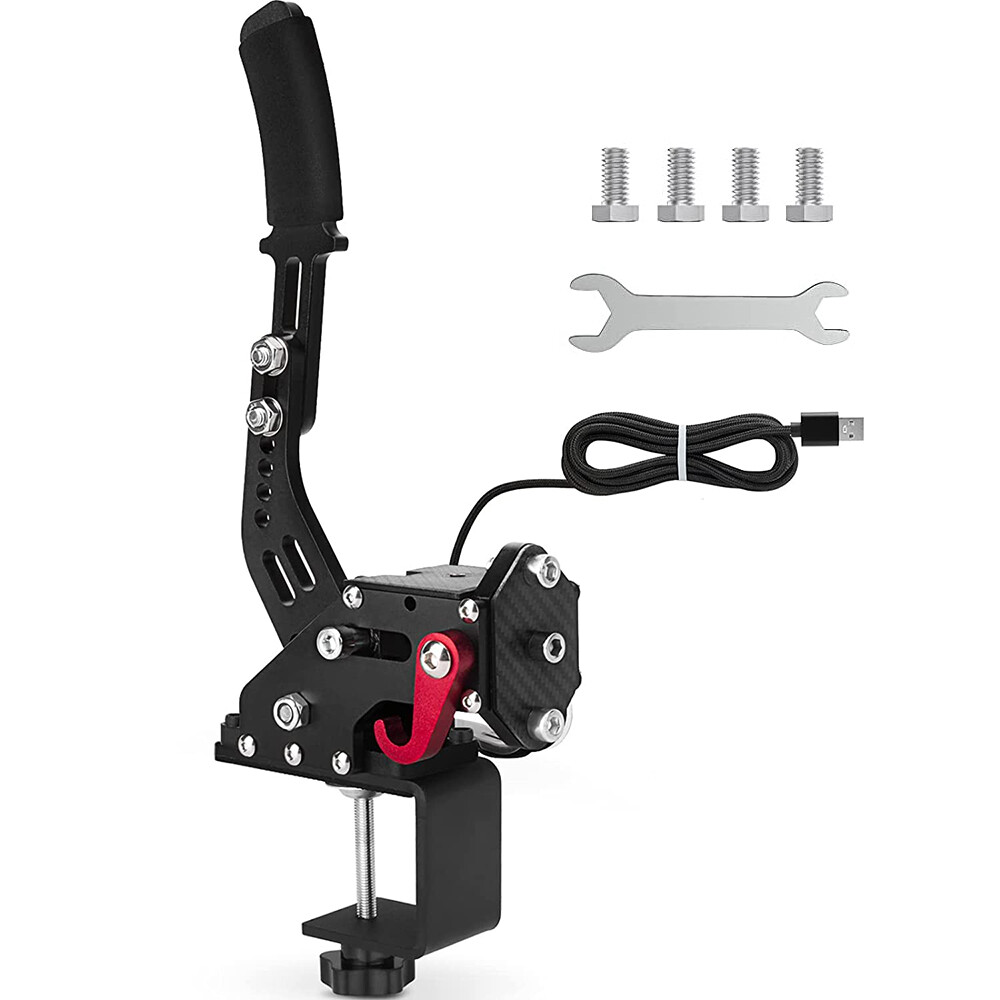

Photos from current listings. Actual item, color, and included accessories may vary.
Handbrake Logitech G920 Buying Guide
A handbrake for the Logitech G920 is an add-on analog lever that connects via USB to a PC and must work alongside Logitech's wheelbase, since the G920 itself has no handbrake input. The core trade-off is between a standalone USB unit with a clamp or desk mount versus a console-compatible chain that requires an adapter like Drive Hub. Buy a USB analog handbrake with a 900-degree Hall sensor and sturdy clamp for PC; skip console use or any G920-native assumption unless you add a third-party adapter.
Key takeaways
- USB handbrakes use a Hall-effect or potentiometer sensor and present as a separate game controller, so they work with any PC racing title regardless of wheel brand.
- The G920 wheelbase has no dedicated handbrake port; the only native Logitech handbrake is the G Pro pedal-mounted unit for the newer G Pro wheel, not the G920.
- Load-cell and spring-tension handbrakes give progressive braking feel; cheap potentiometer levers wear and develop dead zones over time.
At a glance
- Category
- Sim Racing Shifters & Handbrakes
- Last updated
- Nov 28, 2026
Current offers
Highlights
- USB handbrakes use a Hall-effect or potentiometer sensor and present as a separate game controller, so they work with any PC racing title regardless of wheel brand.
- The G920 wheelbase has no dedicated handbrake port; the only native Logitech handbrake is the G Pro pedal-mounted unit for the newer G Pro wheel, not the G920.
- Load-cell and spring-tension handbrakes give progressive braking feel; cheap potentiometer levers wear and develop dead zones over time.
- A metal clamp or bolt-down plate is essential: clamp jaws must open to at least 1.6 in (40 mm) to grip a desk or rig plate securely.
Best use cases
- PC sim racers on iRacing, Assetto Corsa, or Dirt Rally: pick a USB Hall-effect handbrake with desk clamp and calibrate it as a separate axis in-game.
- Xbox or PlayStation G920 owners: skip native handbrake shopping and budget for a Drive Hub or similar adapter that merges USB handbrake input into the console.
- Cockpit or 8020 rig builders: choose a bolt-mount handbrake with metal housing and adjustable tension rather than a plastic desk-clamp unit.
- Casual desk players with thin or glass-top desks: avoid heavy clamp units and use a lighter lever with a wide clamp pad to prevent desk damage.
Buying tips
- Match sensor type: Hall-effect sensors are contactless and long-lived; potentiometer units are cheaper but degrade with heavy use.
- Check clamp range before buying: measure your desk or rig plate thickness and confirm the clamp opens at least 40 mm.
- For console use, budget for a USB adapter that supports both the G920 wheel and an extra USB handbrake simultaneously.
- Prefer units with adjustable spring tension and a travel stop so you can tune handbrake throw to rally vs drift use.
Specs
| Connection | USB-A standalone controller |
|---|---|
| Sensor Type | Hall-effect vs potentiometer |
| Mounting | Desk clamp 40mm+ / bolt plate |
| Console Support | PC native; console via adapter |
Related searches
What to check before buying
- Measure desk or rig plate thickness and confirm the clamp or bolt pattern fits before ordering.
- Confirm you have a free USB-A port on your PC or adapter; the G920 uses two USB connections already.
- Verify your sim title supports a separate handbrake axis binding, not just button mapping.
- Check floor and rig stability: a clamp handbrake on a light desk will shift under hard pulls.
FAQ
Data sources: eBay / Amazon listings and product attribute feeds. Updated Nov 28, 2026.
Some links on this page are affiliate links. If you buy after clicking one, we may earn a commission at no extra cost to you. This does not change which products appear here or their order. Affiliate disclosure.