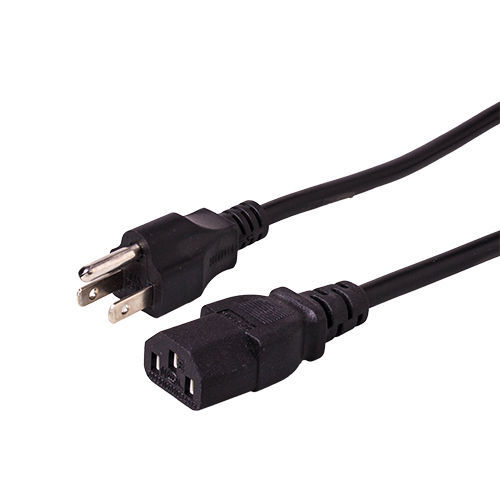

Photos from current listings. Actual item, color, and included accessories may vary.
PC Power Cord Buying Guide
A PC power cord is the AC mains cable connecting your power supply or monitor to a wall outlet, and the key trade-off is conductor gauge versus connector compatibility. Durable cords use 18 AWG or thicker copper with molded strain reliefs and correctly rated IEC connectors; thin 20-24 AWG or loose-fit cords are the compromise. The decision rule: match the IEC connector type and length to your device, and never substitute a lower gauge or unrated cord for a high-wattage PSU.
Key takeaways
- IEC 60320 connector types dictate fit: C13/C14 for most PSUs and monitors, C5/C6 for laptop-style bricks, C19/C20 for high-wattage servers and UPS units.
- Conductor gauge sets safe current: 18 AWG handles up to 10A/1250W at 125V, 16 AWG up to 13A/1625W, while 20-24 AWG is limited to low-draw devices like monitors.
- Molded strain relief and fully welded plug prongs determine durability far more than cosmetic jacket thickness.
At a glance
- Category
- PC Power Supplies & Cables
- Last updated
- Nov 28, 2026
Current offers
Highlights
- IEC 60320 connector types dictate fit: C13/C14 for most PSUs and monitors, C5/C6 for laptop-style bricks, C19/C20 for high-wattage servers and UPS units.
- Conductor gauge sets safe current: 18 AWG handles up to 10A/1250W at 125V, 16 AWG up to 13A/1625W, while 20-24 AWG is limited to low-draw devices like monitors.
- Molded strain relief and fully welded plug prongs determine durability far more than cosmetic jacket thickness.
- Length matters electrically: 6 ft is standard, but runs over 10 ft increase voltage drop—use 16 AWG for longer runs or high-draw PSUs.
Best use cases
- Desktop PC with a standard ATX PSU: pick a 3-prong C13-to-NEMA 5-15P cord in 18 AWG or thicker; skip 2-prong or 20 AWG cords.
- LCD monitor or low-draw peripheral: a 5A-rated C13 cord in 18-20 AWG is sufficient, but confirm the monitor's inlet is C14, not C6.
- High-wattage GPU rig or server with C20 inlet: use a C19-to-NEMA 5-20P cord rated 20A/12 AWG; never force a C13 into a C20 socket.
- Laptop power brick with C5 inlet: use a C5-to-NEMA 5-15P cord; a standard C13 cord will not fit and should not be adapted.
Buying tips
- Measure the distance from outlet to device and add 1 ft of slack; standard 6 ft cords suit most desks, while 10-15 ft runs need 16 AWG to limit voltage drop.
- Check the device inlet label: C14 (rectangular) uses C13 cords, C6 (cloverleaf) uses C5 cords, and C20 (large rectangular) uses C19 cords—mismatches are the top return reason.
- For PSUs above 1000W, select 16 AWG or 14 AWG cordage rated for the PSU's maximum input current at your mains voltage.
- Prefer cords with SJT or SVT jacket ratings and molded plugs; exposed screw terminals or unmarked gauge are durability red flags.
Specs
| Connector Type | C13/C14, C5/C6, C19/C20 |
|---|---|
| Wire Gauge | 18 AWG (10A), 16 AWG (13A), 14 AWG (15A) |
| Cord Length | 6 ft standard; 10-15 ft for long runs |
| Plug Standard | NEMA 5-15P (US), CEE 7/7 (EU), BS 1363 (UK) |
Related searches
What to check before buying
- Identify the exact IEC inlet on your PSU or monitor (C14, C6, or C20) before ordering.
- Confirm your wall outlet standard: NEMA 5-15P for North America, CEE 7/7 for Europe, BS 1363 for UK.
- Verify the cord's amp rating meets or exceeds the device's maximum input current printed on its label.
- Ensure the cord length reaches from outlet to device with slack and does not run under carpets or through doorways.
FAQ
Data sources: eBay / Amazon listings and product attribute feeds. Updated Nov 28, 2026.
Some links on this page are affiliate links. If you buy after clicking one, we may earn a commission at no extra cost to you. This does not change which products appear here or their order. Affiliate disclosure.