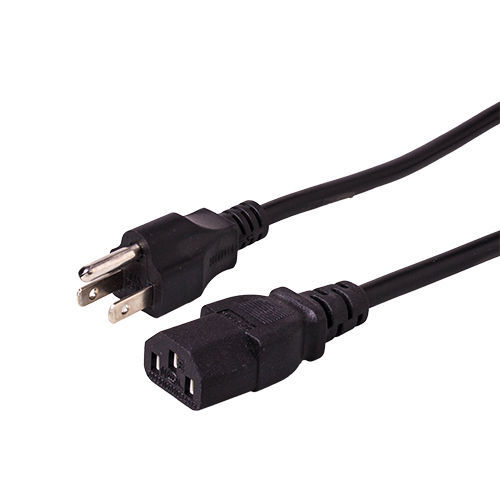

Photos from current listings. Actual item, color, and included accessories may vary.
Dell Power Cord Buying Guide
A Dell power cord is a standardized AC mains cable that connects a Dell desktop, monitor, laptop adapter, or server PSU to a wall outlet. The real trade-off is conductor gauge and connector molding quality versus generic thin-gauge imports, not brand labeling—Dell uses industry-standard IEC and NEMA connectors. Buy any cord rated for the device's amperage with the correct IEC 60320 inlet and a molded strain relief; skip cords thinner than 18 AWG or with unmarked plugs.
Key takeaways
- Dell desktops and monitors use the C13-to-NEMA 5-15P cord (3-prong, 18 AWG typical) rated 10A/125V for US outlets.
- Dell laptop adapters and small form-factor PSUs use the C5-to-NEMA 5-15P 'Mickey Mouse' cord, typically 18 AWG rated 7A/125V.
- Dell servers and high-wattage PSUs use C19-to-NEMA 5-15P (or 5-20P) cords with 14-16 AWG conductors rated 15A/125V.
At a glance
- Category
- PC Power Supplies & Cables
- Last updated
- Nov 28, 2026
Current offers
Highlights
- Dell desktops and monitors use the C13-to-NEMA 5-15P cord (3-prong, 18 AWG typical) rated 10A/125V for US outlets.
- Dell laptop adapters and small form-factor PSUs use the C5-to-NEMA 5-15P 'Mickey Mouse' cord, typically 18 AWG rated 7A/125V.
- Dell servers and high-wattage PSUs use C19-to-NEMA 5-15P (or 5-20P) cords with 14-16 AWG conductors rated 15A/125V.
- UL/CSA listing and molded strain relief at both ends distinguish durable cords from unlisted thin-wall imports that fail at the plug.
Best use cases
- Choose a C13 18 AWG cord for Dell OptiPlex desktops, UltraSharp monitors, and standard ATX PSUs; skip C5 cords, which will not fit these inlets.
- Choose a C5 cord for Dell Latitude/Inspiron laptop power adapters and compact mini-PCs; a C13 cord physically will not seat in the adapter.
- Choose a C19 14-16 AWG cord for Dell PowerEdge servers and 1000W+ PSUs; using a C13 18 AWG cord here risks overheating the connector.
- Skip 'Dell-branded' premium cords for standard desktops—any UL-listed C13 18 AWG cord meets the same electrical standard at lower cost.
Buying tips
- Match the IEC inlet: C13 (desktop/monitor), C5 (laptop adapter), C19 (server/high-watt PSU). The connector shape, not the brand, determines fit.
- Confirm wall plug type: NEMA 5-15P for standard US 15A outlets; NEMA 5-20P for 20A circuits (T-slot neutral). Do not force a 5-20P into a 5-15R.
- Check amperage and gauge: 18 AWG for 10A devices (most desktops/monitors), 16 AWG for 13A, 14 AWG for 15A server cords. Thinner gauge at high load overheats.
- Buy UL or ETL listed cords with molded plugs; unlisted cords often use copper-clad aluminum or undersized conductors that fail at the plug.
Specs
| Connector Type | C13 / C5 / C19 to NEMA 5-15P |
|---|---|
| Wire Gauge | 18 AWG (10A) / 16 AWG / 14 AWG |
| Voltage / Amperage | 125V, 7-15A by connector class |
| Safety Listing | UL / ETL listed, molded ends |
Related searches
What to check before buying
- Identify the device inlet: C13 (3-pin rectangular), C5 (3-pin cloverleaf), or C19 (16A rectangular). Measure if unsure—C13 and C19 are not interchangeable.
- Measure the wall outlet to device distance and add 1-2 ft slack; standard cords are 3-10 ft and 18 AWG handles 10A at any of these lengths.
- Verify outlet type: NEMA 5-15R (standard US) accepts 5-15P; a 20A T-slot 5-20R accepts both 5-15P and 5-20P.
- For rack servers, confirm PSU inlet is C19 and circuit is 20A; C19 cords draw up to 16A and need a 20A branch circuit.
FAQ
Data sources: eBay / Amazon listings and product attribute feeds. Updated Nov 28, 2026.
Some links on this page are affiliate links. If you buy after clicking one, we may earn a commission at no extra cost to you. This does not change which products appear here or their order. Affiliate disclosure.