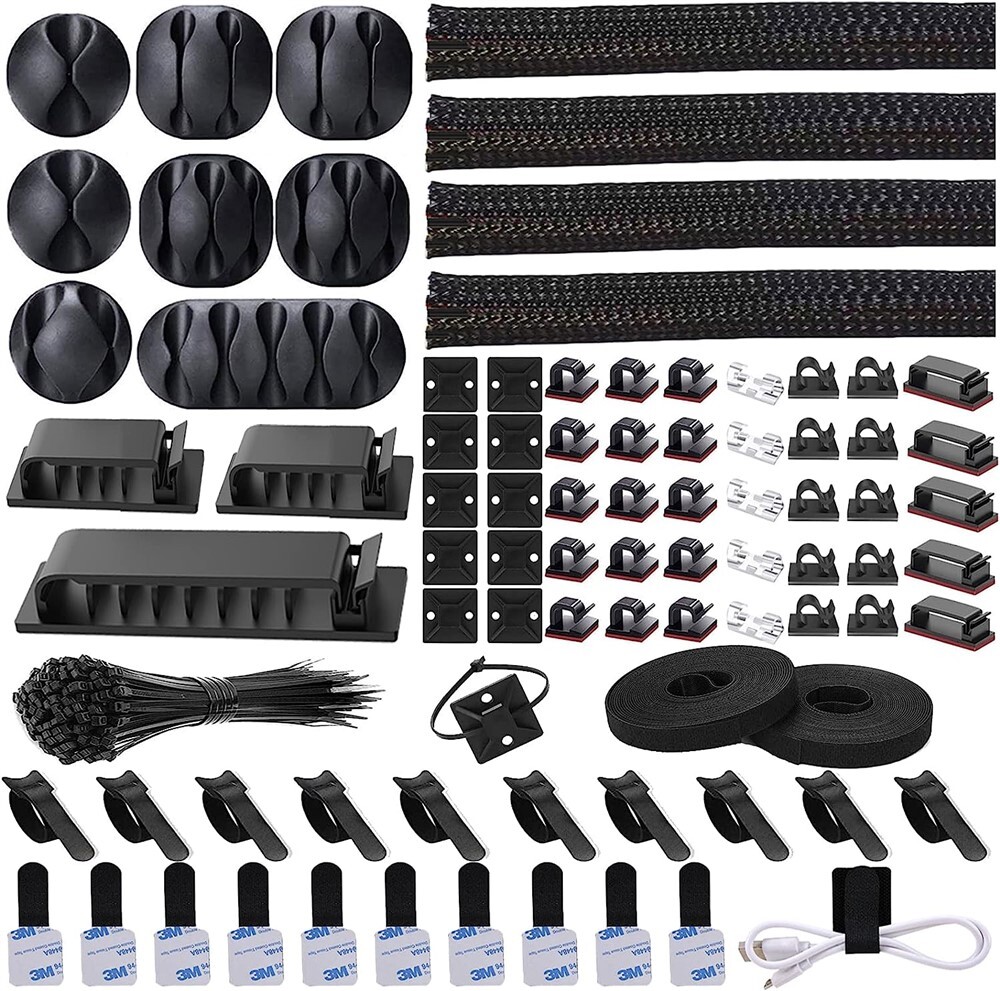

Photos from current listings. Actual item, color, and included accessories may vary.
Cable Management Buying Guide
Cable management is the discipline of routing, securing, and concealing power, data, and display cables to protect signal integrity and airflow while keeping a workspace serviceable. The core trade-off is between cheap one-size-fits-all kits and component-specific hardware, where adhesive grade, cable-safe closures, and raceway capacity determine whether a setup survives heat, movement, and re-cabling. The decision rule: buy kits that specify closure type and adhesive class for bundling, and rigid raceways or under-desk trays for permanent desk routing.
Key takeaways
- Closure type separates safe from damaging: hook-and-loop and silicone ties are reusable and won't crush cable jackets; nylon zip ties require tension control to avoid pinching or shorting conductors.
- Adhesive grade drives longevity: 3M VHB or equivalent acrylic foam tape holds under-desk mounts through heat cycles, while generic foam tapes fail on painted or textured surfaces.
- Raceway capacity is measured by internal cross-section: 1-inch channels handle 3-5 power cables, while 2-inch channels accommodate DisplayPort and thick AC lines without stressing latches.
At a glance
- Category
- PC Power Supplies & Cables
- Last updated
- Nov 28, 2026
Current offers
Highlights
- Closure type separates safe from damaging: hook-and-loop and silicone ties are reusable and won't crush cable jackets; nylon zip ties require tension control to avoid pinching or shorting conductors.
- Adhesive grade drives longevity: 3M VHB or equivalent acrylic foam tape holds under-desk mounts through heat cycles, while generic foam tapes fail on painted or textured surfaces.
- Raceway capacity is measured by internal cross-section: 1-inch channels handle 3-5 power cables, while 2-inch channels accommodate DisplayPort and thick AC lines without stressing latches.
- Standing-desk routing requires slack management: coiled or spiral wrap plus a trailing cable bundle rated for the desk's travel range prevents connector strain at full height.
Best use cases
- Choose a hook-and-loop roll plus adhesive-backed clips for renter-friendly desk setups; skip rigid screw-mount raceways if you can't drill into the desk.
- Pick an under-desk tray with ventilation slots or wire mesh for PC and monitor power bricks; skip fully enclosed plastic boxes that trap heat around adapters.
- For standing desks, select a modular spine or cable chain with 2-3 feet of slack at the lowest position; skip short fixed-length sleeves that yank connectors at full rise.
- Use silicone or hook-and-loop ties inside PC cases; skip nylon zip ties on fan and front-panel cables where over-tightening can cut insulation.
Buying tips
- Match tie length to bundle diameter: a 6-inch hook-and-loop tie wraps about 1.5 inches of cable, so choose 8-12 inch ties for 2-3 inch power bundles.
- Confirm adhesive compatibility: 3M VHB-class tape bonds to metal and smooth plastic; on painted drywall or textured laminate, use mechanical clips or screw-mounted bases instead.
- Size raceway by cable count and connector width: allow at least 20% free cross-section so HDMI and DisplayPort heads pass without forcing, which prevents jacket damage.
- For standing desks, calculate travel slack: add the desk's height range plus 6 inches of loop, and use a cable chain or spiral wrap that extends rather than stretches.
Specs
| Closure Type | Hook-and-loop / silicone / zip tie |
|---|---|
| Adhesive Grade | 3M VHB acrylic vs foam tape |
| Raceway Capacity | 1-2 in internal channel width |
| Standing Desk Travel | Add height range + 6 in slack |
Related searches
What to check before buying
- Measure desk underside clearance and power brick dimensions before choosing a tray depth; bricks thicker than 2 inches need an open-frame tray.
- Check desk surface material: adhesive mounts need smooth, clean, non-porous laminate or metal; wood grain and painted drywall require screw-in or clamp mounts.
- Verify cable jacket types: silicone and rubber jackets tolerate hook-and-loop and spiral wrap; stiff PVC power cables need wider bend radius and larger raceway.
- Confirm your desk's height travel and cable exit points for standing desks, and ensure the routing path clears drawers and keyboard trays through the full range.
FAQ
Data sources: eBay / Amazon listings and product attribute feeds. Updated Nov 28, 2026.
Some links on this page are affiliate links. If you buy after clicking one, we may earn a commission at no extra cost to you. This does not change which products appear here or their order. Affiliate disclosure.