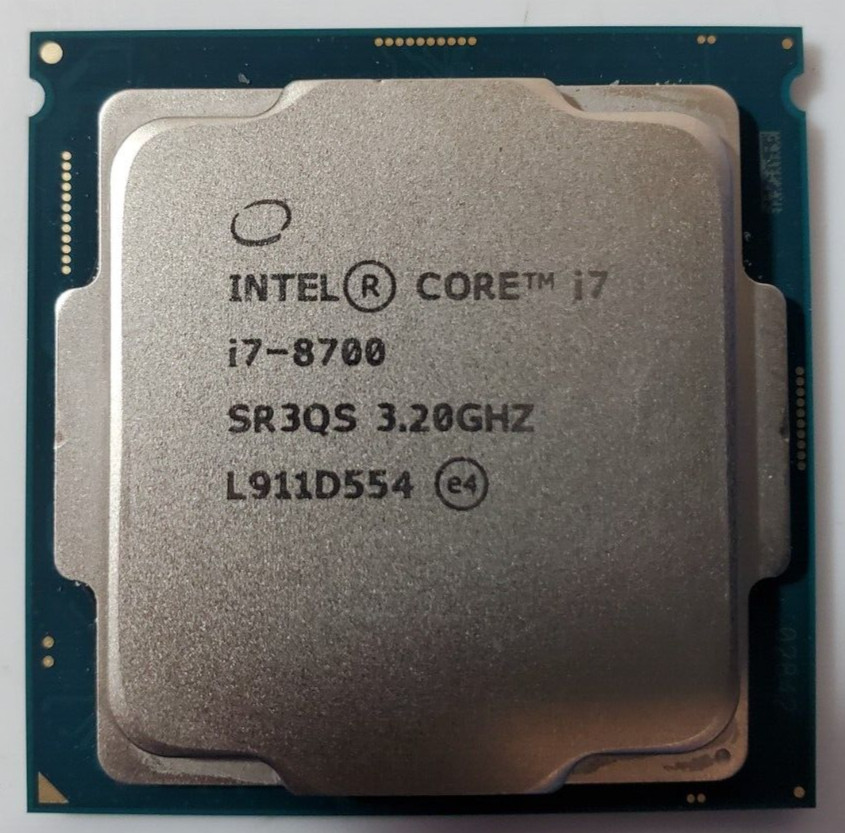

Photos from current listings. Actual item, color, and included accessories may vary.
Intel SR3QS Buying Guide
The Intel SR3QS is the OEM/tray part number for the Core i7-8700, a 6-core/12-thread LGA 1151 (300-series) desktop CPU with a 3.2 GHz base and 4.6 GHz max turbo. The core trade-off is platform age: you get strong 6-core value only if you already own a compatible 300-series board, while new buyers face DDR4 pricing and no upgrade path beyond 9th-gen. Buy the SR3QS only as a verified used/OEM chip for a 300-series build; skip it if you need PCIe 4.0, native USB 3.2 Gen 2, or a future CPU upgrade.
Key takeaways
- SR3QS is the tray/OEM s-spec of the Core i7-8700: 6C/12T, 3.2 GHz base, 4.6 GHz turbo, 12 MB L3, 65 W TDP.
- Requires LGA 1151 socket with 300-series chipset (B360/H370/H310/Z370/Z390); 100/200-series boards are not compatible.
- Locked multiplier (non-K): no CPU overclocking, but DDR4-2666 memory support on Z370/Z390 and B360/H370 boards.
At a glance
- Category
- CPUs, Motherboards & Memory
- Status
- Listings available
- Last updated
- Nov 23, 2026
Current offers
Highlights
- SR3QS is the tray/OEM s-spec of the Core i7-8700: 6C/12T, 3.2 GHz base, 4.6 GHz turbo, 12 MB L3, 65 W TDP.
- Requires LGA 1151 socket with 300-series chipset (B360/H370/H310/Z370/Z390); 100/200-series boards are not compatible.
- Locked multiplier (non-K): no CPU overclocking, but DDR4-2666 memory support on Z370/Z390 and B360/H370 boards.
- OEM/tray chips ship without Intel retail box or stock cooler — a separate LGA1151 cooler and thermal paste are required.
Best use cases
- Best fit: upgrading or repairing an existing B360/H370/Z370/Z390 system where the board, DDR4, and cooler are already in hand.
- Best fit: budget 1080p gaming or office builds pairing the 6C/12T chip with a mid-range GPU — strong multi-thread value at used/OEM pricing.
- Wrong fit: new builds requiring PCIe 4.0, native USB 3.2 Gen 2, or an upgrade path — choose a current LGA1700/AM5 platform instead.
- Skip if you have a 100/200-series LGA1151 board or need overclocking — the SR3QS is locked and electrically incompatible with older chipsets.
Buying tips
- Match chipset first: Z370/Z390 for full DDR4-2666 and OC-ready boards, B360/H370 for locked 65 W builds — 100/200-series boards will not POST.
- Budget a discrete cooler: OEM chips have no heatsink, so add a 120 mm tower air cooler rated for at least 95 W TDP.
- Verify the s-spec on the heat spreader reads SR3QS and inspect for bent LGA pads or thermal paste in the socket before purchase.
- Pair with DDR4-2666 dual-channel (2×8 GB minimum) — 2666 MT/s is the i7-8700's official ceiling on 300-series boards.
Specs
| Socket | LGA 1151 (300-series only) |
|---|---|
| Cores / Threads | 6C / 12T |
| Base / Turbo Clock | 3.2 GHz / 4.6 GHz |
| TDP / Cooling | 65 W, cooler not included |
Related searches
What to check before buying
- Confirm motherboard socket is LGA 1151 and chipset is 300-series (B360/H370/H310/Z370/Z390) before buying.
- Measure CPU cooler clearance in your case and confirm the cooler bracket supports LGA 1151.
- Check PSU headroom: 65 W CPU plus GPU typically needs a 450–550 W 80 Plus unit with a 24-pin and 8-pin EPS connector.
- Verify you have DDR4 DIMMs (not DDR3) and at least one M.2 or SATA boot drive ready for the build.
FAQ
Data sources: eBay / Amazon listings and product attribute feeds. Updated Nov 23, 2026.
Some links on this page are affiliate links. If you buy after clicking one, we may earn a commission at no extra cost to you. This does not change which products appear here or their order. Affiliate disclosure.